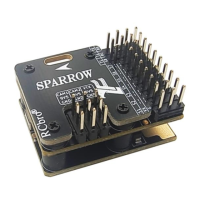
The SPARROW 2 is a flight controller (FC) designed for various remote-controlled aircraft, offering a range of features for flight stabilization, control, and telemetry. It supports multiple receiver types and protocols, making it versatile for different setups.
Function Description
The SPARROW 2 serves as the central control unit for an aircraft, processing inputs from the receiver and GPS module to manage flight dynamics. It provides stabilization, allows for different flight modes, and integrates with OSD (On-Screen Display) and telemetry systems. The device is designed to enhance the user's experience by simplifying setup and operation.
Key Functions:
- Flight Control: Manages aircraft attitude and movement based on user input and sensor data.
- Receiver Compatibility: Supports a wide array of receiver types including PWM, PPM, SBUS, IBUS, and CRSF (ELRS), allowing for flexible integration with various radio systems.
- GPS Integration: Utilizes a GPS module for features like altitude hold, position hold, and return-to-home (RTH) functionality.
- OSD and Telemetry: Integrates with DJI-OSD and CRSF-TELE for displaying flight data and transmitting telemetry information.
- Flight Modes: Offers different flight modes such as Manual, Stabilization, Altitude Hold (ALT HOLD), and Return to Home (RTH).
Important Technical Specifications
Flight Controller (FC):
- Size: 33 x 27 x 12 mm
- Weight: 11g
- Voltage: 5V
- Receiver Types Supported: PWM, PPM, SBUS, IBUS, CRSF (ELRS)
- Accessories: Includes FC, GPS, screwdriver, and wire.
- Protocol: DJI-OSD, CRSF-TELE
GPS Module:
- Size: 18 x 18 x 6 mm
- Weight: 6g
- Voltage: 5V
Receiver Channel Mapping (PWM input):
- CH1-4: AIL, ELE, THR, RUD
- RC CH6 or CH7 output: AUX
- PWM-IN CH1-4: AIL, ELE, THR, RUD
Receiver Channel Mapping (PPM/SBUS/IBUS/CRSF input):
- RC: PPM, SBUS, IBUS, CRSF or PWM Mode Channel
- TX: CRSF_TELE
DJI Interface Voltage Detection:
Usage Features
Installation and Wiring:
- FC Installation Direction: The arrow on the FC should point towards the head of the aircraft, and the FC should be leveled.
- Interface Connections:
- PWM Type Receiver: Specific wiring diagrams are provided for connecting PWM receivers, ensuring correct positive and negative pole connections.
- PPM, SBUS, IBUS, CRSF Receiver: Wiring diagrams are also provided for these receiver types, with a specific example for CRSF+TELE.
- DJI Interface: Supports voltage detection from 7.4-17.6V. Incorrect wiring can damage the device.
- 3-Switch Mode: It is recommended to select the 3-switch as a mode channel.
- 5-Channel PWM Input: When using PWM receiver, the AUX cannot be used.
- Channel Order: For PPM, SBUS, IBUS, CRSF, the order of channel 1-4 is defined as AIL, ELE, THR, RUD.
- 6th Channel: The 6th channel of the PPM/SBUS/IBUS is the mode channel.
- 7th Channel: The 7th channel of the CRSF is the mode channel, and the AUX.
Remote Control (RC) Setup:
- RC Calibration:
- ESC Calibration: Push the throttle to the highest position in MANUAL mode, power on, then push the throttle to the lowest position. The green light T and flash indicate the type of plane and flight mode.
- RC Calibration (Level): The FC should be placed horizontally and kept still. Dial the sticks as shown in the figure until the three green lights flash at the same time.
- RC Calibration (Direction): This must be completed before unlocking the RC. Check the feedback direction. If the feedback direction is not correct, turn the AIL or ELE stick to the maximum position and hold it until the direction of the servo changes. Check the feedback direction again.
- Plane Type Setting: Set the type of plane through the quick hit mode switch (CH5 or CH6) after using the RC to unlock the FC. One stop second after switching once to continue to switch.
- Gain Adjustment: A knob allows for adjusting the overall sensation of the flight control. Turning clockwise increases sensitivity, making the flight more agile. Turning counter-clockwise reduces sensitivity, making the flight more stable. The knob adjusts the overall sensation of the flight control and does not distinguish the individual channel.
Flight Modes:
- MANUAL: RC directly controls the aircraft. Green LED: Slow flash.
- STABILIZATION: Auto-level. Green LED: ON.
- ALTHOLD (NO GPS): Plane holds altitude, 25m minimum height limit. Green LED: Fast flash.
- RTH (GPS OK): Return to home. Circle within a radius of 50m at an altitude of 70m.13m/s. Green LED: Fast flash.
Auto Takeoff:
- ALTHOLD Mode: Push the throttle to the MAX and after the motor rotates, the plane will automatically climb to a height of 25m.
- RTH Mode: Push the throttle to the MAX, shake the plane or give the plane an initial speed. After the motor rotates (Start slowly), the plane will automatically climb and circle at HOME.
Takeoff/Landing State:
- The motor is slowly activated only in the takeoff/landing state. When the altitude is above 30m, the speed is greater than 3m/s, then enter the normal flight state. At this time, switch to the RTH mode, the motor is no longer started slowly; when the altitude is below 15m, the throttle is minimum, the speed is less than 1 m/s, then enter the landing state, at this time, switch to the RTH mode, the motor will start slowly.
Throttle Control:
- The throttle in the return home mode is controlled semi-automatically. If the cruising speed is low, the user can manually raise the throttle to increase the speed; the throttle in other modes is manually controlled.
Throttle Output:
- Before using RC to unlock the FC, the throttle is locked, no output! After unlocking, the throttle output is determined by the GPS state, referring to the table below.
FailSafe:
- PWM, PPM, IBUS, CRSF: Set the mode channel output in the RC to ensure that the flight mode is RTH after the RC is turned off.
- SBUS: Automatically identify whether it is out of control.
- Must connect to GPS when using it, otherwise RTH mode cannot be used.
Maintenance Features
Troubleshooting:
- RC Normalcy Check: After the FC is powered on, all the LEDs are on, and the GPS configuration starts. The 3 green lights flash at the same time, indicating that the GPS configuration is completed, and the RC is not recognized; when the green light T and V flash rapidly at the same time, the RC has been recognized.
- Sensor Initialization: When power-on, the sensor takes 15 seconds to initialize. Please keep the FC level.
- RC Signal Recognition: The green light T and V flash quickly and the is on, indicating that the RC signal has been recognized, but the roll or pitch has a large trim or the throttle is not at the lowest position.
- Unlocking the FC: Keep the throttle at the lowest position after power on; push the throttle to the highest position.
- Control Direction: If the control direction is not correct, set the channel output reverse in the RC.
Warning:
- Please strictly abide by relevant national laws and regulations and fly safely.
- Before using the FC, you must fully understand the safety details.
- The equipment and any electronic products on the aircraft cannot be completely reliable.
- The necessary inspections must be carefully performed before the flight.

 Need help?

 To Next Page
 General