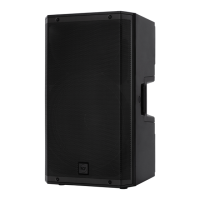
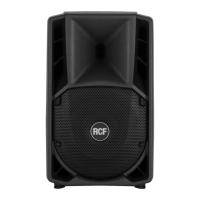
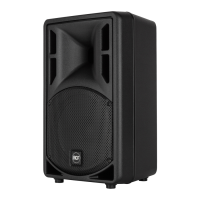
The ART 9-AX series combines a powerful ART 9 active speaker with a compact yet advanced digital mixer, offering ample flexibility and several functions. Remote audio and control via Bluetooth and a touch-based color display allow full management of the internal functions.
Function Description:
The ART 9-AX is an active speaker with an integrated 6-input digital mixer and output processor. It supports various operating modes including MONO, STEREO, and CROSSOVER, catering to a wide range of use cases. Bluetooth connectivity enables both audio streaming and remote control via the LiveRemote app (available for iOS and Android).
Mixer Features:
The internal digital mixer provides 6 inputs. Inputs 1 and 2 are dual COMBO XLR & TRS inputs with mic/line preamps and independent 48V phantom power. These inputs also feature a Compressor section and can be set as a stereo pair or independent. Inputs 3-4 and the Bluetooth audio input are always managed as a stereo pair and do not include a Compressor section.
The mixer offers two Channel Edit modes: EASY and ADVANCED.
- EASY EDIT mode is designed for simpler operation, primarily for MONO MIX OUT mode, without full processing control. In this mode, Input EQ, Input Dynamics (Ch. 1, 2), Input Pan/BAL, and Output EQ are disabled. Input 48V and sensitivity settings are available, and Reverb is enabled.
- ADVANCED EDIT mode provides full control over all mixer functions across all operating modes. This includes Input EQ, Input Dynamics (Ch. 1, 2), Input Pan/BAL, Input 48V and sensitivity settings, Output EQ, and Reverb.
Each input channel features a 3-band equalizer (HPF, LO SHELF, MID PEAK, HI SHELF) and an input preamp with three sensitivity settings:
- LINE +4 dBu: For balanced audio sources, with a maximum input level of +20 dBu and 18 kohm input impedance. 48V is disabled.
- LINE -10 dBV: For unbalanced audio sources or low-level balanced audio sources, with a maximum input level of +8 dBu and 18 kohm input impedance. 48V is disabled.
- MIC: For microphones, with a maximum input level of -8 dBu and 6 kohm input impedance. 48V can be switched ON/OFF.
A single-control Compressor is available for inputs 1 and 2, optimized for generic input signals. The PAN control is accessible when MIX OUT is set to STEREO mode.
Output Processor Features:
The output processor includes an internal crossover option with presets for selected RCF subwoofer products. The MIX OUT connector offers multiple functions depending on the operating mode. Output delay and EQ (HPF, 4-band PEQ, Hi Shelf) are also available.
The stereo EQ section for both MIX OUT and MAIN outputs includes:
- An High-Pass Filter (HPF): OFF, 20-1000 Hz.
- Four fully parametric peak filters (PEQ 1-4): Full range.
- A Hi Shelf filter: Full range.
An EQ INIT button allows for a global EQ on/off. The MAIN output level is also adjustable.
Operating Modes Overview:
The ART 9-AX offers flexible operating modes:
-
MIX OUT mode: Relates to the internal digital mixer and processor behavior, and the MIX OUT connector.
- MONO: Default mode. Internal mixer operates in mono; MIX OUT sends the mixed output to other speakers. Bluetooth audio is mixed to mono.
- STEREO: Internal mixer operates in stereo; MIX OUT is dedicated to the other output (default is MIX OUT = RIGHT). Bluetooth audio is reproduced in stereo.
- XOVER: Internal mixer operates in mono; digital crossover is enabled, and MIX OUT becomes a subwoofer feed. Bluetooth audio is mixed to mono.
-
BLUETOOTH SETUP: Relates to communication with the LiveRemote app.
- SINGLE mode: For controlling a single ART 9-AX speaker with all functions available.
- DUAL mode: For pairing two ART 9-AX speakers, allowing them to operate in Dual L/R or Zone mode. In DUAL mode, the internal mixer becomes less practical, and EDIT mode is forced to EASY.
- DUAL L/R: Each speaker operates as LEFT or RIGHT from an external stereo signal. MIX OUT can be main output or crossover subwoofer feed. EDIT mode is EASY (no input EQ/Compressor, no output EQ). Reverb is disabled. Bluetooth audio is handled as a stereo source.
- ZONE: Each speaker operates as an independent unit with respect to output settings. MIX OUT can be main output or crossover subwoofer feed. EDIT mode is EASY (no input EQ/Compressor, no output EQ). Reverb is disabled. Bluetooth audio is mixed to mono.
Crossover Features:
A high-performance Crossover allows optimal matching with selected RCF subwoofer models. The MIX OUT connector is reassigned to drive an external subwoofer cabinet. Available parameters include SUB Level Trim [-12.0 dB to +12.0 dB], SUB Delay [-10 ms to +10 ms], SUB Polarity, LPF Enable (OFF, 20 Hz to 160 Hz). Additional, non-editable filtering is inserted when an RCF model is selected for optimal TOP/SUB matching. Two User locations are available to save custom crossover settings, while RCF presets are read-only.
System Settings:
The System Settings pages allow full configuration of the ART 9-AX engine.
- SPEAKER PRESET: Offers loudspeaker tunings available in the standard ART 9, including LINEAR (no emphasis), BOOST (loudness equalization for background music), and STAGE (for use as a stage monitor).
- MIX ENGINE BYPASS: Turns off the digital mixing engine, making the speaker a standard ART 9 equivalent, with only SPEAKER PRESET control accessible.
- UTILITIES: Provides global parameters and special functions.
- INFO: Displays current firmware version and Bluetooth low-level details.
- DISPLAY: Adjusts Backlight Intensity, Timeout to Idle (time until display goes idle), and Timeout to Home Page (time until display returns to Mixer View).
- FACTORY RESET: Clears all parameters to default state.
- RESTORE BLUETOOTH: Restarts the Bluetooth section without power cycling the speaker.
- AUDIO SETUP: Groups global parameters and functions.
- DUCKER: Individual enable buttons for level reduction of destinations (ch. 2, ch. 3-4, or BT) when a signal is present on ch. 1 or ch. 2.
- DELAY: Individual DELAY settings for MAIN output and MIX OUT connector, expressed in ms or meters. Maximum delay value is 136 ms (46.6 meters).
- REVERB: Internal stereo Reverb with three presets (SMALL, MEDIUM, LARGE), a global Effect Return level control (FX RTN), and a global Reverb ON/OFF.
- LOAD/SAVE: Allows saving and recalling up to 8 full configurations of the unit (excluding Bluetooth parameters and Edit mode).
Usage Features:
- Touch Screen Gestures: Swipe gestures are enabled for faster navigation between pages (e.g., right-to-left swipe from Mixer View to Reverb page, top-to-bottom gesture to return to Mixer View).
- Encoder Control: The encoder below the touch screen is primarily for speaker level control. In edit pages, it modifies selected parameter values.
- Step-by-Step Configuration: A wizard-like approach to quickly configure the system, including SYSTEM SETTINGS, INPUT WIZARD, and INITIALIZATION.
- INPUT WIZARD: Quick configuration of input parameters for channels 1 and 2, with presets for SPEECH, MALE SINGER, FEMALE SINGER, and LINEAR (flat EQ/compressor).
- INITIALIZATION: Resets audio parameters to a "clean" setup (INIT MIXER for input channels only, INIT ALL for all input/output channels, INIT AUDIO for debug).
Maintenance Features:
- Troubleshooting Bluetooth Connection: If the LiveRemote app is not connecting, users can:
- Press SCAN on the LiveRemote app to refresh the device list.
- Double-check if the speaker is already connected to another smartphone.
- Perform a CLEAR LIST action (available in all Bluetooth modes) to clear all saved and current connections, then redo the SCAN and connect.
- RESTORE BLUETOOTH: Allows restarting the Bluetooth section without power cycling the speaker in rare cases where the connection needs to be reset.
- FACTORY RESET: Clears all parameters to the default state, useful for starting fresh.

 Need help?

 To Next Page

 General