11 12
The Pace wheel is designed especially for your PS4™ to give you the
extra edge to beat even your toughest opponents. Built-in motors
transmit vibrations from the race track straight into your steering wheel
and give you a feeling for the action in and around you (if the game you
play supports vibration functions), while the ergonomic design provides
fatigue-free comfort over long gaming sessions. We hope you enjoy your
Pace wheel!
Features and Specifications
• Vibration feedback eects for realistic racing experiences
• Rubber coated steering wheel for a perfect grip
• Suction cups for perfect stability
• Sensitivity settings to adjust settings to your personal driving style
• 270 degree rotation
• Auto-centring function
• 2-axis Directional Pad
• Includes foot pedals
CONNECTION AND INSTALLATION
a Connect the pedals to the wheel.
b Plug the wheel cable into the USB port of your PS4™ system. Switch
on your PS4™.
c Press the “PS” button on the pace wheel.
d Once your PS4™ is connected you may start the game or change the
settings of your game or PS4™ system.
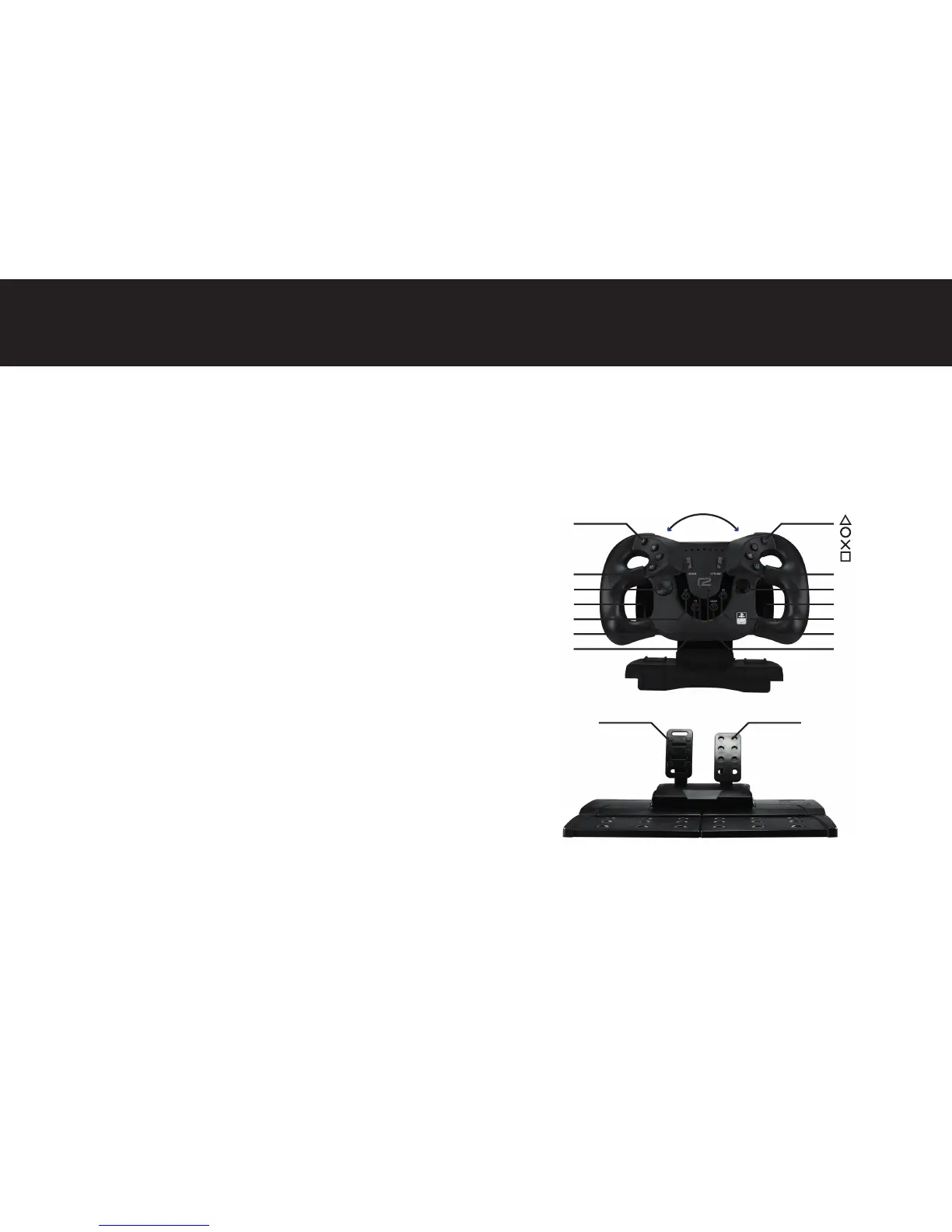
Button layout
ENGLISH
R2
L1
R1
D-PAD
270°
L3
R-JOYSTICK
R3
MODE
LED
BRAKE ACCELERATOR
SHARE
SENSITIVITY
LED
OPTIONS
MODE
L-WING R-WING
L2
PS BUTTON


 To Next Page