CONTROLS
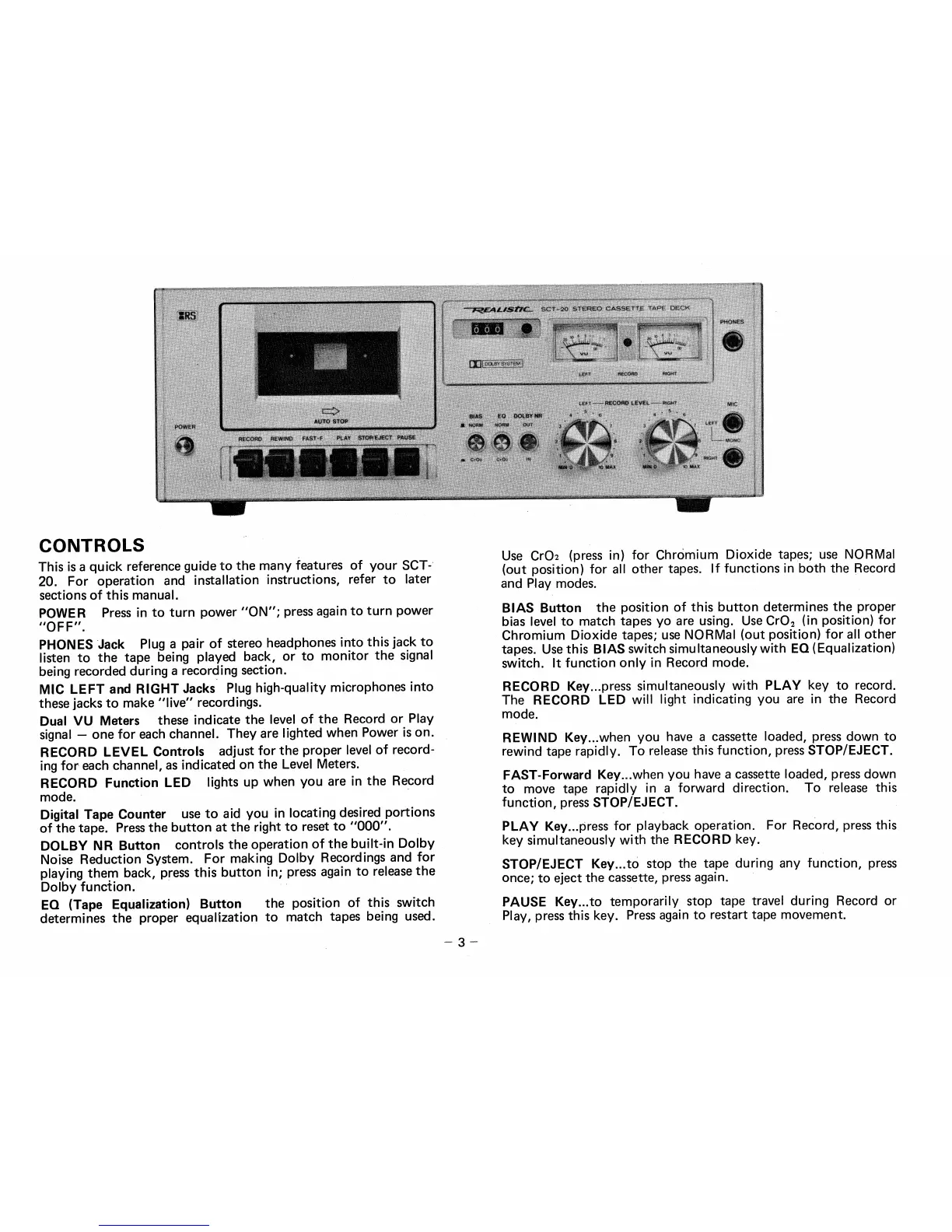
This is a quick reference guide to the many features of your SCT-
20. For operation and installation instructions, refer to later
sections of this manual.
POWER
Press in to turn power "ON"; press again to turn power
"OF F".
PHONES Jack
Plug a pair of stereo headphones into this jack to
listen to the tape being played back, or to monitor the signal
being recorded during a recording section.
MIC LEFT and RIGHT Jacks
Plug high-quality microphones into
these jacks to make "live" recordings.
Dual VU Meters
these indicate the level of the Record or Play
signal — one for each channel. They are lighted when Power is on.
RECORD LEVEL Controls
adjust for the proper level of record-
ing for each channel, as indicated on the Level Meters.
RECORD Function LED
lights up when you are in the Record
mode.
Digital Tape Counter
use to aid you in locating desired portions
of the tape. Press the button at the right to reset to "000".
DOLBY NR Button
controls the operation of the built-in Dolby
Noise Reduction System. For making Dolby Recordings and for
playing them back, press this button in; press again to release the
Dolby function.
EQ (Tape Equalization) Button
the position of this switch
determines the proper equalization to match tapes being used.
Use Cr02 (press in) for ChrOmium Dioxide tapes; use NORMal
(out position) for all other tapes. If functions in both the Record
and Play modes.
BIAS Button
the position of this button determines the proper
bias level to match tapes yo are using. Use Cr0
2
(in position) for
Chromium Dioxide tapes; use NORMal (out position) for all other
tapes. Use this
BIAS
switch simultaneously with
EQ,
(Equalization)
switch. It function only in Record mode.
RECORD
Key...press simultaneously with
PLAY
key to record.
The
RECORD LED
will light indicating you are in the Record
mode.
REWIND
Key...when you have a cassette loaded, press down to
rewind tape rapidly. To release this function, press
STOP/EJECT.
FAST-Forward
Key...when you have a cassette loaded, press down
to move tape rapidly in a forward direction. To release this
function, press
STOP/EJECT.
PLAY
Key...press for playback operation. For Record, press this
key simultaneously with the
RECORD
key.
STOP/EJECT Key...to
stop the tape during any function, press
once; to eject the cassette, press again.
PAUSE Key...to
temporarily stop tape travel during Record or
Play, press this key. Press again to restart tape movement.
— 3 —


 To Next Page
 Loading...