OPEPATION
Followthesestepstooperateyourwalkie-talkie.
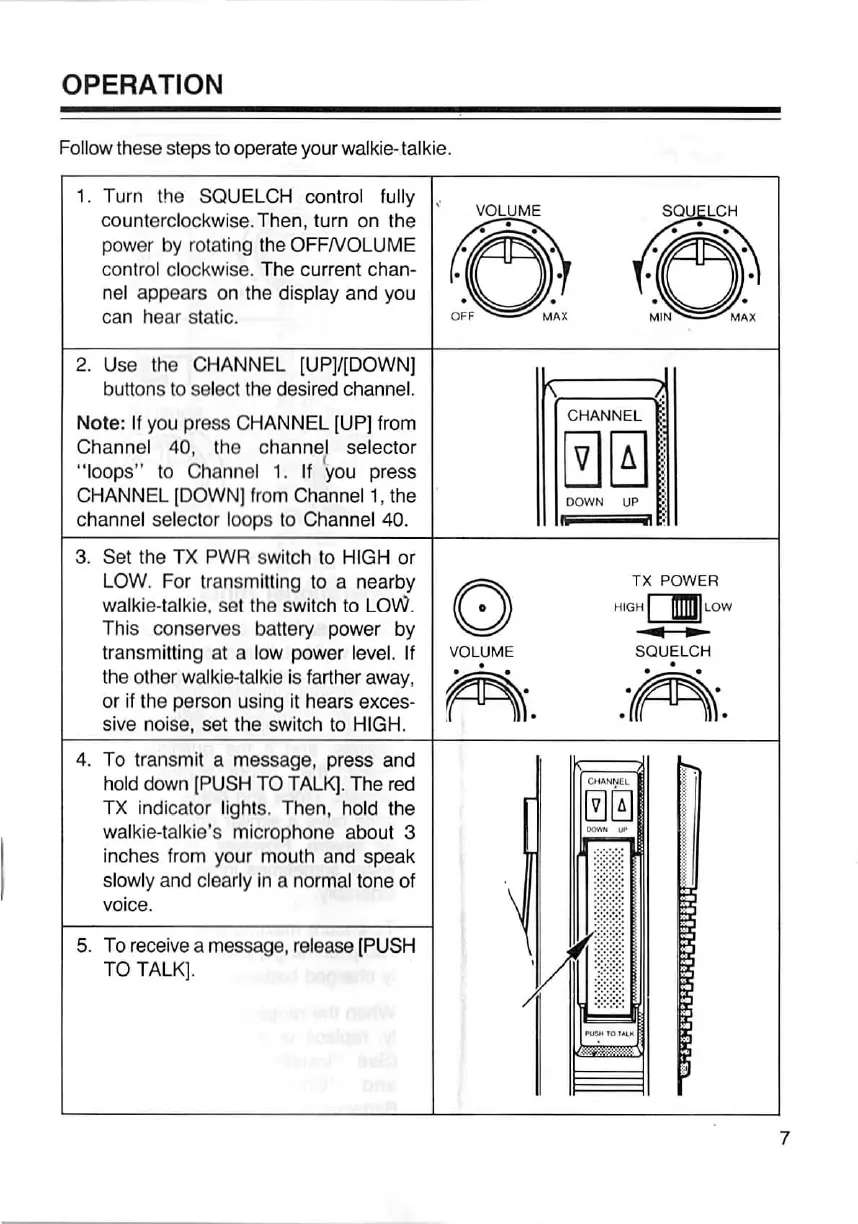
1. Turn the SQUELCH control fully
VOLUME SQ LCH
counterclockwise.Then, turn on the
power by rotating the OFFrvoLUME
:!F©M,A.X .i,©M!:
control clockwise. The current chan-
nel appears on the display and you
can hear static.
2. Use the CHANNEL [UP]/[DOWN]
buttons to select the desired channel.
Note: lf you press CHANNEL [UP] from
CHANNEL
EE
i::::I?'to4°6h:hn:a,Ci?n,ie!yo:e':rcet::
CHANNEL [DOWN] from Channel 1, the
DOWN UP
channel Selector loops to Channel 40.
3. Set the TX Pwpl switch to HIGH or
© HIGTHEffLRow
LOW. For transmlttlng to a nearby
walltie-talkie, set the switch to LOW.
This conserves battery power by
transmitting at a low power level. If
VOLU ME SOU ELCH
the other walkie-talkie is farther away,
fa....ffifro..
or if the person using it hears exces-
sive noise, set the switch to HIGH.
4. To transmit a message, press and
Emuffi
§.8
hold down [PUSH TO TALK|. The red
lx indicator lights. Then, hold the
walkie-talkie's microphone about 3
inches from your mouth and speak
slowly and clearly ln a normal tone of
voice.
5. To receive a message, release (PUSH
TO TALK].


 To Next Page