8
3
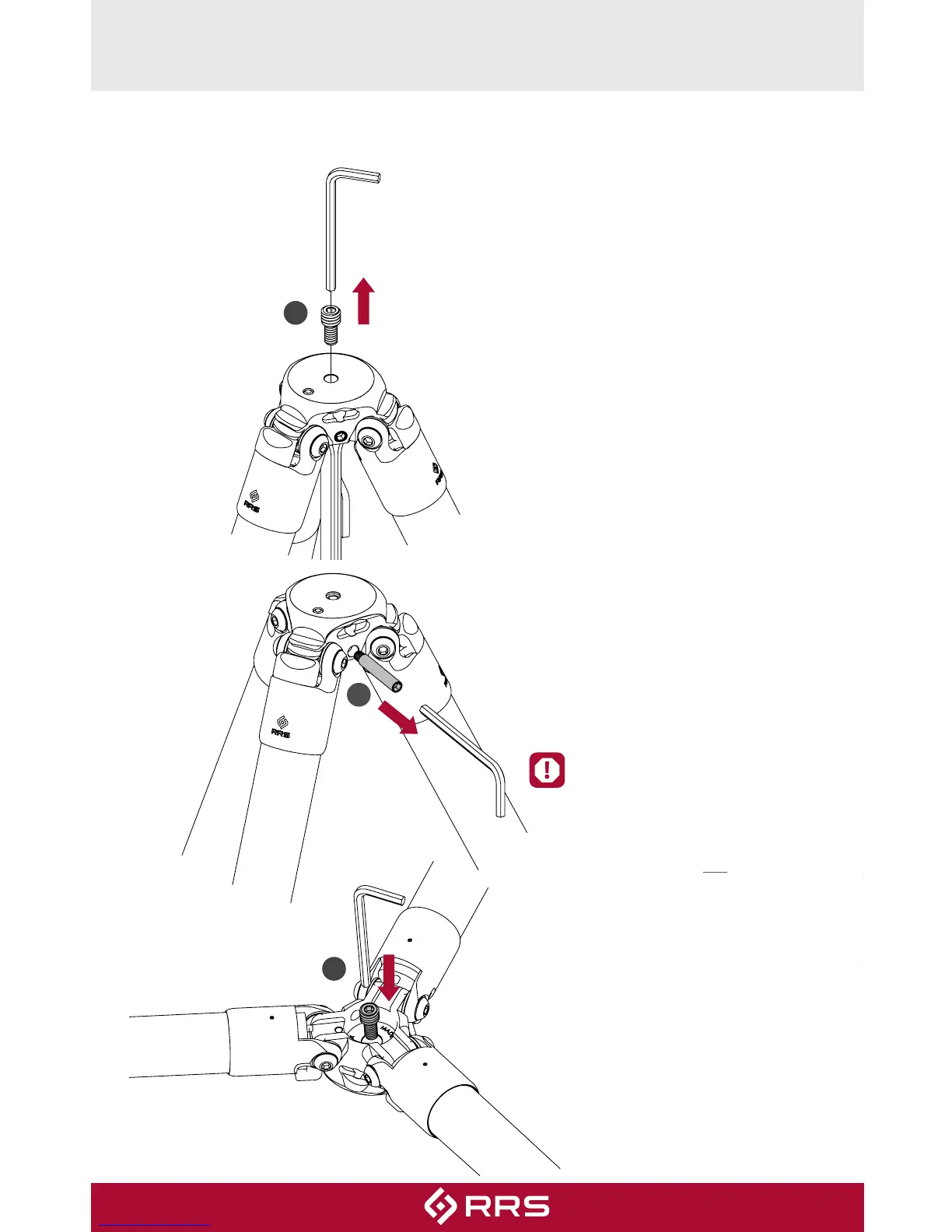
REVERSE THE STUD
The threaded platform stud on the TFC‑14 is dual‑threaded ¼”‑20 and 3⁄8”‑16
and is reversible. Follow the steps to reverse the stud from 3⁄8”‑16 to ¼”‑20.
1
2
1. Use 5/32” hex key to unscrew
and remove the Stud.
2. The Strap & Strap Pin must be
removed before the Stud can
be re-installed. Use 5/32” hex
key to unscrew and remove the
Strap Pin.
3. Turn the tripod upside down.
Use 5/32” hex key to re-install
the Stud by screwing it into the
bottom of the apex.
4. Re-install the Strap & Strap Pin
(not shown).
The Stud is not secured with
threadlocker fluid at the
factory. This allows you to
easily reverse it if needed. To
semi-permanently secure the
Stud in place, use one drop of
threadlocker fluid (included
with your tripod) on the Stud.


 To Next Page