
 Need help?
Do you have a question about the Really Right Stuff TQC-14 and is the answer not in the manual?
Details specifications for Series 1 tripods and monopods, including load capacity.
Details specifications for Series 2 tripods and monopods, including load capacity.
Details specifications for Series 3 tripods and monopods, including load capacity.
Details specifications for Series 4 tripods and monopods, including load capacity.
Describes the 1/4"-20 mounting stud for attaching tripod heads.
Explains the bullseye spirit level for easy tripod leveling (Versa tripods).
Details the ratcheting Angle Stop for setting leg angles.
Covers the SureGrip™ Apex Lock for secure carrying (Versa tripods).
Mentions the optional Versa Quick-Column accessory.
Describes Quick-Column tripods with integrated columns and ergonomic knobs.
Explains Offset Leg Joints to reduce folded tripod circumference.
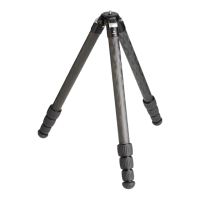
Highlights the carbon fiber leg tubes for strength and vibration absorption.
Describes the Weight Hook for adding stability with a carabiner.
Details the large twist locks with rubber-over-molded aluminum for grip.
Discusses the unique tapered shape of the interchangeable foot for stability.
Step-by-step guide to swinging out and extending tripod legs for use.
Instructions on how to lock and unlock tripod legs using twist locks.
Steps to properly loosen twist locks and collapse tripod legs.
Note on securing optional feet using threadlocker fluid.
First step in adjusting leg angles by swinging the leg inward.
Process for sliding and engaging the Angle Stop mechanism.
Moving the leg to a horizontal position for angle adjustment.
How the Angle Stop automatically ratchets to the desired position.
Step to loosen set screws using a hex key before column removal.
Instructions for detaching the platform and weight hook.
Method for removing the quick-column from the apex.
Steps for placing and securing the platform/hook assembly.
Reverse procedure to reinsert the quick-column into the apex.
Use a 5/32" hex key to unscrew and remove the threaded platform stud.
Remove the Strap & Strap Pin before re-installing the Stud.
Turn tripod upside down and screw the Stud into the bottom of the apex.
Procedure for re-installing the Strap & Strap Pin.
Swing the leg closest to the Set Screw inward slightly.
Pull the Angle Stop out until it stops, then swing the leg completely out.
Insert 2.5mm hex key and tighten the Set Screw against the tripod head.
Note that tightening the Set Screw may mar the tripod head.
Check SureGrip™ set screws for proper tightness to ensure accessory security.
Wipe down and dry legs completely after exposure to mud or saltwater.
Leg bolts should be tight enough to prevent collapse but allow easy opening.
Periodically apply multi-purpose lubricant to the threads of each leg joint.
Inspect for metal corrosion and contact Really Right Stuff for replacement parts.
Always keep your tripod in a protective bag when transporting or storing.
Always fully extend lower leg section in sand or mud to prevent contamination.
Unscrew Twist Lock and fully remove the leg section.
Remove Twist Lock, foot, and Anti-Twist Sleeves from the leg.
Wipe down leg, foot, and threads with a damp cloth, then allow to dry.
Apply a small amount of multi-purpose grease to the exposed leg threads.
Replace Anti-Twist Sleeves and Twist Lock onto the leg.
Insert leg into tripod, aligning arrow with gap between Anti-Twist Sleeves.
Screw Twist Lock and foot back into position, rotating to spread grease.
Introduction to the QD "Quick-Detach" mounting hardware system.
Describes the Apex QD Mount and Leg QD Mount system.
Details requirements for a QD-compatible strap with sling swivels.
Instructions for installing the Leg QD Mount to the bottom of a leg section.
Instructions for installing the Apex QD Mount to the tripod's apex.
Use a 5/8" hex key to loosen the three SureGrip™ set screws around the Apex.
Remove the Apex platform or other accessory by pushing it upward.
Instructions for inserting a new compatible accessory into the Apex.
Tighten all three SureGrip™ set screws to secure the new accessory.
Details Versa Quick Columns with integrated SureGrip™.
Highlights the MTX Multi-Tool as the best tool for your tripod.
Shows replacement feet options like Rock Claws and Foot Spikes.
Explains leveling bases for tripods, offering ±15° leveling capability.
 General
| Material | Carbon Fiber |
|---|---|
| Sections | 4 |
| Type | Tripod |
| Leg Lock Type | Twist Lock |
| Feet Type | Rubber |
| Weight | 2.6 lb / 1.2 kg |
| Load Capacity | 25 lb / 11.3 kg |

 To Next Page