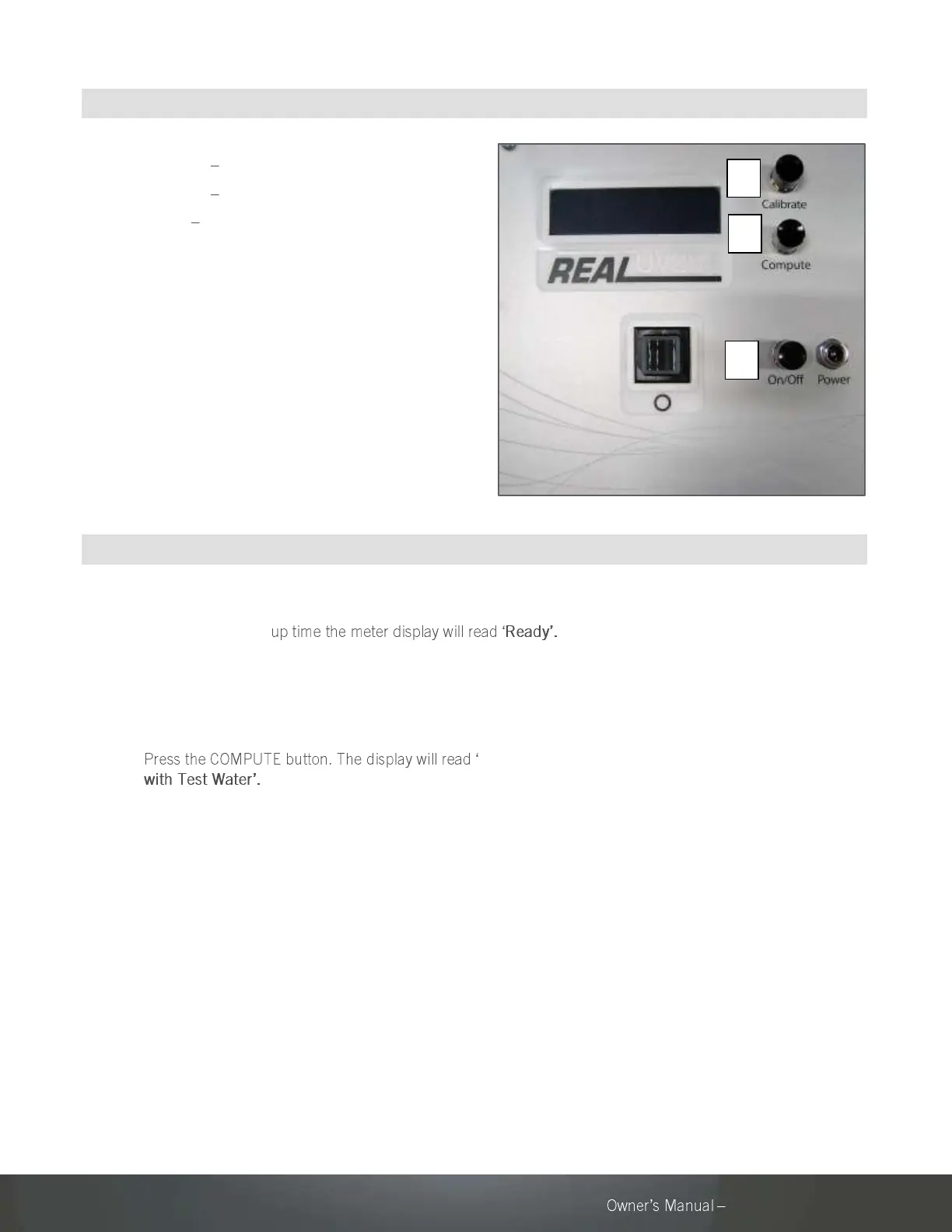
6.2 OPERATOR INTERFACE
1. Calibrate Press for calibration.
2. Compute Press to perform test.
3. Power Press to power ON and OFF.
Note: To switch between UV transmittance (UVT)
mode and UV absorbance (UVA) mode, hold down
both CALIBRATE and COMPUTE for 2 seconds. Either
UVT or UVA will be specified in the corner of the
display to indicate current mode.
6.3 OPERATOR INSTRUCTIONS
1. Plug in the power cord and press POWER to turn the meter on.
After a short warm-
Note: Real UV254 P200 meter with battery option requires the
switch on the battery pack to be in the ON position before pressing
the POWER button.
2. Ensure the quartz cuvette is not in the test chamber.
3. Insert Cuvette
4. Ensure the outside of the cuvette is clean and dry.
5. Insert the cuvette containing the water sample to be tested ensuring
the black dot on the cuvette is aligned with the circle next to the
test chamber.
6. Display will show the computed UVT or UVA.
7. To perform another test, remove the cuvette from the test chamber.
Rinse the cuvette twice before inserting the new sample. Repeat
steps 2-5.
8. Clean and dry the cuvette thoroughly before reinserting into the
meter for storage.
9. Press POWER to turn the meter off.



 To Next Page