EasyManua.ls Logo

Realtek AmebaPro RTL8715AD - User Manual

Realtek AmebaPro RTL8715AD
35 pages
Print Icon
To Next Page IconTo Next Page
Loading...
Ameba-Pro KVS Getting Started Guide
Getting Started Guide All information provided in this document is subject to legal disclaimers. © REALTEK 2020. All rights reserved.
1
Amazon Kinesis Video Streams Producer
on AmebaPro Getting Started Guide
Realtek Semiconductor Corp.
No. 2, Innovation Road II, Hsinchu Science Park, Hsinchu 300, Taiwan
Tel.: +886-3-578-0211. Fax: +886-3-577-6047
www.realtek.com
Question and Answer IconNeed help?

Do you have a question about the Realtek AmebaPro RTL8715AD and is the answer not in the manual?

Summary

AmebaPro RTL8715 AD Board Overview

AmebaPro Demo EVB Details

Details the AmebaPro Demo EVB, including CPU, memory, and key features.

PCB Layout and Interfaces

PCB Layout

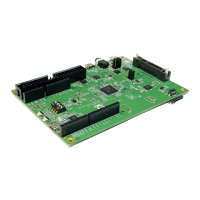
Illustrates the physical PCB layout of the AmebaPro board.

LOGUART Port

Identifies the LOGUART port on the AmebaPro board for debugging.

Debugging Interfaces

JTAG;SWD Interface

Describes the JTAG/SWD interface for debugging and programming.

Image Sensor Interface

Highlights the socket for connecting an image sensor module.

Project Building Requirements

AWS Setup for Kinesis Video Streams

Create AWS Account

Step-by-step guide to create a new Amazon Web Services account.

Configure Administrator IAM User

Instructions for creating a secure administrator IAM user for your AWS account.

Generate AWS Access Keys

Procedure to generate AWS access keys for programmatic access.

AmebaPro Configuration for Amazon KVS

Download Project Source Code

Instructions for downloading the project's source code from GitHub.

Clone Repository and Submodules

Details on using Git commands to clone the repository and its submodules.

Image Sensor Configuration

AWS Credentials and Stream Setup

Set AWS Keys and Stream Name

How to set AWS access keys, secret keys, and stream name in the project.

Enable KVS Producer Demo Example

Steps to enable specific KVS producer examples within the project configuration.

Project Compilation and Build

IAR Embedded Workbench Build Setup

Guide to setting up the build environment using IAR Embedded Workbench.

Compile Little CPU Core

Instructions for compiling the 'little' CPU core of the project.

Compile Big CPU Core

Instructions for compiling the 'big' CPU core of the project.

Generate Binary Image Files

Compile with GCC Toolchain

Firmware Download and Flashing

Image Tool Overview

Overview of the Image Tool for downloading firmware to the board.

Download Environment Setup

Details the necessary hardware and software configurations for downloading.

Enter UART Download Mode

Download Image to Flash

J-Link Debugging and Image Download

J-Link SWD Interface Configuration

Guide to setting up the J-Link debugger using the SWD interface.

Linux J-Link GDB Server Setup

Instructions for configuring and running the J-Link GDB Server on Linux.

Windows J-Link GDB Server Setup

Download Image via J-Link

Enter GDB Debugger Mode

KVS Producer Demo Operations

Obtain Device Logs

Steps to capture and view device logs using a terminal emulator.

Run KVS Producer Demo

Guide to running the KVS Producer demonstration on the AmebaPro.

Connect to Wi-Fi Network

Procedure for connecting the AmebaPro to a Wi-Fi network.

Stream Media to KVS

Verify Demo Results

Verify via Media Viewer Webpage

Using an online viewer to confirm media is being sent to KVS.

Verify via AWS KVS Console

Steps to verify data streams using the AWS Kinesis Video Streams console.

Rekognition Integration Example

Create Kinesis Streams for Rekognition

Creating AWS Kinesis Data Streams to receive Rekognition analysis results.

Start Video Streaming

Create Rekognition Stream Processor

Retrieve and Process Video Locally

Retrieve Results from Data Stream

Display Faces with Bounding Boxes

Python Demo for Local Result Analysis

Troubleshooting and Configuration

Modify Video Parameters

Adjusting video parameters like resolution, bitrate, and FPS.

Resolve Library Linking Errors

Fix Header File Inclusion Issues

Troubleshoot AWS Connection Failures

Resolve Image Sensor Initialization Errors

Troubleshoot Boot-up Failures

Realtek AmebaPro RTL8715AD Specifications

General IconGeneral
ProcessorARM Cortex-M4
Clock Speed200 MHz
Wi-Fi Standard802.11 a/b/g/n
BluetoothBluetooth 4.2
Flash Memory2MB
RAM512KB
Operating Voltage3.3V
Operating Temperature-40°C to 85°C
SPI2
I2C2
I/O PortsGPIO, UART, SPI, I2C, ADC, PWM
SecurityAES

Related product manuals