Need help?
Do you have a question about the Realtek AmebaPro2 RTL8735B and is the answer not in the manual?
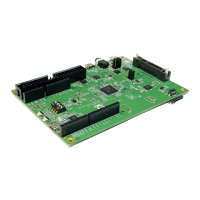
Details the AmebaPro2 Demo EVB's MCU, memory, and key features for initial setup.
Visual guide to the PCB layout and identification of the Log UART port.
Steps to create an AWS account and configure necessary user permissions.
Process for registering a physical device as a 'thing' in AWS IoT Core.
Defining access permissions for devices interacting with AWS IoT Core.
Linking a created policy to a device's certificate for access control.
Instructions to download the FreeRTOS-LTS library source code from GitHub.
Obtaining the AWS IoT Core device data endpoint for device communication.
Configuring project credentials like thing name, broker endpoint, and Wi-Fi details.
Integrating device's private key and certificate into the project.
Activating specific FreeRTOS demos, like MQTT mutual authentication.
Building the application firmware using the GCC toolchain.
Setting up the necessary hardware for firmware image download.
Procedure to put the AmebaPro2 board into download mode.
Using the tool to flash the compiled firmware onto the AmebaPro2 device.
Executing the MQTT demo to communicate with AWS IoT Core.
Subscribing to MQTT topics to view incoming messages in AWS IoT console.
Necessary steps and configurations before performing OTA updates.
Defining the application version for firmware updates.
Signing the firmware binary using custom keys for verification.
Creating an OTA update job within the AWS IoT Core console.
Executing the OTA update process and observing its progress.
Diagnosing and resolving issues related to invalid Wi-Fi credentials.
Troubleshooting problems with establishing MQTT connections to AWS IoT.
Resolving failures related to TLS connection during device setup.
 General
| Brand | Realtek |
|---|---|
| Model | AmebaPro2 RTL8735B |
| Category | Computer Hardware |
| Language | English |

 To Next Page