BATTERY INSTALL
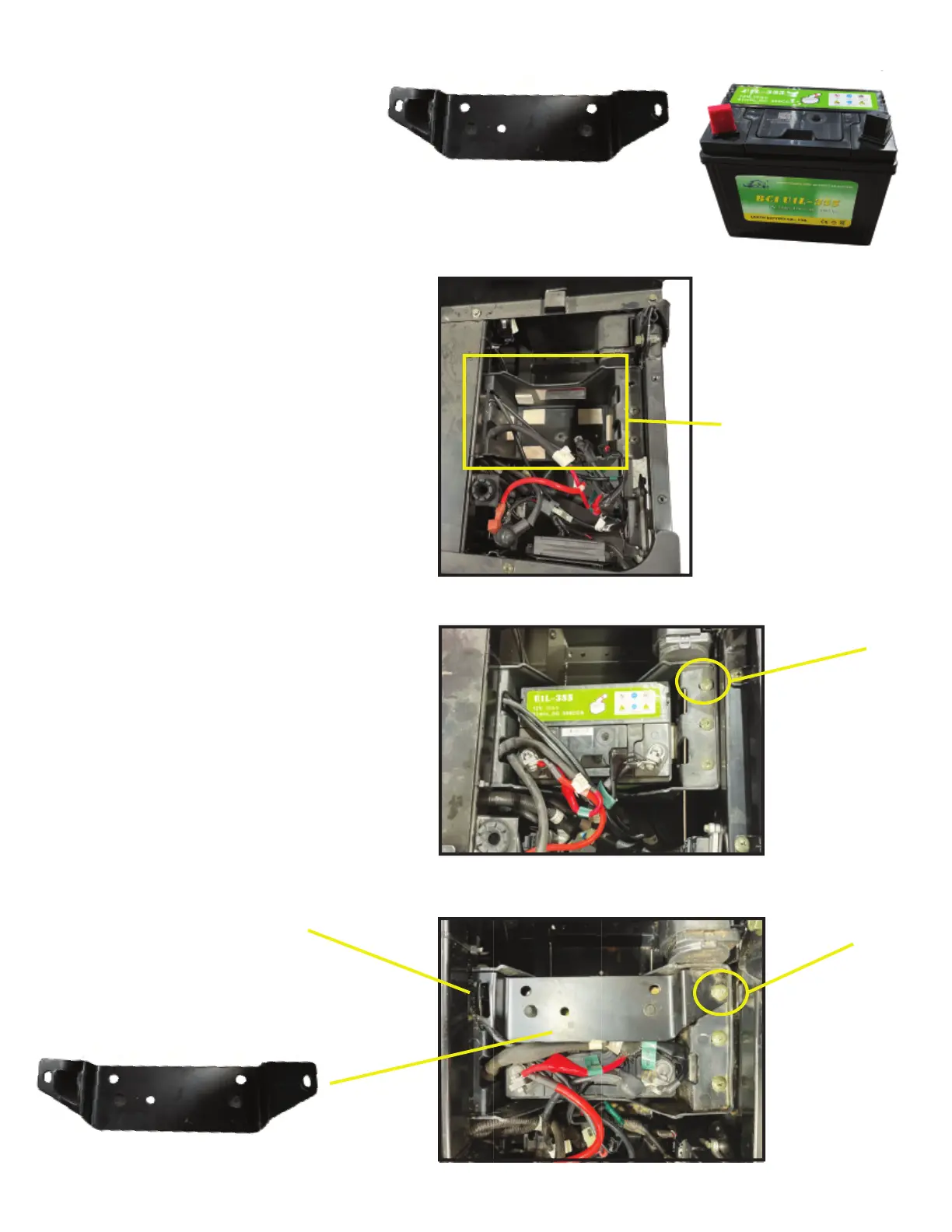
1. Remove bottom seat and located
battery box under driver side seat area.
2. Place battery inside battery box
ensuring not to damage or pinch battery
wires and remove battery terminal protective
caps.
3. Attach RED battery wires to positive
(+) battery terminal using supplied M6X15
BOLT, M6 washer and M6 Flange Nut.
WARNING! ALWAYS ATTACH POSITIVE
(RED) WIRES BEFORE NEGATIVE
(BLACK) WIRES TO BATTERY TERMI-
NALS.
4. Attach BLACK battery wires to
negative (-) battery terminal using supplied
M6X15 BOLT, M6 washer and M6 Flange
Nut.
5. Install battery bracket with angled
edge facing forward by removing the Phillips
head screw (show in picture below), place
battery over the battery, replace Phillips
head screw.
6. Re-install seat.
Tools Needed:
10mm Wrench
Phillips Head Screw Driver
Battery Bracket
Battery
Battery Box
Remove screw
Press bracket
down and
replace screw
Place under seat
frame
8
9


 To Next Page
 Loading...