1. Long-press
(for 2 seconds) to
switch the device on.
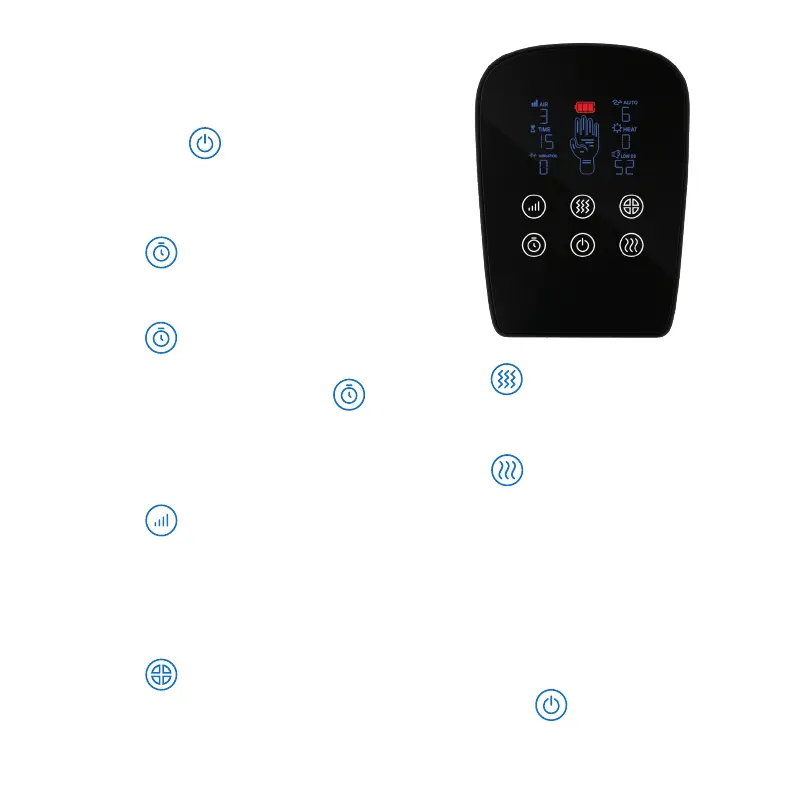
2. Insert your hand into the massager.
3. Press to choose the duration of
the massage session. By default, the
time is set at 15 min. For every time you
press , 5 min will be added: 20, 25,
30. When the time displayed on the
screen is 30 min and you press
again, it will go to 10 min, and you can
keep pressing the button, adding 5 min
each time, to go up to 30 min.
4. Press
to choose the strength
of air compression. By default, the
device will run on 3 (medium intensity),
but you can change it to 4, 5, 6 (the
highest), 1 (the lowest), or 2.
5. Press
to choose an automatic
massage program out of six available
modes.
6. Press
to turn the vibration on
and to choose between two available
speeds.
7. Press
to turn the heat on and to
choose between two available levels. It
takes about 5 minutes for the device to
warm up before you start feeling the
heat inside it.
8. Play with the configurations, and build
a hand massage routine that will keep
your hands healthy and fit every day.
9. Long-press
(for 2 seconds) to
switch the device off.
How to Use DEXTRA



 To Next Page