15
Network Settings(Continued)
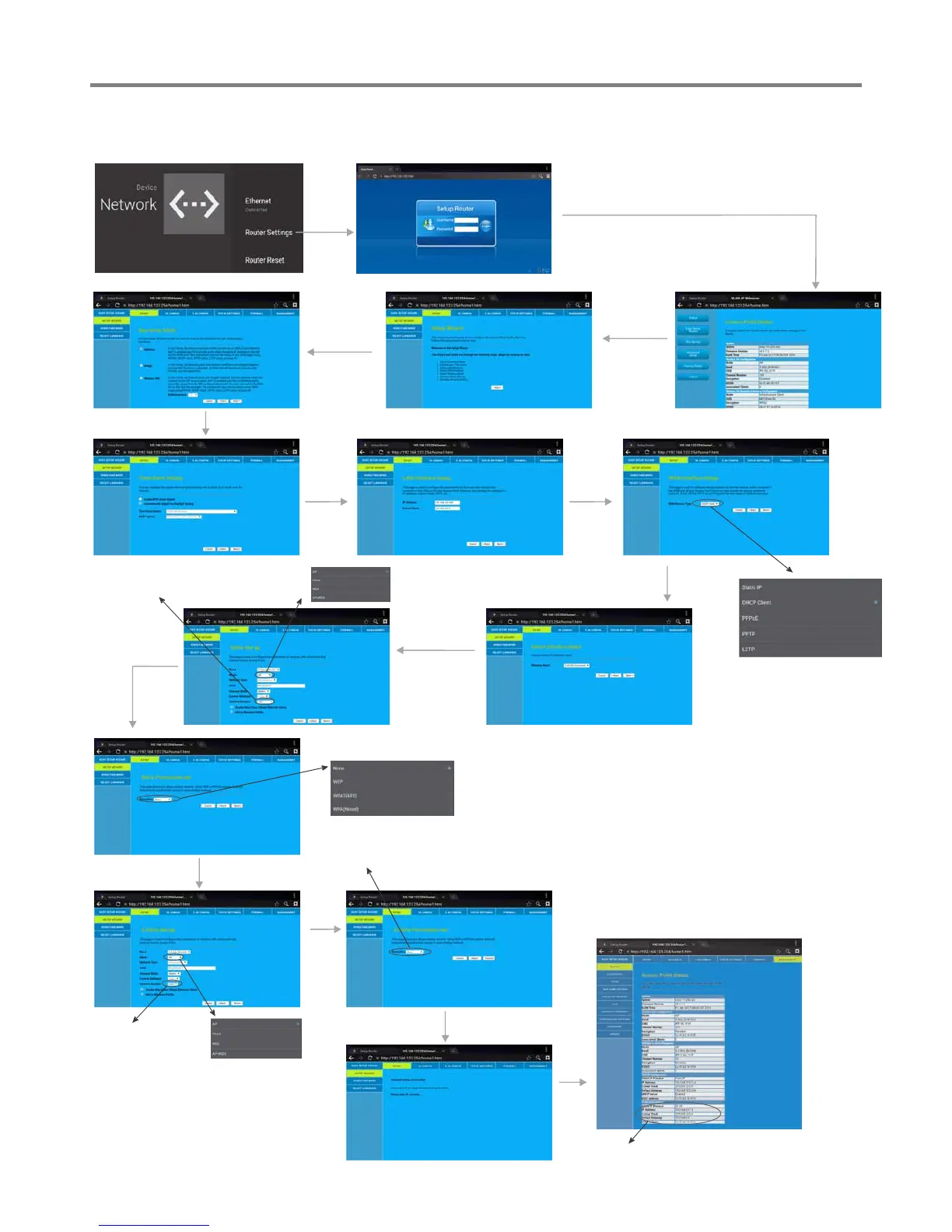
Wired Network Setting ( )Internal router
Select Gateway
Next
Next
Finished
There are five methods to
connect with network, choose
your preferred one.
Recommended to select the
DHCP Client connection.
Automatically obtain IP
information from your ISP.
Password Setting Format
5GHz Setup
Next
2.4GHz Setup
Next
Method 2: Advanced Mode
Input the default UserName: admin, skip the
default password setting as there is no default
password, then press Login button login.
Select
Advanced
Mode
Select
SETUP,
then SETUP
WIZARD
Next
Next
Next
WiFi Password of Internal Router in
the IFP. (Password should be set at
least 8 characters. )
Next
Recommended
to select Auto.
Recommended
to select AP
Next
Recommended
to select Auto.
Recommended
to select AP
Changed setting successfully.
Get IP,


 To Next Page