(AES)
Triple Data Encryption Standard Block Cipher
(3DES)
Default Value
Syntax DirectoryString
Example nsEncryptionAlgorithm: AES
3.5. Database Link Plug-in Attributes (Chaining Attributes)
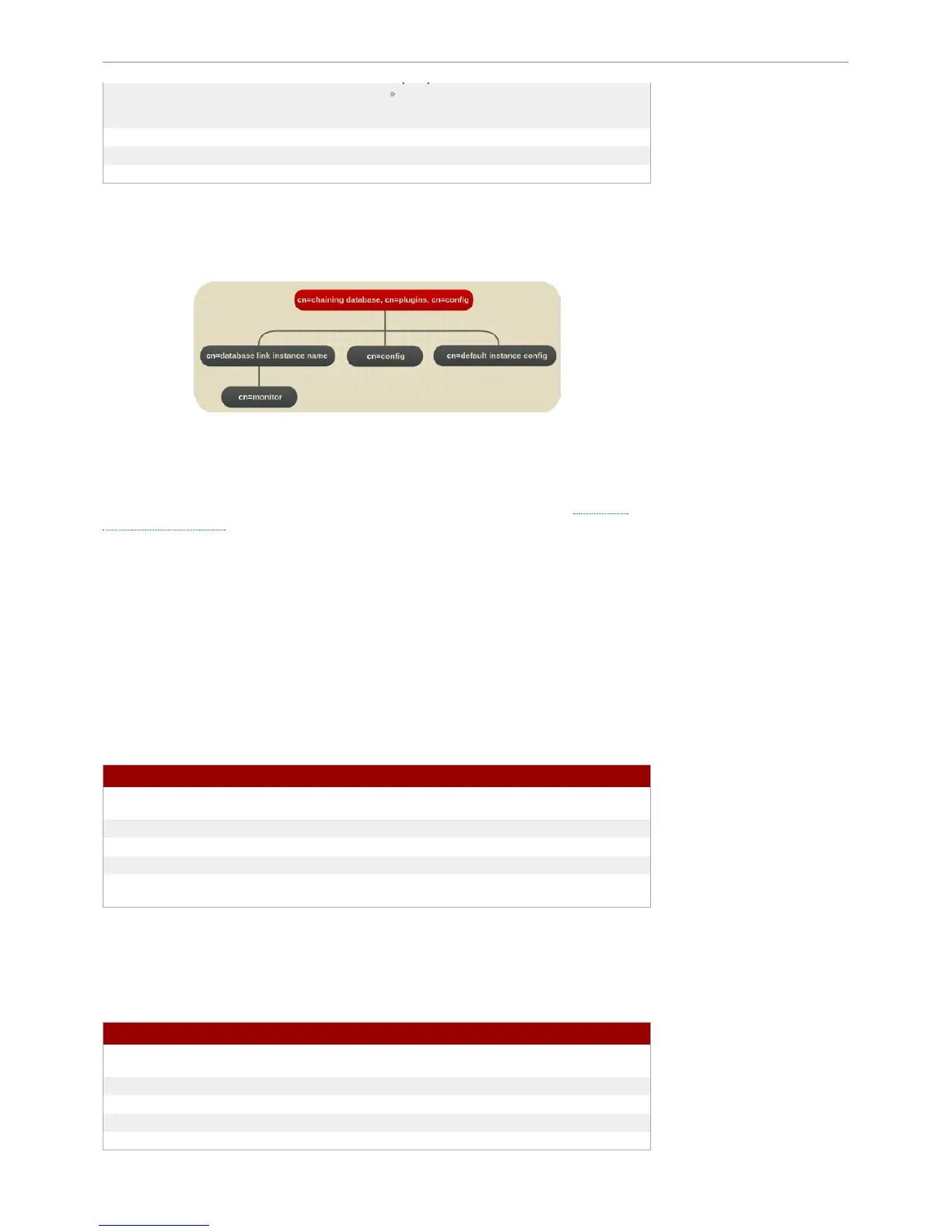
The database link plug-in attributes are also organized in an information tree, as shown in the following
diagram:
Figure 3.4 . Data base Link Plug- in
All plug-in technology used by the database link instances is stored in the cn=chaining database
plug-in node. This section presents the additional attribute information for the three nodes marked in
bold in the cn=chaining database, cn=plugins, cn=config information tree in Figure 3.4 ,
“Database Link Plug-in”.
3.5 .1. Data base Link At tributes under cn=config, cn=chaining database, cn=plugins,
cn=config
This section covers global configuration attributes common to all instances are stored in the
cn=config, cn=chaining database, cn=plugins, cn=config tree node.
3.5 .1.1. nsActiveChainingComponents
This attribute lists the components using chaining. A component is any functional unit in the server. The
value of this attribute overrides the value in the global configuration attribute. T o disable chaining on a
particular database instance, use the value None. This attribute also allows the components used to
chain to be altered. By default, no components are allowed to chain, which explains why this attribute will
probably not appear in a list of cn=config, cn=chaining database, cn=config attributes, as
LDAP considers empty attributes to be non-existent.
Parameter Description
Entry DN cn=config, cn=chaining database, cn=plugins,
cn=config
Valid Values Any valid component entry
Default Value None
Syntax DirectoryString
Example nsActiveChainingComponents: cn=uid
uniqueness, cn=plugins, cn=config
3.5 .1.2. nsMaxResponseDelay
This error detection, performance-related attribute specifies the maximum amount of time it can take a
remote server to respond to an LDAP operation request made by a database link before an error is
suspected. Once this delay period has been met, the database link tests the connection with the remote
server.
Parameter Description
Entry DN cn=config, cn=chaining database, cn=plugins,
cn=config
Valid Values Any valid delay period in seconds
Default Value 60 seconds
Syntax Integer
Example nsMaxResponseDelay: 60
3.5 .1.3. nsMaxT estResponseDelay



 To Next Page