
 Need help?
Do you have a question about the RED SHIELD WS500 and is the answer not in the manual?
Provides a high-level overview of the system's purpose and components.
Explains the WS500 system, its control panel, and sensors.
Lists all components that should be present in the product package.
Details the LCD screen, function buttons, keypad, and other features.
Explains the sound alerts and backlight indications for different operating modes.
Covers locating, tamperproofing, and wall mounting the Smart Panel.
Guides on how to correctly power the Smart Panel using batteries and AC adapter.
Explains the meaning of battery status and AC adaptor icons on the panel.
Instructions on how to change the default PIN for system access.
Details how to trigger an immediate alarm signal using the panel or remote.
Explains how to use the system's STANDBY, ARM, ALERT, and HOME modes.
Provides an overview of the wireless sensors included with the system.
Guides on determining sensor locations and the general installation process.
Presents common questions and answers regarding the system's setup and operation.
Addresses common issues like AC power failure, system battery failure, and sensor communication.
Discusses wireless system limitations and general considerations for reliable operation.
Lists technical details for the Smart Panel, Key Fob, Door/Window Sensor, and Motion Sensor.
Provides guidelines for cleaning and maintaining the system components.
Offers instructions on battery handling, replacement, and disposal.
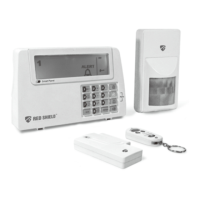
The Red Shield WS500 Wire-free Home Protection System is a high-quality security system designed for home or office use, offering a range of user-friendly features. It operates wirelessly, with a Smart Panel acting as the central control unit, gathering information from various sensors placed throughout the property. In the event of a security breach, the Smart Panel will activate indicator lights and sound the siren(s) to alert users.
The system operates in four distinct modes: STANDBY, ARM, ALERT, and HOME, each tailored to specific security needs.
The system also features an emergency (Panic) alarm. Pressing the Panic buttons on the Keypad or Key Fob Remote Control immediately transmits an alarm signal to the Smart Panel, activating the siren and sending a signal to any optional response devices (like an Auto Dialer or Outdoor Bell Box). A Duress Password allows users to disarm the system silently, transmitting an alarm signal to response devices without sounding the siren.
 Power
Power| power source | AC adaptor |
|---|---|
| back up power | 9V alkaline battery x1pc |
 Operating Specifications
| operating frequencies | 433.92MHz +/-0.5MHz |
|---|---|
| siren output | 120dB (Duration-adjustable) |
| sensor numbers | Unlimited |
Power| power source | 12V alkaline battery x 1pc |
|---|
Operating Specifications| RF working transmission frequency | 433.92MHz +/-0.5MHz |
|---|---|
| wireless range to Smart Panel | <65 meters (215ft, open area) |
| house code | 4 Jumpers |
Power| power source | AAA alkaline battery 1.5V x 2pcs |
|---|
Operating Specifications| RF working transmission frequency | 433.92MHz +/-0.5MHz |
|---|---|
| wireless range to Smart Panel | <150 meters (500ft, open area) |
| house code | 4 Jumpers |
Power| power source | 9V alkaline battery x1pc |
|---|
Operating Specifications| RF working transmission frequency | 433.92MHz +/-0.5MHz |
|---|---|
| PIR detection angle | <110 Degree (@9VDC) |
| PIR detection range | “H”:< 15M(50ft); “M”:< 6M(20ft); “L”:< 4M(13ft) |
| wireless range to Smart Panel | <150 meters (500ft, open area) |

 To Next Page
