46
12-MENU ENTRIES AND OPERATION
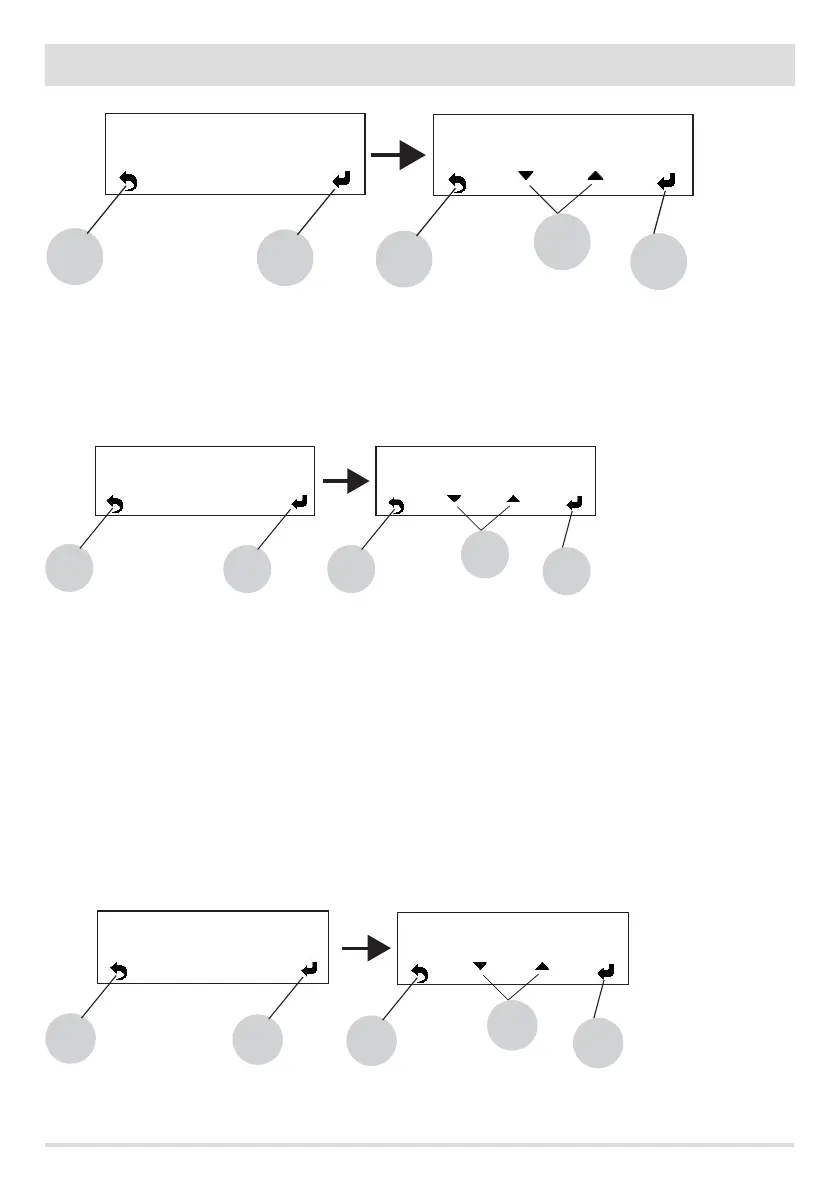
Use key 5 to go to the settings menu and select the Smoke Var.rpm option. Conrm with key 5 and then with keys “b” (arrows) you can
increase or reduce the %. Key 5 is used to conrm, while key 8 is used to go back to the main screen.
n - Maximum power (only for experienced users)
Allows you to set the maximum power limit of the ames which the boiler can use to reach the set target temperature.
Use key 5 to go to the settings menu and select the Maximum power option. Conrm with key 5 and then with keys “b” (arrows) you can
change the power value from 01 to 05. Key 5 is used to conrm, while key 8 is used to go back to the main screen.
o - Component test (only when boiler is o).
This can be done only when the boiler is o and allows you to select the components to be tested:
• Spark plug: it is turned on for a xed test period during which the panel displays the countdown in seconds.
• Feed screw: it is powered for a xed test period during which the panel displays the countdown in seconds.
• Smoke extractor: it is activated at 2500 rpm for a xed test period during which the panel displays the countdown in seconds.
• Exchanger (test not available for the boiler): enables you to conduct the test in V5 for a xed test period of 1 minute during
which the panel displays the countdown in seconds.
• Pump: it is activated for a xed period of 10 seconds during which the panel displays the countdown.
• 3-way valve: the 3-way valve is activated for a xed test period of 1 minute during which the panel displays the countdown in
seconds.
Use key 5 to go to the settings menu and select the Component test option. Conrm with key 5 and then with keys “b” (arrows) you can
select the test you want to carry out. Key 5 is used to conrm, while key 8 is used to go back to the main screen.
8
< Maximum Power >
5 8
5
4
b
< Maximum Power >
3
8
< Components Test >
5
8
5
Feed screw
b
< Components Test >
3-way valve
8
< Smoke Fan rpm >
5
8
5
10%
b
< Smoke Fan rpm >
00%


 To Next Page