48
5550°
7570°
2020°
7570°
2020°
7570°
7570°
12-MENU ENTRIES AND OPERATION
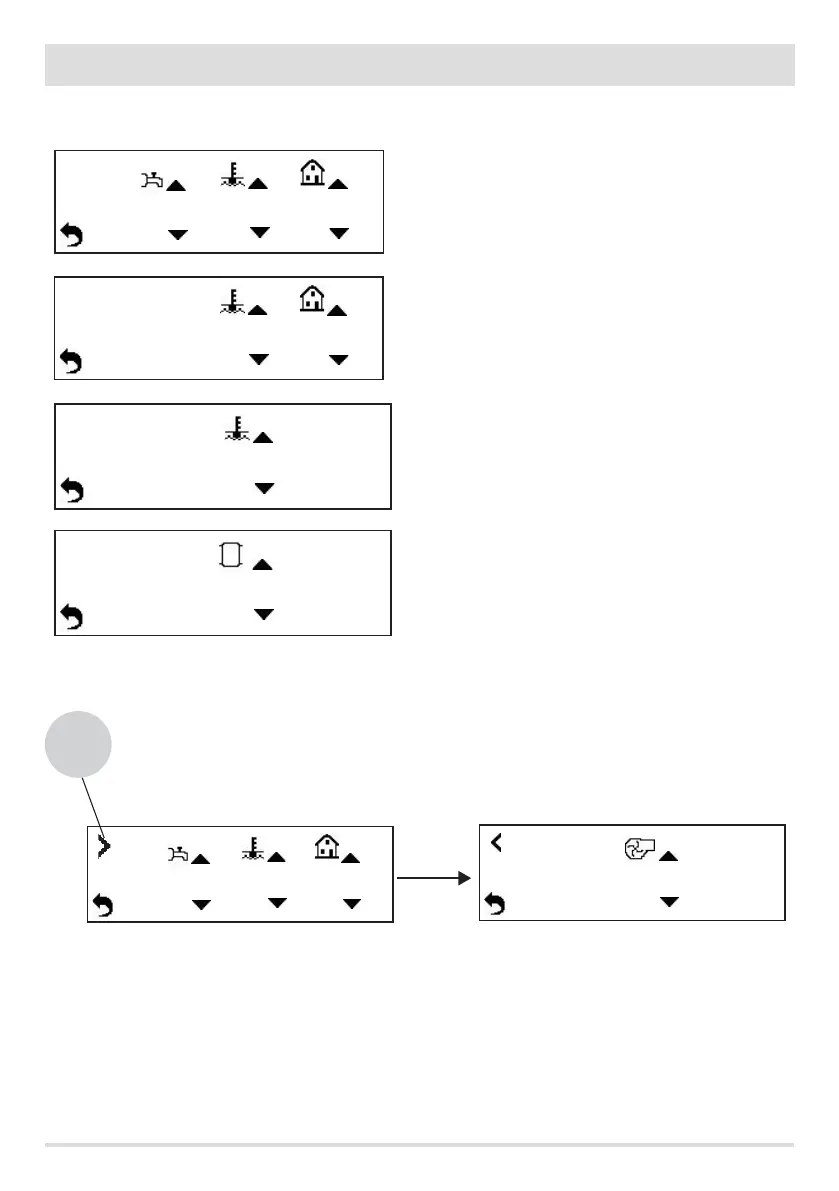
The temperature in small print on the display is the value detected by the probe, while the one in large print is the set temperature (SET).
The icons represent the various available SETPOINT values available.
The display's screen shows up to three SETPOINT value settings. For instance, if there is a fan (SET7), you need to press key 1 and go to the
next screen.
Keys 2/3/4 to increase the value
Keys 5/6/7 to decrease the value
Key 8 to go back to the main screen
SETPOINT VALUE 1
DHW SETPOINT VALUE
AMBIENT SETPOINT VALUE
WATER SETPOINT VALUE
SETPOINT VALUE 2
AMBIENT SETPOINT VALUE
WATER SETPOINT VALUE
SETPOINT VALUE 3
WATER SETPOINT VALUE
SETPOINT VALUE 4
PUFFER SETPOINT VALUE
SETPOINT VALUE 7
ROOM FAN SETPOINT VALUE (NOT IN THE BOILER)
SETPOINT VALUE 6
5550°
7570°
2020°
1
3 5
key
1


 To Next Page