50
12-MENU ENTRIES AND OPERATION
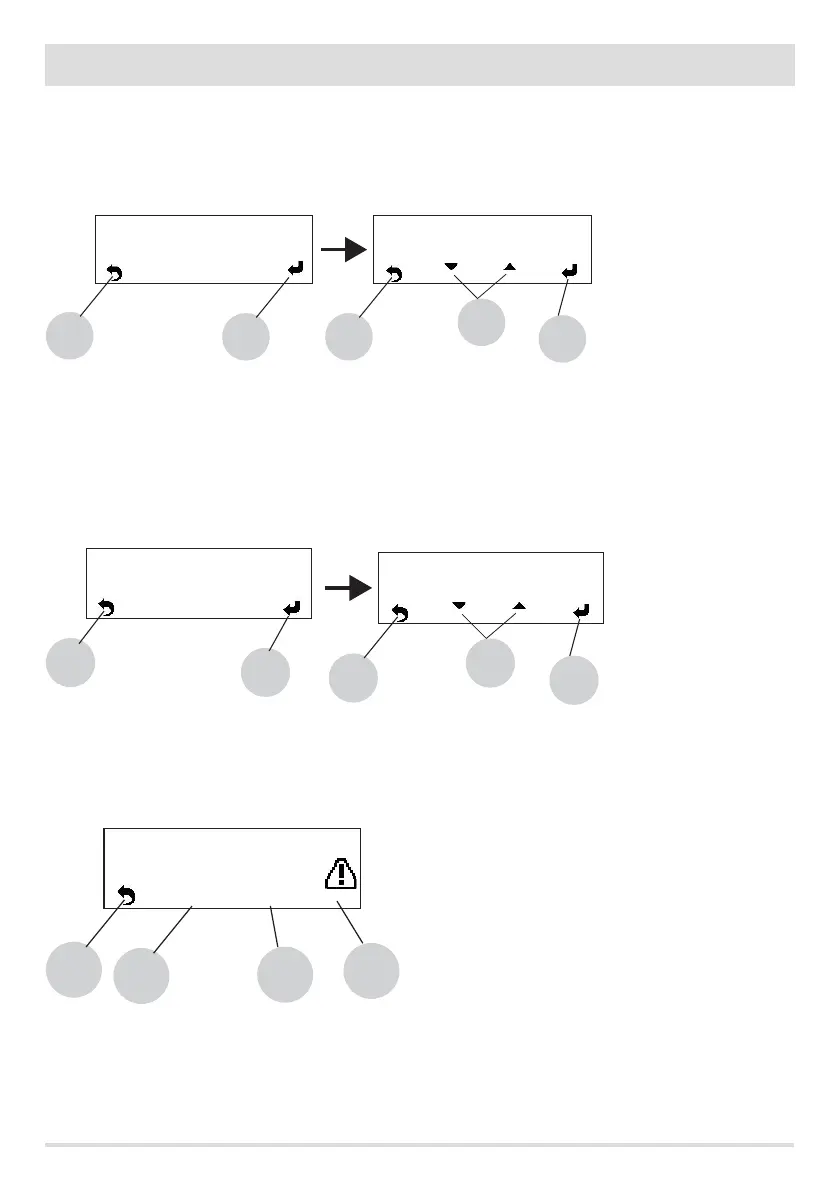
r - Season
In congurations 2 and 3, enabling the ''summer'' function disables deviation of the 3-way valve towards the heating system to prevent
the radiators from heating up, and so the ow is always towards the hot water system (DHW).
Selecting the "summer" option automatically enables the auto-eco function (cannot be deactivated). The room temperature probe/
external thermostat are ignored.
With keys 1 and 4 inside the menu, select the SETTINGS control. Use key 5 to go to the settings menu and select the Season option. Conrm
with key 5 and then with keys “b” (arrows) you can select summer/winter. Key 5 is used to conrm, while key 8 is used to go back to the
main screen.
s - Technical menu
To access the technical menu you must contact the assistance centre as it requires a password.
Use key 5 to go to the settings menu and select the Technical menu option. Conrm with key 5 and then with keys “b” (arrows) enter the
password (example in gure 00). Key 5 is used to conrm, while key 8 is used to go back to the main screen.
The technical parameters you can change are: ''Product Type'', ''Service'', ''Parameters'', ''Counter memories'', ''Enable fan'' and ''Puer
data''.
EXAMPLE OF COUNTER MEMORIES
8
< Technical Menu
5
5
00
b
8
Password
8
< Alarm Memory >
A01
No Ignition
7
5
6
10/01/2014 22:30
8
< Season >
5
5
Summer
b
8
Winter
< Season >


 To Next Page