The Redback A 2548 is a 4-channel mixer with USB output and effects, designed for home recording and podcasting. Its compact size, measuring 124mm wide, makes it suitable for desktop use. The mixer offers a variety of features for audio input, processing, and output, including low noise mic preamps, fader level control, and 3-band EQ. It is powered by USB (5V DC @ 0.5A min) via a Type 'B' connection, which also provides the USB interface functions for connecting to a computer.
Function Description:
The A 2548 mixer allows for the connection of various audio sources and provides tools for mixing and processing them. It features:
- 4 Input Channels:
- CH1 MIC/LINE: This channel supports XLR/TRS combination inputs for microphones (including condenser mics requiring phantom power) and line-level instruments. It includes a PAD switch (-20dB) for attenuating strong signals and a GAIN knob for adjusting input volume.
- CH2 INST: This channel provides a 1/4" input for instruments like guitars or basses, with an INST-HI-Z impedance switch.
- CH3-CH4: These channels offer 6.35mm or 1/4" line inputs for stereo devices like keyboards, CD players, or audio interfaces, with mono output capability.
- 3-Band EQ (LOW/MID/HIGH): Each channel features a 3-band equalizer to shape the tone of the audio. The LOW band affects frequencies below 80Hz, HIGH affects frequencies above 12kHz, and the MID band is a bell-shaped peak/dip filter centered at 2.5kHz.
- Effects Processor (DELAY & LEVEL knob/ MUTE switch): CH1 includes a digital effect processor with controls for delay time and effect level, along with a mute switch to turn off the effect rendering.
- Phantom Power (+48Vd.c.): Available on CH1 for condenser microphones.
- USB Stereo Input/Output: The mixer functions as an external soundcard for computer connectivity, compatible with Windows & Mac OSX. It supports Audacity and Cubase.
- Main L/R Output: 6.35mm phone jacks for connecting to powered monitor speakers or an amplifier. Includes a MUTE button.
- PHONES Output: 6.35mm phone jacks for stereo headphones, with a dedicated level knob.
- Headset Microphone Input: A 3.5mm input for connecting a headset microphone to CH1.
Important Technical Specifications:
- Gain: -14~40dB
- PAD: -20dB
- CLIP: +6dB (LED turns on when 3dB below clip)
- EQ LOW/MID/HIGH: 80Hz, 2.5kHz, 12 kHz (+/-15dB)
- Phantom Power: +48V LED
- Fader Level: Yes
- Effect: Digital Echo on CH1 (DELAY, LEVEL, MUTE)
- LINE/INST-HI-Z Switch: Yes
- Signal LED: -3dB
- Level Knob: Yes
- Main L/R Out: 1
- PHONES: 2x Stereo (includes HEADSET phones 3.5mm)
- BUS: 1x Stereo + Effects
- LEVEL METER: 2x2 point L/R LED meter (CLIP, SIG)
- Power Requirement: DC 5V, 500 mA (via USB)
- Power Consumption: Max. 2.5W
- Dimensions: 124 x 40 x 157 mm
- Weight: 0.67kg
- USB Audio Input and Output:
- Stereo Input / Output: Yes
- USB Audio Class: 2.0 – like external sound card to PC
- Sampling Frequency: Max 48KHz
- Bit Depth: 16-Bit
- Connector: Type B
- Signal LED: -3dB
- Playback LEVEL Knob: Yes
- Stereo ADC: THD+N=0.01%; snr=89 dB; Dynamic Range = 89 dB; OUTPUT
- Stereo DAC: THD+N=0.005%; snr=96 dB; Dynamic Range =93 dB; INPUT
Usage Features:
- CLIP LED / GAIN knob: The CLIP LED illuminates when the input signal is too high. The GAIN knob adjusts the basic volume for CH1.
- PAD -20dB switch: Attenuates the sound input to CH1 by 20dB, useful for preventing distortion from strong signals.
- PHANTOM POWER Switch +48V d.c. LED: Activates phantom power for condenser microphones connected to CH1.
- LOW/MID/HIGH EQ (3-band for CH1): Provides independent controls for shaping the tone of CH1.
- CH1 MIC/LINE fader: Adjusts the volume of the sound input from the microphone or other line source connected to CH1, and controls the volume for the headset microphone input.
- EFFECT processor (DELAY & LEVEL knob/ MUTE switch): Allows adjustment of delay time and effect level for CH1, with a mute switch to bypass effects.
- CH2 INST (Guitar – ¼” INPUT) jack (UNBAL MONO): Connects electric guitars/basses using a mono phone jack.
- INPUT - INST / LINE (LINE / INST-HI-Z) Impedance switch: Switches the impedance for CH2 between instrument and line level.
- CH3-CH4 input line jacks (6.35mm or ¼”, BAL/UNBAL): Connects stereo line-level devices. The L/Mono jack outputs from both L and R channels when a mono input is used.
- MAIN OUTPUT (Monitor) jacks (BAL/UNBAL): Connects to powered monitor speakers or an amplifier.
- PW power on LED: Indicates that the mixer is receiving adequate voltage from the USB connection.
- PHONES output jack: Connects to stereo headphones.
- MIC TO CH1 (Headset Microphone) input plug: For connecting a 3.5mm microphone plug for your headset.
- OUTPUT LEVEL meter (SIG, CLIP): Indicates the sound level sent to the computer via the USB interface. SIG (green LED) turns on, and CLIP (red LED) lights up 3dB before clip level.
- PHONES knob: Adjusts the volume of connected stereo headphones.
- MAIN L/R knob/MUTE switch: Adjusts the volume of the audio signal sent to the powered speakers or amplifier connected to the MAIN OUTPUT jacks. The MUTE switch mutes all audio output to the MAIN OUTPUT jacks and headphones.
- Input level knobs: Adjusts the volume of each channel.
- USB TO COMPUTER (USB 2.0 Terminal): Connects the mixer to a computer, functioning as an external USB sound card. It supports LOOP-BACK feature, allowing the computer to send audio back to the mixer for recording.
Maintenance Features:
- Handling and Maintenance:
- Avoid placing the device in the vicinity of TV, radio, stereo equipment, mobile phone, or other electric devices that may generate electrical and RF noise.
- Do not expose the device to excessive dust, vibration, extreme cold or heat, direct sunlight, or a heater.
- Do not place vinyl, plastic, or rubber objects on the device as this may discolour the panel.
- Clean the device using a soft dry cloth; do not use paint thinners, solvents, cleaning fluids, or chemically impregnated wiping cloths.
- Condensation can occur in the device due to drastic changes in ambient temperature. Allow the device to warm up before use.
- Avoid setting all equalizer controls and faders to their maximum setting.
- Do not apply oil, grease, or contact cleaner to the faders.
- When turning on the AC power in your audio system, always turn on the power amplifier LAST. When turning the power off, the power amplifier should be turned off FIRST.
- Precautions when using the USB 2.0 and 5V DC Terminals:
- When connecting to the computer, observe the following points to avoid freezing the computer or corrupting or losing data.
- If the computer or mixer freezes, restart the application software or the computer OS, or disconnect the mixer and then turn the computer on again.
- Use an AB male type USB 2.0 cable. USB 3.0 cable cannot be used.
- Before connecting the computer to the mixer's USB 2.0 terminal, exit any power-saving modes of the computer (suspend/sleep/standby).
- Do not connect any device to the USB 2.0 terminal that is not a personal computer or tablet.
- Use a power source and cable that can supply power via a USB male type B plug based on the following USB standards: Output Voltage: 4.8V to 5.2V and Output Current: 0.5A or greater.

 Need help?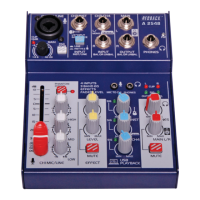

 To Next Page
 General