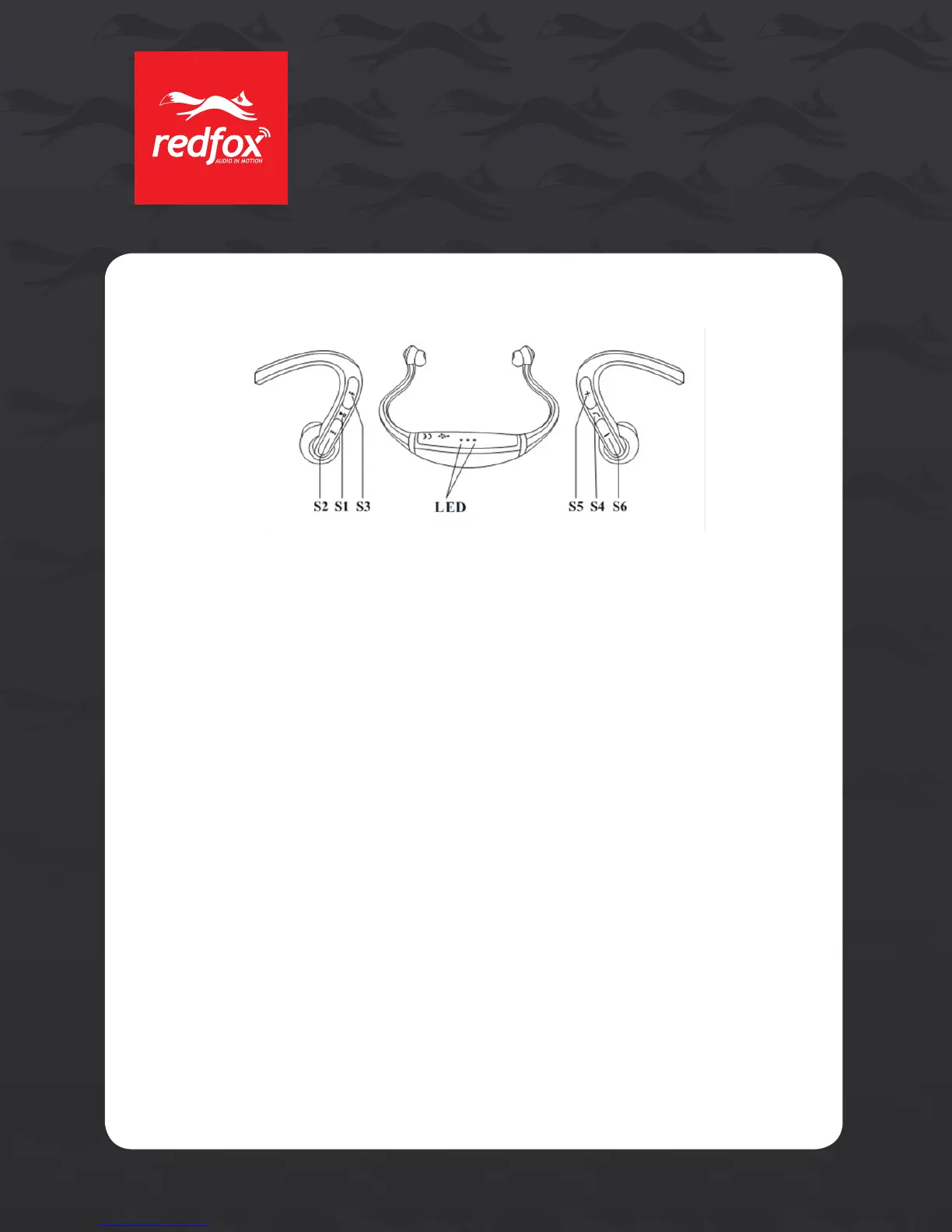
2. Button Denition and Function:
• S1Play/Pause/Refusecall
• S2Trackforward
• S3TrackBack
• S4MultiUseButton–Answercall,On/Off,BluetoothPairingMode
• S5Volumeup“+”
• S6Volumedown“-”
• LEDRed&Blueworklightindicators
3. How to Pair to Bluetooth Devices:
PairingisaprocesstoconnectingBluetoothdevicestoeachothersothatthey
communicate.Itwillcreateapermanentandsafelinkbetweenyourdevicesandprovide
themwithquickBluetoothlinkwithoutusinganypassword.
• Firststep:WithyourEDGEpoweredoff,pressS4buttonandholdforabout8-10
secondsuntilred&blueLEDlightsstartquicklyflashingalternately,whichindicates
you are in pairing mode.
• Secondstep:Whileinparingmode,searchfor“RedFoxEDGE”onyourBluetoothdevice.
• Thirdstep:IfyouareaskedtoenteraPin-Code,use0000.
• Fourthstep:Whenpairingissuccessfulyouwillhear2beepsontheheadsetand
thered&blueLEDlightswillbegintoflashslowly,single&stereoareconnected
successfully.
Note:
If the EDGE cannot nd the pairing device within 3 minutes, it will automatically shutdown.
If you have not put the EDGE in pairing mode, your mobile phone or other Bluetooth device cannot
nd the EDGE, please insure the EDGE is in pairing status and your phone or other Bluetooth
device is in Bluetooth search mode.
4. Start-up and Shutdown:
• ToturnonyourEDGE:WiththeEDGEturnedoff:PressS4keyfor4-6seconds,thered
andbluelightswillcomeonandyouwillhear2beepsontheheadset.ReleasetheS4
key.
2
EDGE
owner’s manual
EDGE
owner’s manual


 To Next Page