Thank you for purchasing the RedFox EDGE Bluetooth sport headset. To get the most
enjoyment from your EDGE and to learn how to properly operate and use this product please
read this manual carefully.
A. IntroductIon:
Wireless Bluetooth Technology:
• TheEDGEisaBluetoothstereoheadsetthatcanbeconnectedwithsmartphones,
iPods,PDA’s,computers,BluetoothTV’s,orotherBluetoothequippeddevices
wirelessly.TheEDGEisequippedwithBluetoothV2.1+EDR.Bluetoothcommunication
rangeisupto10M(CLASSIIstandard).
EDGE Bluetooth Sport Headset Features::
• Oursleekexteriorandportabledesignletsyouenjoystereomusicduringanyactivity.
TheideaforthedesignoftheEDGEcomesfromstudiesinadvancedsomatology.
Gettingridofdisturbing,distracting,tanglingandpotentiallydangerouswiresfreesyou
uptofullyenjoyyouraudioandphonedevices.Uniqueandintelligentfunctionsinsure
youwillnotmissanymobilecallswhileyouenjoyyourmusic.
B. use rAnge:
• PairwithanyBluetoothenabledmobilephonetowirelessenjoymobilephonemusic
andaudiowhilenevermissinganincomingcall.
• PairwithPC(withBluetoothfunctionorconnectwiththeRedFoxSIDEKICK)and
wirelessenjoynetworkmusic,QQ,SKYPE,oranyotheraudioavailable;
• PairwithiPodorMP3player(withBluetoothfunctionorconnectwiththeRedFox
SIDEKICK)andwirelessenjoyyourmusicoraudio.
• PairwithyourTV(withBluetoothfunctionorconnectwiththeRedFoxSIDEKICK)and
wirelessenjoyyourfavoriteshowswithoutdisturbingothers.
c. PAckIng LIst:
• EDGEBluetoothSportHeadset1pc
• USBChargingcable1pc
• QuickStartCard1pc
d. to stArt usIng:
1. Charge your EDGE Bluetooth Sport Headset:
• YourEDGEBluetoothsportheadsethasabuilt-inrechargeablelithiumbattery.Before
yourrstuse,pleasechargeitatleast4hourstofullychargethelithiumbattery.
ConnecttheenclosedUSBcabledirectlytoaUSBwallchargeroryourcomputerto
charge.(Wesuggestthatyounotusethecarchargerfortherstcharge)Afterthis
initialcharge,anormalre-chargeof1-2hoursshouldbeenough.Whenchargingyour
EDGE,thebluelightwillbeon;whenthebatteryisfullthebluelightwillturnoff.Afully
chargedbatterycansupportabout5-7hoursofcontinuousmusicortalk.
1
EDGE
owner’s manual
EDGE
owner’s manual

 Need help?
 General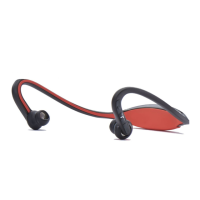

 To Next Page