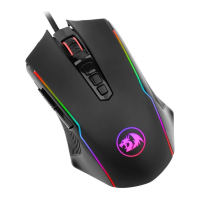
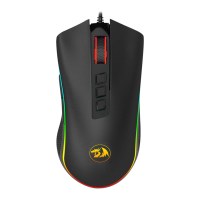
The Redragon Cobra Gaming Mouse is a wired peripheral designed for an enhanced gaming experience, offering a range of customizable features and lighting effects. This manual provides comprehensive instructions for its operation, software configuration, and maintenance, ensuring users can maximize its potential.
Function Description
The Redragon Cobra Gaming Mouse serves as a high-performance input device for computers, primarily aimed at gamers. It features a wired connection, ensuring stable and lag-free performance crucial for competitive gaming. The mouse is equipped with multiple programmable buttons, allowing users to assign specific functions or macros to suit their individual playstyle. Its core function revolves around precise cursor control, adjustable DPI settings, and a variety of lighting modes that enhance the aesthetic appeal of a gaming setup. The device is designed to be compatible with various Windows operating systems, including XP, Vista, Win7, Win8, and Win10, making it accessible to a broad user base.
Usage Features
The Redragon Cobra Gaming Mouse is packed with features designed to optimize user experience and adaptability.
The mouse incorporates eight primary buttons, each with a default function, but many are customizable via software:
- Left Mouse Button (1): Standard primary click function.
- Right Mouse Button (2): Standard secondary click function.
- Scroll Wheel (3): Functions as a scroll mechanism and can be clicked as a middle mouse button.
- Side Key - Forward (4): Defaulted to the "Forward" action, typically used for navigating web pages or file directories.
- Side Key - Backward (5): Defaulted to the "Backward" action, complementing the forward key for navigation.
- DPI+ Button (6): Increases the cursor speed (DPI) in predefined increments.
- DPI- Button (7): Decreases the cursor speed (DPI) in predefined increments.
- Light Mode Toggle Key (8): Cycles through seven different lighting modes with each click, allowing users to customize the mouse's aesthetic.
Bottom Instructions
The underside of the mouse also features important controls:
- User Mode Toggle Key (9): Switches between five different user modes with each click. These modes can be configured via software to store different button assignments and DPI settings, allowing for quick adaptation to various games or applications.
- Teflon Foot Pads (10): Made from large, wear-resistant materials, these pads ensure smooth and effortless movement of the mouse across various surfaces, reducing friction and enhancing precision.
DPI Indicator and Settings
The mouse includes two transparent lines on its sides that serve as DPI indicators. When a DPI button (DPI+ or DPI-) is pressed, these lights flash three times to indicate the current DPI setting. There are five predefined DPI gears:
- Red: Gear 1 (500 DPI)
- Blue: Gear 2 (1000 DPI)
- Green: Gear 3 (2000 DPI)
- Purple: Gear 4 (3000 DPI)
- Yellow: Gear 5 (5000 DPI)
These settings provide a range of sensitivity options, from precise control for sniping to rapid movement for fast-paced action.
Chroma Lighting Effects
The Redragon Cobra Gaming Mouse boasts seven distinct Chroma lighting effects, adding a dynamic visual element to the device:
- Breathing: A pulsating light effect.
- Rainbow: Cycles through a spectrum of colors.
- Full Lighted: All lights are constantly on.
- Wave: A flowing light pattern.
- Go without Trace: A unique effect where lights appear and disappear.
- Reactive: Lights respond to mouse clicks or actions.
- Flash: A rapid blinking effect.
These lighting options can be toggled using the dedicated light mode button or configured through the software.
Software Instructions
For advanced customization, users can download and install the Redragon Cobra software. This software unlocks several powerful features:
- DPI Adjustment: Allows for fine-tuning of the mouse's DPI from a range of 100 to 10000 DPI, offering unparalleled control over cursor speed.
- Macros: Users can record up to 59 actions and assign them to a single button click, streamlining complex in-game commands or repetitive tasks.
- Button Customization: All eight mouse buttons can be customized, allowing users to reassign functions, macros, or multimedia controls to any button.
- User Modes: The software enables the setup of five different user modes, each with its own unique button assignments and DPI settings. These modes can be switched on the fly using the user mode toggle key on the bottom of the mouse.
- Chroma Lighting Options: Provides comprehensive control over the seven lighting effects, allowing users to select their preferred style and potentially adjust colors or patterns.
Maintenance Features
Maintaining the Redragon Cobra Gaming Mouse involves understanding its warranty, troubleshooting common issues, and ensuring proper usage to prolong its lifespan.
Warranty Rules
Redragon offers a robust warranty to protect user rights and ensure customer satisfaction:
- 18-Month Repair Guarantee: Within 18 months of the purchase date, repairs are guaranteed for failures caused by electrical circuit problems.
- Exclusions: The warranty does not cover man-made damages such as disassembly, hard impacts, submersion into water, plugging into improper current or voltage, or damage caused by natural disasters like fire, flood, or earthquakes.
- Consumable Parts: Replacement of consumable parts, such as foot pads, and spare parts is not included in the warranty.
Frequently Asked Questions (FAQ)
The manual addresses common issues users might encounter:
- Mouse Not Responding: If the mouse is unresponsive, users should first check if it is correctly plugged into the computer's USB port. Trying another USB port is also recommended to rule out port-specific issues.
- Slow, Jumping, or Delayed Movement: If the mouse exhibits erratic movement, users should try using it on a different surface. Dark, dirty, un-flat, or overly bright surfaces can negatively impact mouse performance. The use of a mouse pad is strongly recommended to ensure optimal tracking and smooth movement.
Environmental Responsibility
Redragon emphasizes environmental responsibility:
- Non-Toxic Materials: The products are designed to be free from toxic or harmful substances.
- Recyclability: The mouse is environment-friendly and can be recycled, contributing to sustainable practices.
Hazardous Substances Table
The manual includes a table detailing the presence of hazardous substances in different parts of the mouse, adhering to environmental regulations. An "O" indicates that the percentage of the toxic or harmful substance in that part is below the specified threshold. This table covers:
- Piece Parts: Plastic parts, Metal parts, Circuit components, Cable.
- Substances: Pb (Lead), Hg (Mercury), Cd (Cadmium), Cr(VI) (Hexavalent Chromium), PBB (Polybrominated Biphenyls), PBDE (Polybrominated Diphenyl Ethers).
This transparency ensures users are aware of the materials used in the product and Redragon's commitment to minimizing harmful substances.
By following these instructions and guidelines, users can ensure the longevity and optimal performance of their Redragon Cobra Gaming Mouse, making it a reliable tool for both gaming and everyday computing.

 Need help?
 General

 To Next Page