Tip: When an exception occurs during the use of the product that requires your attention, the
screen will display the prompt information and follow the instructions on the screen to
maintain normal performance.
Tip: If there is no operationin more than 30 seconds, it will automatically exit the language
setting interface, and the information displayed on the screen will go out.
Electronic lock: long press for 1.5 second to switch
working mode
Reset Filter element:
.
Super: Red
.
Strong: Blue
.
Power Saving: Green
.
First, press for 3 seconds to enter the Menu, click to select
"Filter Element Reset", press for 3 seconds to enter the
"Filter Element Reset" interface, and then press for 3
seconds to confirm the reset.
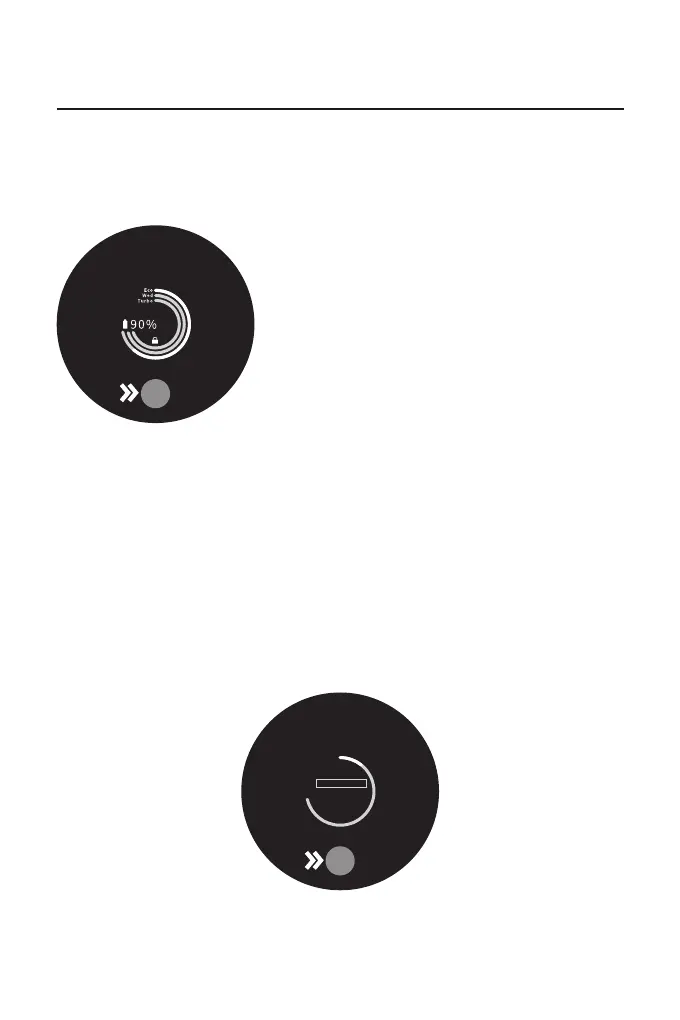
Electric power
monitoring ring:
.
White>20%
.
Red <20%
.
Red flicker<10%
Battery small icon:
.
Click to switch to Power Saving, Strong, or Super mode
Shift gear:
.
Press for 3 seconds to enter the Menu, click to select
"Language Selection", press for 3 seconds to enter the
"Language"interface, click to select your language, and
then press for 3 seconds to complete the set.
Language Settings:
Display Panel Function Introduction
Refer to the following methods to set the display language according to your need.
Press the "○" button for 3 seconds to enter the "Language Selection" interface, click the "○"
button to slide through the language list, select the appropriate language and then press the
"○" button for 3 seconds to save.
Language settings
Product use
Language
English
简体中文
繁体中文
日本语
短按选择 长按确认
1
Eco
8


 To Next Page
 Loading...