EasyManua.ls Logo

Reef Factory Dosing pump - User Manual

Reef Factory Dosing pump
16 pages
Print Icon
To Next Page IconTo Next Page
Loading...
Dosing pump device manual
1/16
Thank you for purchasing our device
Dosing pump
Question and Answer IconNeed help?

Do you have a question about the Reef Factory Dosing pump and is the answer not in the manual?

Summary

Device Setup and Initial Configuration

Package Contents and Peripheral Connection

Lists package contents and guides initial peripheral connections for the dosing pump.

Initial Device Setup Steps

Instructions for initial setup, including hose connections and power setup.

Language Selection

Guide to selecting the preferred language for device operation.

Dose Configuration Settings

How to set liquid amount, number of doses, and start time for dosing.

Wi-Fi Network Connection

Instructions for connecting the device to a home Wi-Fi network.

Smart Reef Account Setup

Process for creating or logging into a Smart Reef account for remote management.

Setup Completion

Confirmation screen upon successful device setup.

Device Operation and Calibration

Status Display and Navigation Icons

Understanding the device status screen and navigation icons.

Device Calibration Procedure

Step-by-step guide for calibrating the dosing pump for accuracy.

Manual Refill Functionality

How to manually add liquid doses and set refill parameters.

Liquid Level Monitoring and Management

Monitoring and managing the liquid level in the reservoir.

Advanced Dosing Options

Configuring detailed daily doses, amounts, and timing.

Maintenance and Support

Device Reset Procedure

Procedures for restoring the device to factory default settings.

Online Account and Firmware Updates

Managing the device via the online account and checking for firmware updates.

Additional Information and Resources

Where to find further details, product information, and support.

Overview

The Dosing pump is a device designed for precise and automated dosing of liquids in aquariums, particularly for reef systems. It integrates with the Smart Reef system, allowing for remote operation, water purity control, and access to additional functionalities and device updates.

Function Description

The primary function of the Dosing pump is to accurately dispense specified amounts of liquid into an aquarium over a set period. Users can define the daily liquid amount, the number of dosing cycles, and the start time for the first dose. The pump automatically calculates the size and frequency of individual doses based on this input.

The device also includes a "Manual refill" function, which allows for temporary adjustments to the dosing schedule. Users can increase or decrease the liquid dose once or cyclically for a specified number of days. For example, if the daily dose is 6 ml in 6 cycles (1 ml each), increasing the daily dose by 3 ml will result in 9 ml per day in 6 cycles (1.5 ml each), while decreasing it by 3 ml will result in 3 ml per day in 6 cycles (0.5 ml each). After the manual refill period, the pump reverts to its previously configured cycles.

The Dosing pump monitors the liquid level in its container and displays this information to the user, helping to track consumption and facilitate timely reordering of liquids. It provides a notification when the liquid level drops to 10% of the container's capacity.

Advanced dosing functions, accessible via the "Dosing" button, allow users to specify the number of daily doses and the amount of liquid for each. The pump then calculates and sets the dosing hours and indicates the percentage share of each dose relative to the total daily dose. Up to 24 daily doses can be scheduled for large tanks, though for standard tanks (up to 300 liters), 10 doses per day are recommended. The "Adjust" function allows for increasing the volume or percentage share of a daily dose.

Important Technical Specifications

  • Power Supply: The device operates with a dedicated 12 V power supply unit. It is crucial to use only the provided power supply unit, as using one from other devices with different supply voltages may lead to incorrect operation or permanent damage.
  • Connectivity: The Dosing pump is compatible with 2.4 GHz Wi-Fi networks. It connects to the user's home Wi-Fi network for remote management and integration with the Smart Reef system.
  • Identification: Each device has a unique serial number, which is used for Wi-Fi network identification (e.g., RFDPXXXXXXXXXXXX).
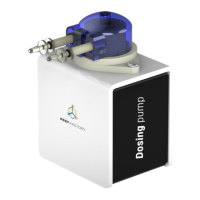
  • Physical Components: The package includes the Dosing pump device, a pump cylinder head, a 12 V power supply unit, a magnet for resetting the device, an abbreviated manual, and silicone hoses for liquid dosing.

Usage Features

  • Setup Process: The device setup is performed via a web browser on a computer, laptop, tablet, or smartphone.
    1. Language Selection: Users first choose their preferred language.
    2. Dose Configuration: Users set the daily liquid amount, number of doses, and start time.
    3. Wi-Fi Connection: The device connects to the home Wi-Fi network. The Wi-Fi network name corresponds to the device's serial number (e.g., RFDPXXXXXXXXXXXX), and the default password is "reeffactory". A strong Wi-Fi signal is recommended for optimal connection.
    4. Smart Reef Account Integration: Users can create a free Smart Reef account or log in to an existing one to manage the device remotely, control water purity, and access additional features and updates. This step can be skipped if remote management is not desired, but it will limit access to certain functionalities.
  • Remote Operation: Once connected to the Smart Reef system, the device can be operated remotely.
  • User Interface: The device's status and settings are displayed on a screen. The upper right corner features a drop-down menu for device setup, Wi-Fi network management, device network password, Smart Reef account management, time and date settings, language selection, and restoring default settings. Icons indicate the status of connections to the wireless network and the Smart Reef system.
  • Dosing History: Users can view the dosing history by clicking the "Show more..." text on the screen.
  • Container Management: The middle part of the screen displays the liquid level in the container. Users can manually set the container size and the current liquid amount.

Maintenance Features

  • Calibration: The device features a calibration function to ensure dosing precision. Calibration involves filling the hoses with liquid ("FILL THE CIRCUIT" button) and setting the amount of liquid dosed into a container over a specified time ("BEGIN CALIBRATION" button). During calibration, the pump runs for 30 seconds. Users then measure the dispensed liquid in milliliters and input the value.
  • Recalibration Reminders: After calibration, users can set a reminder for future recalibrations (e.g., 1 week, 2 weeks, 1 month, 3 months). These reminders are delivered as Smart Reef system notifications.
  • Device Reset: If the device malfunctions, fails to connect, or if the user wishes to repeat the setup procedure, it can be restored to default settings. This is done by placing a magnet (included in the package) on the top part of the device's housing, near the light bar. The magnet should be moved along the side of the device to ensure detection.
  • Firmware Updates: The device is designed to be "SMART" and receives continuous improvements. Users will receive notifications about firmware updates that enhance device performance.
  • Online Resources: Additional and up-to-date information about the device, its operation, and setup can be found on the manufacturer's website, www.reeffactory.com, in the relevant product tab.
  • Contact and Notifications: Icons on the screen allow users to contact support and view a history of notifications registered by the device.

Reef Factory Dosing pump Specifications

General IconGeneral
BrandReef Factory
ModelDosing pump
CategoryWater Pump
LanguageEnglish