Reencle MANUAL 9
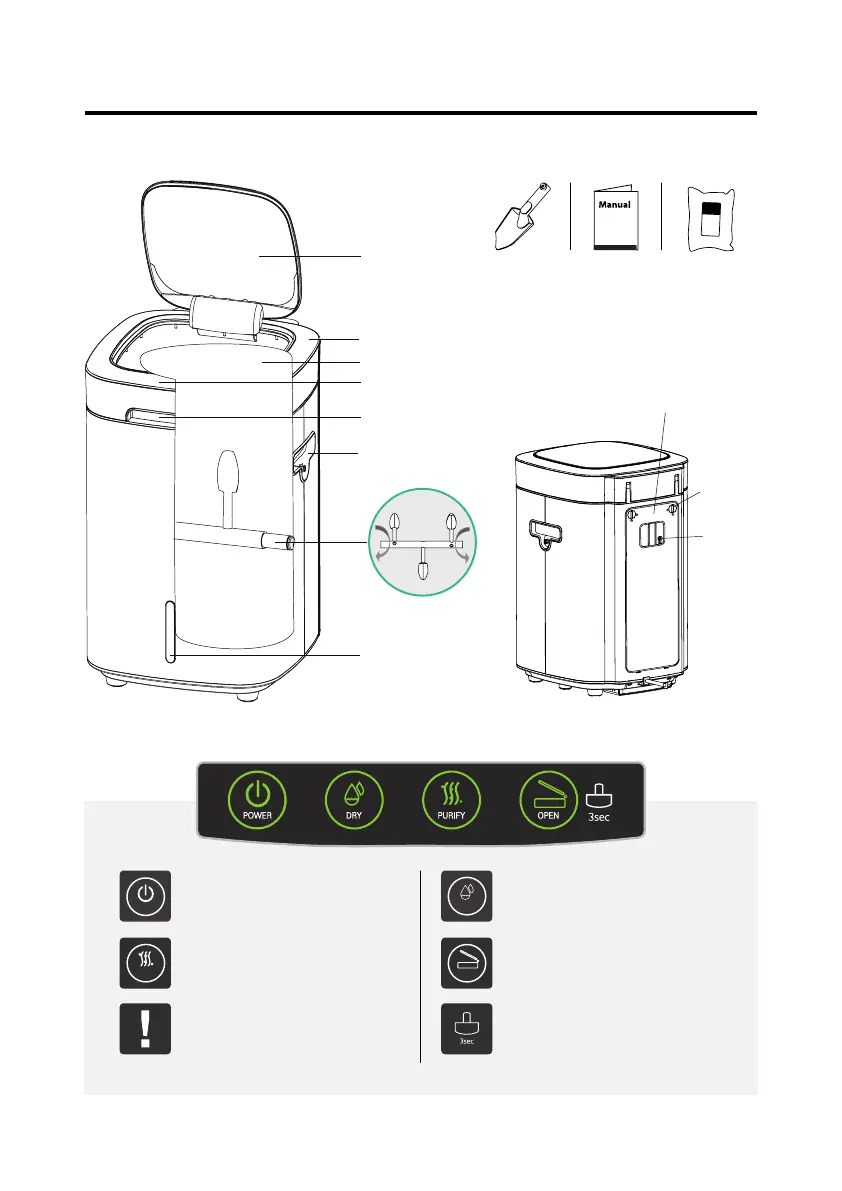
III. Parts and buttons
Control Buttons
* Accessories are placed inside of the appliance.
Small lid
Shovel Manual Microorganism
(Food Cleaner)
Stirring tank
Purier lter
Filter
lock lever
Rear shovel
hanger
Handle of big cover
Big lid
Touch controls
Knob and shovel hanger
Stirring rod and blades
Motion sensor
POWER
PURIFY
DRY
OPEN
Power
Always keep the power on. In case of service
or repair, power o and unplug the device.
Dry
Press this button when the stu in the stirring
tank becomes boggy with too much water
Purify
When the odor is oensive, press the button
to reduce the odor.
Open
Opens the small cover for food waste.
Check
Indicates product errors in the product or
buttons through ickering LED with alarm
sounds.
Lock
Please refer page 11
Food
Cleaner


 To Next Page