CHANNEL MENU (DVB-C / T / T2HD)
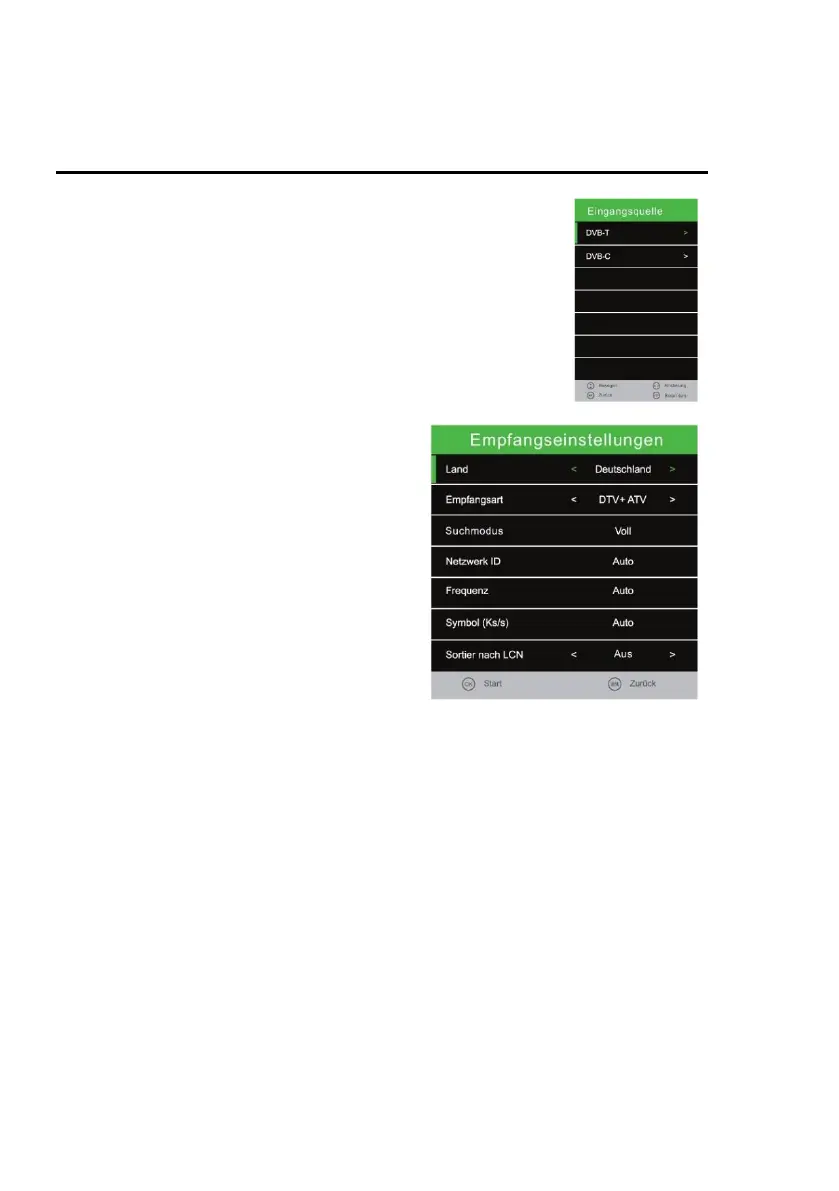
Input Source
1. Select the menu item "Receive Source" and press the [OK] key.
2. Use the [▲ / ▼] buttons to choose between "DVB-T" (aerial)
and "DVB-C" (cable).
3. Confirm with the [OK] key to select the respective "Reception
source".
4. You will now return to the station menu.
DVB-T: Select DVB-T to enter the Antenna Settings menu.
DVB-C: Select DVB-C to enter the cable setup menu.
Auto Tuning
1. Select the menu item "Automatic station
search" and press the [OK] key.
2. Use the [▲ ▼ ◄►] buttons to select the
various setting options.
3. Confirm the entry with the [OK] key.
4. The search starts.
5. To pause the station search, press the
[EXIT] key.
The following setting options and menu items
are available:
DVB-C Auto Tuning
Tune Type: DTV / ATV
Scan Type: Full / Network
Scan
Netzwork ID: The menu item is only active if network search is selected.
Frequency: The menu item is only active if network search is selected.
Symbol (ks/s): The menu item is only active if network search is selected.
Sorting by LCN: On / Off (Turn the option off because otherwise the station
sorting will not work).
DVB-T Auto Tuning
Tune Type: DTV / ATV
Scan Type: The menu item is fixed and can not be edited.
Netzwork ID: The menu item is fixed and can not be edited.
Frequency: The menu item is fixed and can not be edited.
Symbol (ks/s): The menu item is fixed and can not be edited.
Sorting by LCN: On / Off (Turn the option off because otherwise the station
sorting will not work).
Note:
The Network ID / Frequency / Icon (ks / s) settings are only available for DVB-C.
Manual entry will only be experienced by users.



 To Next Page