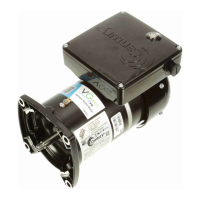
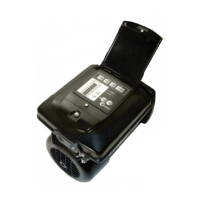
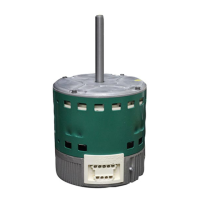
The VGreen Evo™ Variable Speed Motor is a cost-effective replacement pool pump motor designed to provide pool owners with maximum energy savings compared to traditional single-speed motors. Its variable speed design allows for programming at optimal settings for the pool, ensuring energy efficiency. The motor is engineered for ease of installation, offering a direct drop-in replacement for various applications, and features a simplified user interface for easy programming.
Function Description:
The VGreen Evo™ motor operates as a variable speed pool pump motor, allowing users to adjust the motor's RPM (revolutions per minute) to suit specific pool needs, such as filtration, cleaning, or water features. This capability to vary speed significantly reduces energy consumption. The motor comes with pre-programmed operating schedules, including both general energy-efficient options (Schedule Set A) and California Energy Commission 2021 Compliant schedules (Schedule Set B). It also includes several operational modes: Operating Mode, Override Mode, Pause Mode, Schedule Check Mode, and Schedule Set Mode, all accessible via a single button on the user interface.
Important Technical Specifications:
- Speed Operation: Variable Speed Operation (600-3450 RPM).
- Voltage: Dual Voltage 230/115 VAC, with Auto-Voltage Detect Enabled Device.
- Phase: Single Phase.
- Frequency: 50/60 Hz.
- Shaft Material: 303 Stainless Steel Shaft.
- Insulation Class: Class F Insulation.
- Ambient Temperature: 50°C Ambient.
- Bearings: Sealed Ball Bearings.
- Design: TEFC (Totally Enclosed Fan Cooled) Design.
- Rotation: CCWPE (Counter-Clockwise Pump End).
- Moisture Intrusion Rating: IPX5, providing enhanced protection against moisture.
- Mounting Configurations: Available in both square flange and C-Face mounting configurations for replacement versatility.
- Enclosure: UV and rainproof enclosure for protection against harsh weather conditions.
- Wiring: Designed for direct wire connection. Terminal block handles solid or stranded wire up to 12 AWG. Screw for mains connections requires a torque value of 10 in-lb.
Usage Features:
- Simplified User Interface: A new, simplified user interface allows for easier programming and motor setup with the push of one button.
- Automatic Default Schedule: When power is first applied, the motor automatically runs a programmed default schedule, ensuring operation even after a power outage.
- Operating Modes:
- Operating Mode: The default mode where the motor runs according to the preset or user-defined schedule.
- Override Mode: Temporarily runs the motor at 3450 RPM (or high speed if currently below 3450 RPM) for a duration of 24 hours. Activated by a single button press.
- Pause Mode: Temporarily stops the motor for maintenance work (e.g., backwashing) without disrupting the 24-hour schedule. Activated by two button presses. This mode has no automatic timeout.
- Schedule Check Mode: Allows the user to check which of the 8 available schedules the motor is currently operating. Activated by three button presses. The motor indicates the schedule number by blinking 1-8 times.
- Schedule Set Mode: Enables the user to select one of the 8 pre-programmed operating schedules. Accessed by pressing and holding the button for 3 seconds. The desired schedule is set by pressing the button a number of times corresponding to the schedule number, followed by a 3-second press and hold. This mode automatically exits after 45 seconds.
- Pre-programmed Schedules: Two sets of energy-efficient schedules (Set A and Set B) are available, with Set B being California Energy Commission 2021 Compliant. These schedules define RPMs for different time blocks (e.g., 0-2 hours, 2-4 hours, etc.) and include a priming sequence for most schedules.
- Freeze Protection: Automatically turns on the motor and circulates pool water if the outside air temperature drops below 39°F. The default settings are a 1-hour duration at 1725 RPM. The motor re-checks the ambient temperature after this period and continues running for additional 1-hour intervals if the temperature remains below the threshold.
- Auto-Voltage Detection: The motor automatically detects and adapts to either 230V or 115V AC power.
- Power Outage Restart: In the event of a power outage or if power is cycled, the motor will restart operating at hour one of the previously set schedule.
Maintenance Features:
- Reliable and Robust Design: Built to withstand harsh environments.
- Installation of New Shaft Seal: It is recommended to install a new mechanical shaft seal when installing a new replacement motor.
- Regular Checks for Leaks and Low Water Levels: Inspect equipment and plumbing for leaks, moisture, or air bubbles in the pump basket or pool returns. Promptly address any leaks to prevent water damage and bearing failure.
- Clear Debris and Ensure Proper Ventilation: Regularly clean the fan inlet on the back of the motor and keep the surrounding area free of obstructions like leaves, branches, mulch, plastic bags, and chemical storage to ensure proper airflow and prevent overheating.
- Clear Pump Basket and Impeller: Regularly clear the pump basket and impeller to ensure the proper operation of the pump filtration system.
- Clean/Backwash Filter: Regularly clean or backwash the filter to maintain the efficiency of the pump and filtration system.
- Troubleshooting Guide: The manual provides a comprehensive troubleshooting guide for common issues such as the motor failing to start, running then stopping, or being noisy. It also lists fault statuses indicated by LED flashes and their corresponding reset conditions. For example, 1 flash indicates input voltage too high or low, 2 flashes indicate motor current too high, 3 flashes indicate internal temperature too high, 4 flashes indicate motor stalled, 5 flashes indicate internal motor failure, and 6 flashes indicate communication lost.



 To Next Page
 General