2015-03-05 28 1511647
New Rider Profile
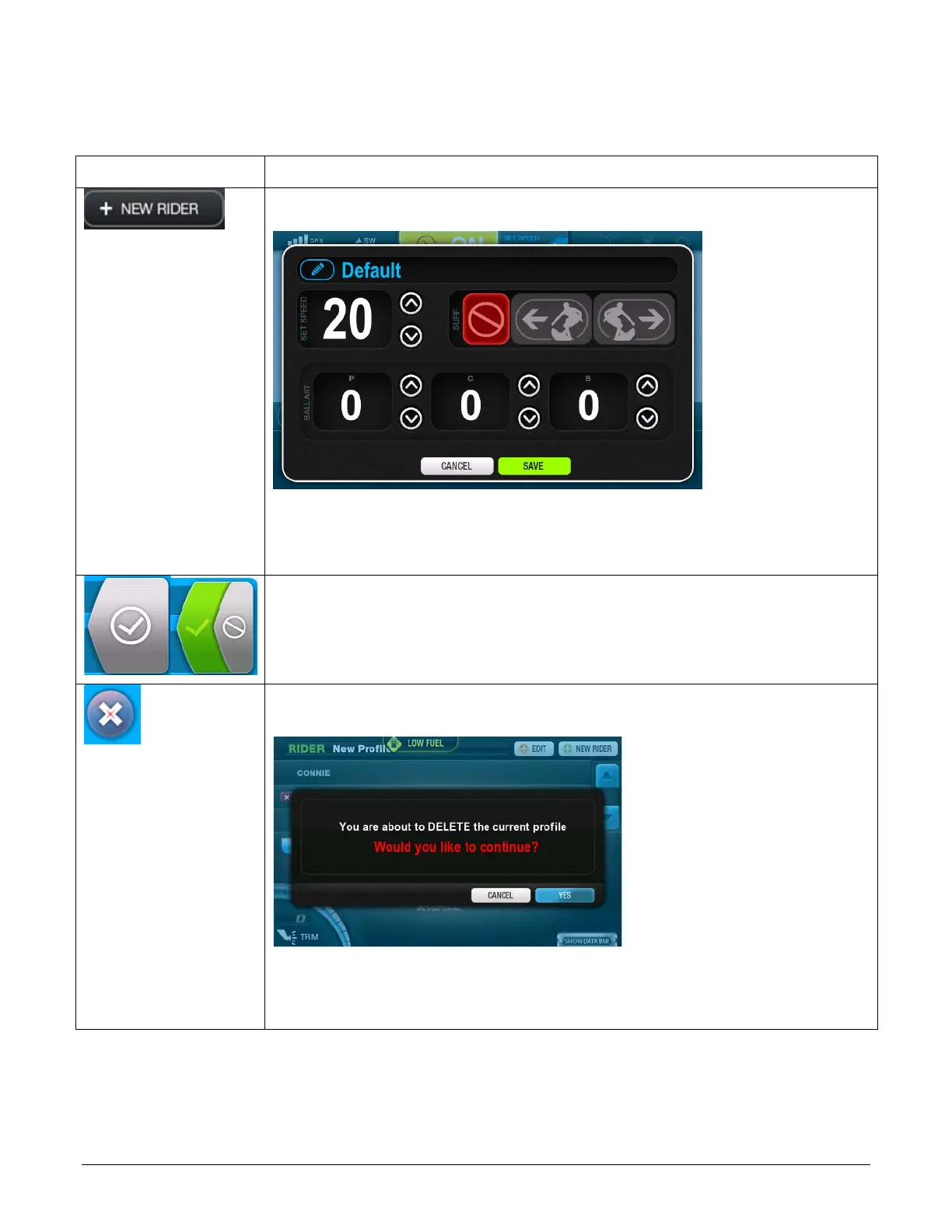
To create a new profile touch [+ NEW RIDER]. The following screen
will be displayed:
Touch the pencil icon in the upper left and type a name for the new
rider. Utilize the up and down arrows to set the Speed and Port, Center
and Starboard ballasts. Touch the appropriate Surf icon (No Surf, Surf
Left or Surf Right). Touch SAVE when complete.
ACTIVATE/DEACTIVATE RIDER– Touch the gray checkmark to make
the selected rider Active. Touch the green checkmark to Deactivate the
selected rider.
DELETE RIDER PROFILE – Touch this to delete the selected rider
profile. The following screen will display:
Touch [YES] to continue the deletion process. The profile is removed
from the selection list. Touch [CANCEL] to return to the selection
screen without deleting the profile.


 To Next Page