IB-HT391-WM-E-073003
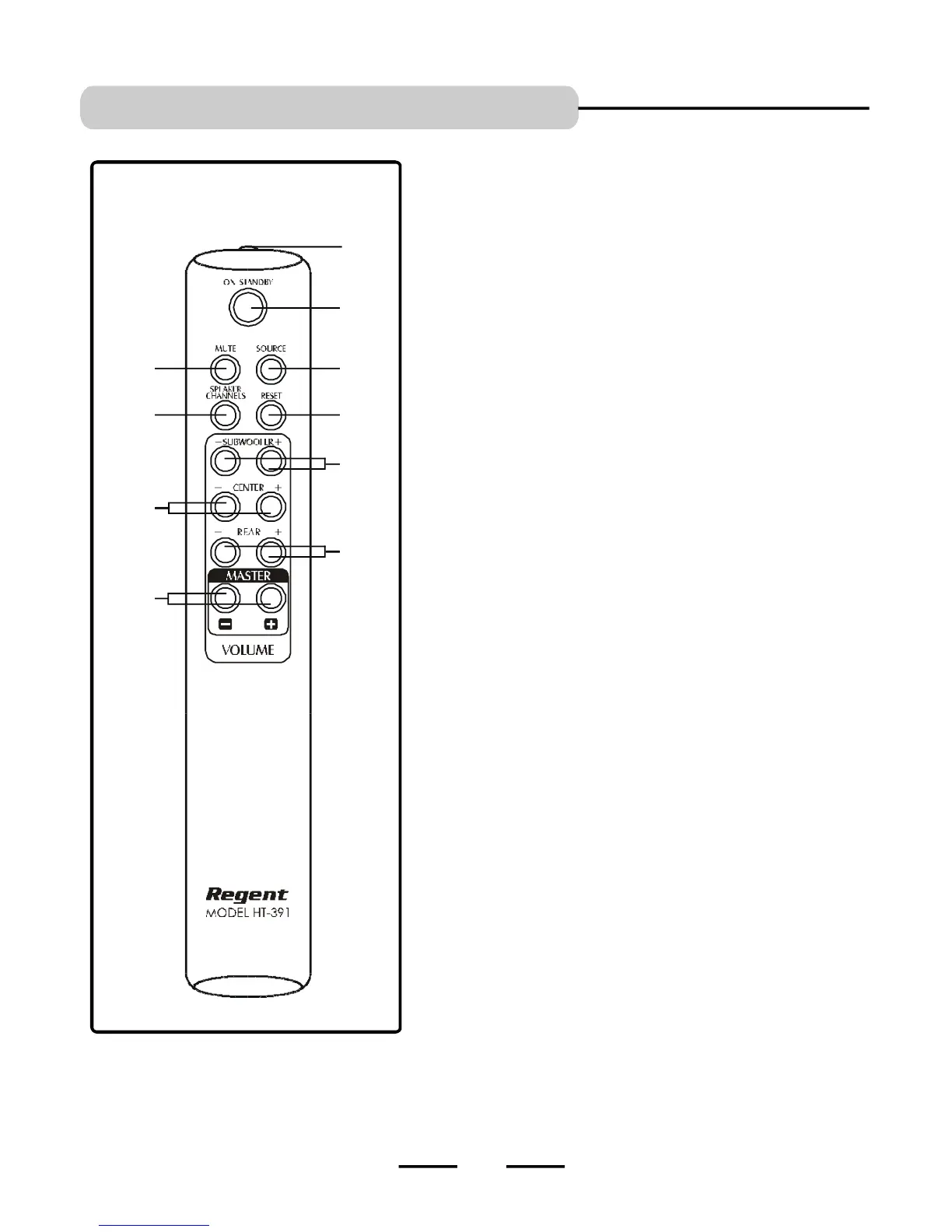
REMOTE CONTROL
1
2
3
46
5
7
8
9
10
1.IR DIODE - Sends the signal to the set. Do not block or cover this.
2.ON/STANDBY button - Switches the player from STANDBY to ON
or ON to STANDBY (if the main POWER of the set is ON).
3.SOURCE button - Press to select the sound input source you want:
DVD, AUX or GAME.
4.RESET button - Press to adjust all speakers’ output to the factory’s
default settings.
5.MUTE button - Instantly turns off the sound. Press again to restore the
sound.
6.SPEAKER CHANNELS button - Press to select 2 channel or 5.1
channel listening mode.
7.SUBWOOFER UP & DOWN VOLUME button - Press to adjust the
individual SUBWOOFER’s sound level.
8.CENTER UP & DOWN VOLUME button - Press to adjust the
individual CENTER speaker’s sound level.
9.REAR button - Press to adjust the REAR LEFT/RIGHT speakers’ sound
level.
10. MASTER VOLUME UP & DOWN button - Press to adjust the sound
level of all speakers.
LOCATION OF CONTROLS
5
SEE NEXT PAGE FOR REMOTE CONTROL BATTERY INSTALLATION.


 To Next Page