IB-HT500-WM-E-080202
SPEAKER SYSTEM CONNECTIONS
To avoid short-circuiting the speakers
Make sure the stripped end of each speaker wire does not
touch another speaker terminal or the stripped end of
another speaker wire.
NOTE:
Be sure to match the speaker wire to the appropriate terminal on
the components: (+) to (+) (color), and (-) to (-) (black). If the wires
are reversed, the sound will be distorted and will lack some tones.
Follow the color codes of each speaker.
• Stripped wires are touching each other due to excessive
removal of insulation. Do not allow the above to happen on
your set or speakers.
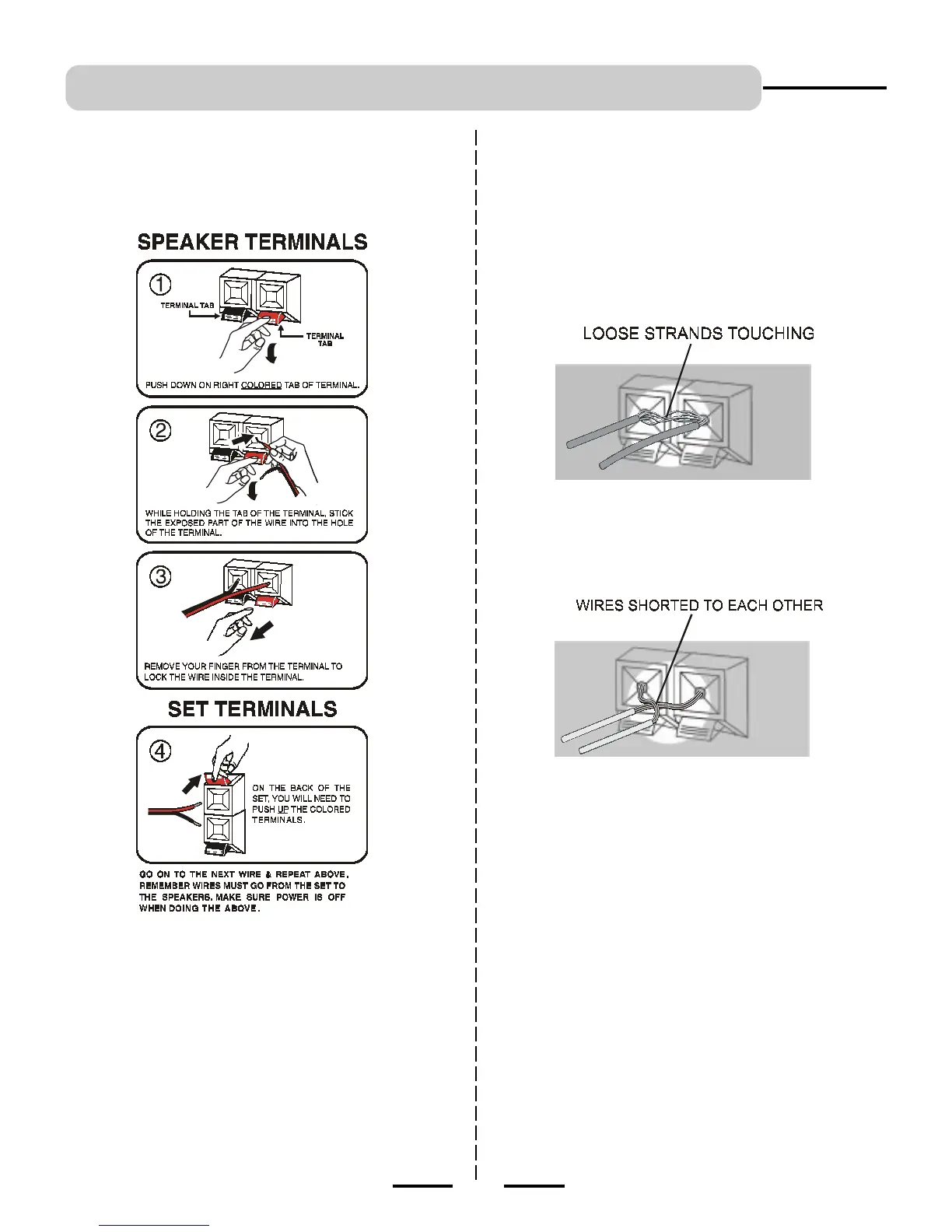
Tips for connecting the speaker wires
Push and hold the Speaker terminal tab down to insert each wire.
Release the tab to lock the wire into the terminal. Make sure the
wire is fully inserted, but the insulation is not covering the inserted
part of the speaker wires.
6
Stripped speaker wire is touching another speaker terminal.
Make sure not even 1 strand of wire touches the other
wire!
Examples of poor connection of the
speaker wires



 To Next Page