Need help?
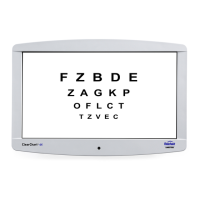
Do you have a question about the Reichert ClearChart 4 and is the answer not in the manual?
Provides detailed instructions for securely mounting the ClearChart 4 unit to a wall.
Describes the articulating wall mount system and its installation requirements.
Explains how to connect and apply power to the ClearChart instrument.
Describes the available communication ports on the ClearChart 4 for connectivity.
Details the layout and functions of the remote control buttons.
Guides the user through the initial setup and configuration of the ClearChart 4 system.
Explains the functions of various buttons on the remote control for operating the ClearChart 4.
 General
| Manufacturer | Reichert |
|---|---|
| Model | ClearChart 4 |
| Type | Digital Acuity System |
| Display Type | LCD |
| Resolution | 1920 x 1080 pixels |
| Light Source | LED |
| Masking | Yes |
| Power Supply | 100-240V AC, 50/60Hz |
| Contrast Ratio | 1000:1 |
| Brightness | 250 cd/m² |
| Response Time | 5 ms |
| Display Size | 24-inch |
| Connectivity | USB |

 To Next Page