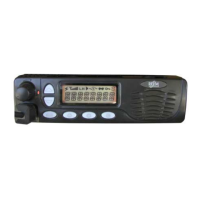
The RELM RM Series mobile radios, including models RMV25, RMV50, RMU25, and RMU45, are full-featured FM transceivers designed for flexible mobile and base station business communications in the VHF or UHF Land mobile frequency bands. These radios are programmable with 128 channels and feature a 16-segment, 8-character alphanumeric display for channel display. The channel frequency data is stored in an EEPROM and flash memory, allowing for easy programming by dealers using personal computers with the PC editing software.
Function Description
The primary function of the RELM RM Series mobile radios is to facilitate two-way radio communication. They are designed for both receiving and transmitting radio signals within their specified frequency bands. The radios offer a range of programmable functions to enhance communication efficiency and safety.
Controls and Indicators
The front panel of the radio features several controls and indicators for operation:
- VOL/PWR Knob (1): This knob controls the radio's power and volume. Turning it clockwise switches the radio "on" and increases the volume, while turning it counterclockwise until a click is heard switches the radio "off."
- BUSY/TX Indicator (2): This indicator shows the transceiver's status. It glows steady red when transmitting and steady green when receiving (RX/Busy Channel).
- UP/DOWN Buttons (3): These buttons change the current channel (and displayed name) by pressing them.
- LCD (4): The 8-character alphanumeric display shows channel names, status, and identity information, as well as error messages.
- Microphone Jack (5): This jack connects the microphone plug to the radio.
- [A]-[D] Buttons (6) (Programmable Function Buttons): These buttons can be programmed by your dealer for special applications, such as selecting High/Low power, Monitor, Talk-Around, and other system requirements.
The LCD Icons and Indicators provide visual feedback on the radio's status:
- Monitor in progress: Indicates that the monitor function is active.
- Transmission power level: Shows the current power output level.
- Indicate strength of radio wave: Displays the signal strength.
- Transmission in progress (follows red BUSY/TX Indicator): Confirms active transmission.
- Scan Enabled: Indicates that the scanning function is active.
- Talk-Around Enabled: Shows that the Talk-Around feature is engaged.
- Key-Lock Enabled: Signifies that the keypad is locked.
- 8-Character Alpha-Numeric Display: The main display area for channel names and other information.
Rear Panel Connections
The rear panel provides connections for external accessories:
- Antenna Socket (1): A 50-ohm coaxial feed line to the antenna must be connected here, using a Type-M (PL-259) connector.
- 13.8V DC Input Connector (2): The supplied DC power cable must be connected to this connector. Use only the supplied fused cable.
- External Speaker Jack (3): An external loudspeaker may be connected to this 3.5mm audio jack. Caution: Do not connect either wire of this line to ground, and be certain that the speaker is capable of handling the audio output (4W) from the radio.
- D-Sub 15-Pin Accessory Port Connector (4): External TX audio line input, PTT (Push To Talk), and external RX audio Line output signals may be obtained from this connector for use with accessories such as data transmission.
Basic Operation
- Switching Power ON: Turn the VOL/PWR knob clockwise. The radio will beep, and become illuminated. Press the UP/DOWN button to choose the desired operating channel. A channel name will appear on the display.
- Setting the Volume: Turn the VOL/PWR knob clockwise to increase the volume, and counterclockwise to decrease it.
- Selecting a Channel: Press the assigned PF (Programmable Function) button to increment or decrement the channel. The display can show channel numbers or channel labels, which the dealer can program.
- Transmitting: Before transmitting, ensure there is no channel activity. Channel activity can be monitored by pressing the preprogrammed monitor button. When receiving a call, transmit only after the incoming call ends. The radio cannot receive a call and transmit simultaneously.
- Press the microphone PTT switch: If the channel is clear, the BUSY/TX indicator will be red. The radio is now transmitting. While holding in the PTT switch, speak across the face of the microphone in a clear and normal voice. For best transmission, hold the microphone about 1-1/2 to 2 inches away from your mouth. Release the PTT switch to receive.
- Busy Channel Lockout: If the Busy Channel Lockout feature is programmed on a channel, the radio will not transmit when a carrier is present. Instead, the radio will generate a continuous low-pitched tone while the PTT switch is pressed. Release the PTT switch and wait for the channel to be clear of activity.
- CTCSS (Continuous Tone Code Squelch System) or DCS (Digital Code Squelch): If CTCSS or DCS lockout has been programmed on a channel, the radio can transmit only when there is no carrier being received or when the carrier being received includes the correct CTCSS tone or DCS code.
- Time-Out Timer: If the selected channel has been programmed for Time-Out Timer, you must limit the length of each transmission. While transmitting, a beep will sound 10 seconds before TX time-out. Another beep will sound just before the TX time out. The TX indicator will disappear and the transmission will cease at the TX time out. To resume transmitting, you must release the PTT switch and wait for the "penalty timer" to expire. If you press the PTT switch before this timer expires, the timer restarts and you will have to wait another "penalty" period.
Advanced Operation
The RM Series mobile radio includes eight Programmable Function (PF) Buttons (long press and short press). The PF button functions can be customized via programming by your dealer to meet your communication requirements. Some features may require the purchase and installation of optional internal accessories. The possible PF button programming features are illustrated below, and these functions are explained on pages to follow. For future options and accessories, contact your dealer. For future reference, check the box next to the function that has been assigned to each PF button on your particular radio, and keep it handy.
- MONITOR: Press the assigned PF button to un-squelch the audio. The BUSY/TX indicator will be green.
- SCAN 1-4: The Scanning feature is used to monitor multiple channels programmed into the transceiver. While scanning, the transceiver will check each channel for the presence of a signal and stop on a channel if a signal is present. Press the assigned PF button to active scanning. Press the assigned PF button again to disable scanning. Operation will revert to the channel before scan was activated. Note: Your dealer can program your radio to revert on one of following channels if you press the PTT switch during scanning pause:
- Scan List Top channel
- Priority channel 1
- Priority channel 2
- SCAN Skip: Press the assigned PF button to delete the current paused channel while scanning.
- POWER: Press the assigned PF button to set the radio's transmitter to the "Low Power" mode. Press this button again to return to "High Power" operation.
- Talk Around: The Talk Around feature allows you to bypass the repeater station and talk directly to a station that is nearby. When TA is on, the radio transmits on the receive frequency of the selected channel or receive on the transmit frequency of the selected channel. Press the assigned PF button to activate the Talk Around feature when you are operating on a duplex channel system (separate receive and transmit frequencies that utilizes a "repeater" station).
- CALL 1-4: Press the assigned PF button to send your radio's identification code (ANI) to the dispatcher (requires the Optional DTMF pager UNIT).
- EMERGENCY: The RM Series mobile radios includes an "Emergency" feature, which allows you to transmit an alert tone and unit ID to notify a dispatcher or compatible monitoring station that could assist in a time of need. Press the assigned PF button to initiate an emergency call. For future details, contact your dealer.
- Display Invert: This feature allows you to mount the transceiver from the top side or bottom side and still have the display correctly oriented. Press the assigned PF button to invert the LCD display to backward-facing readout. Press the assigned PF button again to return the LCD display to frontward-facing readout.
- Display Change: Press the assigned PF button to change the display information to channel aliases (Alphabet 16 character number), TX and RX frequency, and channel number.
- SQL: Press the assigned PF button to squelch adjust mode. The current squelch level is displayed on the LCD. The Squelch level is changed by pressing the UP/DOWN button. Return to channel by pressing the same button again.
- Public Address: Press the assigned PF button to toggle the Public Address system "on" or "off". When PA is on, pressing the microphone PTT switch causes the TX audio to be routed to the audio amplifier without enabling the transmitter.
- Key Lock: Press the assigned PF button to lock the front panel button. When locked, the front panel buttons are inactive to prevent accidental activation.
- MEMO CH1, 2: Press the assigned PF button to call the directory channel mode. When MEMO 1 is ON, pressing the [A]-[D] key will revert to the respective preprogrammed channel.
- DTMF system: (Requires the optional DTMF Unit) This system allows selective calling, using DTMF tone sequences. When your radio is paged by a station generating the same DTMF tone sequence as the radio's decoder, the radio's squelch will open and the alert tone will sound.
Important Technical Specifications
- Frequency Bands: VHF or UHF Land mobile frequency bands.
- Channels: 128 programmable channels.
- Display: 16-segment, 8-character alphanumeric display.
- Memory: EEPROM and flash memory for channel data.
- Antenna Impedance: 50 ohms.
- Power Input: 13.8V DC.
- External Speaker Output: 4W.
- FCC Requirements: This transmitter must not exceed an antenna gain of 3dBi. The radio must be used in vehicle-mount configurations with a maximum operating duty factor not exceeding 50%, in typical push-to-talk configurations. This radio is NOT approved for use by the general population in an uncontrolled environment. This radio is restricted occupational use, work related operations only where radio operator must have the knowledge to control the exposure conditions of its passengers and bystanders by maintaining the minimum separation distance of 2 feet (0.7meters) between any persons and the antenna. Failure to observe these restrictions will result exceeding FCC RF exposure limits. Do not operate the radio without a proper antenna attached. As this may damage the radio and may also cause to exceed FCC RF exposure limits.
Usage Features
- Programmable Function Buttons: The [A]-[D] buttons on the front panel can be customized by a dealer to suit specific operational needs, such as power level selection, monitoring, or Talk-Around.
- Channel Management: Users can easily switch between channels using the UP/DOWN buttons, and the display shows channel names for easy identification.
- Scanning: The scan feature allows monitoring of multiple programmed channels, stopping on any active signal.
- Emergency Call: A dedicated emergency feature allows users to transmit an alert tone and unit ID to a dispatcher or monitoring station in times of need.
- Display Invert: For flexible mounting options, the display can be inverted to ensure correct readability regardless of the radio's orientation.
- Public Address System: The radio can function as a public address system, routing microphone audio through the external speaker without transmitting.
- Key Lock: The key lock feature prevents accidental changes to settings during operation.
- DTMF System (Optional): With an optional DTMF unit, the radio supports selective calling, allowing it to respond only to specific tone sequences.
Maintenance Features
- Dealer Programming: The radio's channels and programmable functions are configured by a dealer using PC editing software, ensuring optimal setup for specific communication environments.
- Repair and Service: Only qualified technicians are allowed to repair this product. Typical electronic systems that may malfunction due to the lack of protection from radio frequency energy when transmitting. If the vehicle contains such equipment, consult the dealer.
- Installation: Installation information is typically found in the Service Manual.
- Contact for Service: For service needs, contact your RELM dealer or any other RELM dealer equipped to service your radio. If you can't find a local service provider, contact RELM WIRELESS directly.
- Hazardous Materials: Just as it is dangerous to fuel a vehicle with motor running, similar hazard exist when operation a mobile radio. Be sure to turn the radio off while fueling a vehicle.
- Dynamite Blasting Caps: Dynamite blasting caps may be caused to explode by operating a radio within 500 feet of the blasting caps. Always obey the "Turn Off Two-Way radios" signs posted where dynamite is being used.
- LP Gas Containers: Do not install the radio in the closed compartment that contains an LP gas container or its fitting.
- Modifications: No changes or adjustments shall be made to the equipment except by an authorized dealer or certified electronic technician.
- Personal Messages: Using your radio to send personal messages is a violation of FCC rules.
Always use authorized accessories.

 Need help?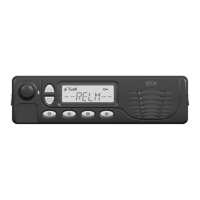

 To Next Page
 General