5
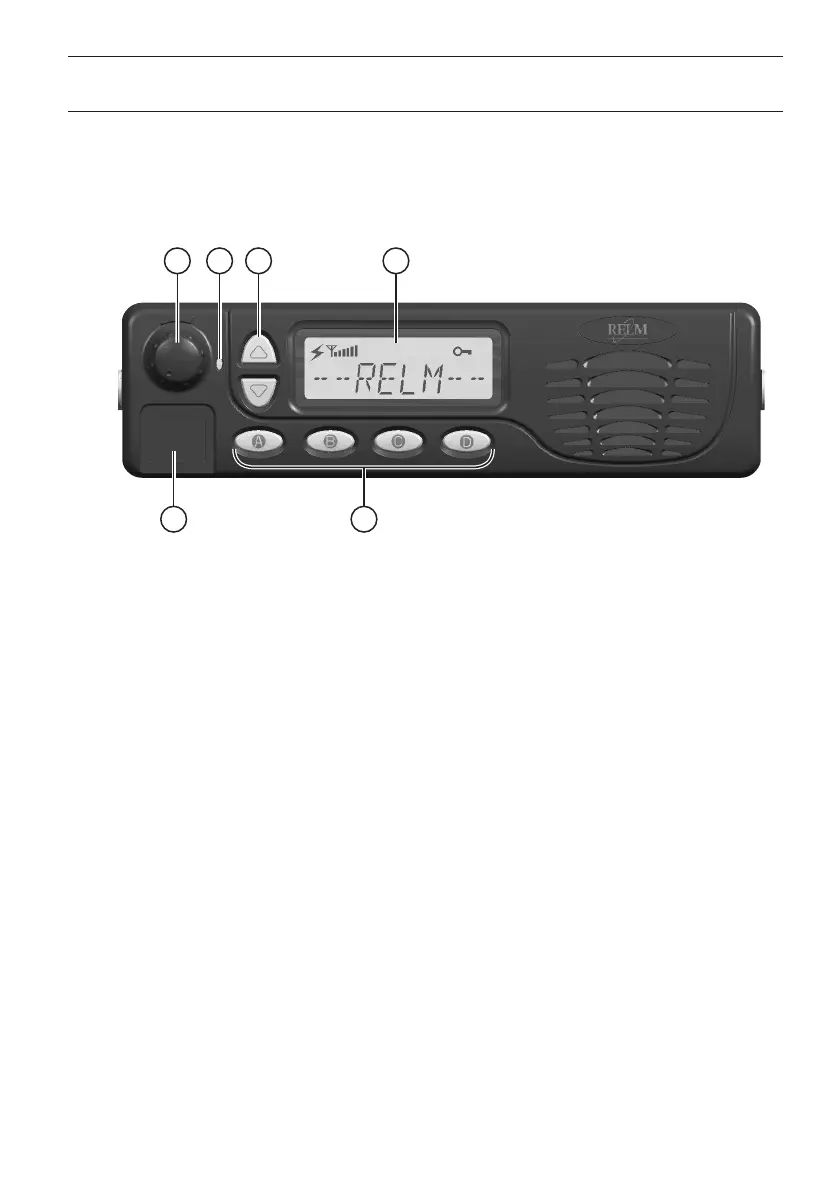
1
5 6
4
3
2
CONTROLS and INDICATORS
FRONT PANEL
All Buttons on the Front Panel are Programmable Function (PF) Buttons, configured
according to your system requirements and can be programmed by your dealer. The
instructions below refer to a typically configured radio.
1. VOL/PWR Knob
Turn this control clockwise to switch the radio "on" and increase the volume. Turn it
counterclockwise until a click is heard to switch the radio "off".
2. BUSY/TX Indicator
Indicates transceiver Transmit/Receive Status
Steady Red: Transmitting in progress
Steady Green: RX/Busy Channel
3. UP/DOWN Buttons
Pressing either button changes the current channel (and displayed name).
4. LCD
The 8-character alphanumeric display shows channel names, status and identity
information, and error messages.
5. Microphone Jack
Connect the microphone plug to this jack.
6. [A]-[D] Buttons (Programmable Function Buttons)
These buttons can be programmed by your dealer to be assigned for special
applications for selecting High/Low power, Monitor, Talk-Around, etc as determined
by your system requirements.


 To Next Page