IMPORTANT SAFETY
INSTRUCTIONS
When using electrical appliances,
especially when children are pres-
ent, basic safety precautions should
always be followed, including the
following:
READ ALL
INSTRUCTIONS
BEFORE USING.
DANGER
As with most electrical appliances,
electrical parts are electrically live
even when switch is off. To reduce
the risk of death by electric shock:
■ Do not reach for a plugged-in
trimmer that has fallen into water.
Unplug immediately.
■ Do not place or store trimmer
where it can fall or be pulled into a
tub or sink while plugged in.
■ Except when charging, always
unplug this trimmer from the
electrical outlet immediately
after using.
■ Unplug this trimmer before
cleaning.
■ Do not use this trimmer with a
damaged or broken cutting unit,
as facial injury may occur.
■ Always attach plug to trimmer,
then adapter to outlet. To
disconnect, turn all controls to OFF,
then remove adapter from outlet,
then detach power cord from the
trimmer for storage.
■ Always store your trimmer
and adapter in a moisture-free
area. Make sure the cord is
disconnected from the trimmer.
■ Keep trimmer out of extreme heat
and cold. Product must be stored
at 0º F to 120º F.
■ Dispose of used batteries properly.
Do not incinerate. Batteries may
explode if overheated. Do not wrap
in metal or aluminum foil. Wrap in
newspaper before discarding. It is
suggested that you contact local
town/city officials to determine
proper battery redemption site(s)
in your area.
■ For household use only.
■ Do not store in tub or shower.
■ Do expose the trimmer to liquids
other than water.
WARNING
To reduce the risk of burns, fire,
electric shock or injury to persons:
■ Do not crush, disassemble, expose
to excessive heat or incinerate the
appliance.
■ Your trimmer should never be
left unattended when plugged
in, except when charging your
rechargeable trimmer.
■ Close supervision is necessary
when this trimmer is used by, on,
or near children or persons with
certain disabilities.
■ Use this trimmer only for its
intended use as described
in this manual. Do not use
attachments not recommended
by the manufacturer.
■ Keep the cord away from heated
surfaces.
■ Never operate this trimmer if it has
a damaged cord or if it is not
working properly, if it has been
dropped or damaged, or dropped
into water while plugged in.
■ Never drop or insert any object into
any opening.
■ Do not use outdoors or
operate where aerosol (spray)
products are being used or where
oxygen is being administered.
SAVE THESE INSTRUCTIONS
KEEP AWAY FROM CHILDREN
Product Features
Charging/Recharging
To recharge this trimmer, use only
the charging adapter provided.
■ Turn the trimmer off. Insert the
adapter plug into the Power Port,
then plug the adapter into an
electric wall outlet. The Charging
Indicator will blink, indicating
unit is charging. A full charge will
take approx. 3 – 5 hours. The
light will stop blinking and remain
illuminated to indicate that the
trimmer is fully charged.
■ You may leave your trimmer
plugged in between uses. However,
if the trimmer is not going to
be used for an extended period
(2 weeks), unplug the unit and
recharge when resuming use.
■ Charge the trimmer at
temperatures between 40 – 90°F,
to avoid adversely affecting battery
life.
■ In order to preserve the life of
the batteries, they should be fully
discharged every six months and
then fully charged for 3–5 hours.
■ Lithium (LiFePO
4
) batteries are
included in this trimmer (see
battery removal section for proper
disposal of batteries).
■ In cordless mode, your trimmer
will run for 120+ minutes before
additional charging is required.
Corded Operation
In the event that you run out of
cordless power, this trimmer can be
plugged in and used immediately in
corded mode to complete your trim.
Zoom Wheel and Removable
Adjustable Comb
NOTE: Adjustable Comb must be
attached to the trimmer in order to
use the Zoom Wheel.
The Zoom Wheel and Adjustable
Comb ensures precise trimming and
has nine adjustable positions:
Setting Beard Style Length
1 Stubble look 1.5mm
2 2.5mm
3 Short 4mm
4 5.5mm
5 Medium 7mm
6 9mm
7 11mm
8 Long 14mm
9 18mm
Operating Your Trimmer
Register Your New Product Today!
By registering your new Remington
®
product, you will receive these important benefits:
Proof of Ownership • Product Protection • Product Registration • Special Offers
Register online at: www.RemingtonProducts.com
MB4850
Use and Care Guide
■ To adjust, roll the Zoom Wheel
toward the top of the trimmer for
a longer length, and toward the
bottom of the trimmer for a shorter
length. The wheel will click into
one of nine positions.
■ Begin trimming at one of the
longest settings 8 or 9 to avoid
accidentally trimming hair too
short. As you become familiar with
the settings, you can then select
your desired length setting.
Adjustable Comb
Remove Adjustable Comb if you
are: defining hairline edges such as
sideburns, trimming the nape of your
neck, trimming your beard line on
front of neck, or if you want to clean
cutter assembly.
To remove:
■ Be sure the trimmer is in OFF
position.
■ While holding trimmer in one hand,
and holding the Zoom Wheel to
prevent it from turning, gently pull
the Adjustable Comb away from
the trimmer. The comb
can be removed and replaced
on any setting.
To replace:
■ Be certain trimmer is in OFF
position.
■ While holding the trimmer in one
hand, and holding the Zoom Wheel
to prevent it from turning, slide the
comb over the top of the trimmer
until it “clicks” into position.
NOTE: The Adjustable Comb can only
be placed on the trimmer one way;
if it does not fit properly, remove and
reverse it.
Before Using
Quick Release Blades
Before Using Your Trimmer
■ Before using your trimmer for the
first time, charge the unit 4 hours
for optimal performance.
■ Make sure your face and facial hair
are clean and dry.
■ Double check that the Adjustable
Comb is the desired position.
Cutting length is visible in Length
Indicator.
Quick Release Blades
■ The blade assembly can be
removed to change blades or for
easy cleaning.
■ To remove blade assembly, press
the Quick Release Button and pull
blade away from trimmer body.
■ To replace blade, align the guide
rails of the blade assembly with
the slots on the trimmer body and
snap into place. Make sure blade is
secure before turning on trimmer.
6
8
1
9
10
5
4
3
2
7
11
Feature Checklist
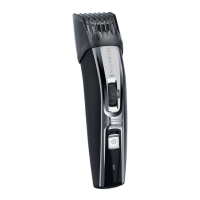
1. Beard Blade
2. Stubble Blade
3. Goatee/Detail Blade
4. Quick Release Button
5. Zoom Wheel
6. Length Indicator
7. Adjustable Comb (1.5-18mm)
8. On/Off Switch
9. Charging Indicator
10. Power Port
11. Cleaning Brush
12. Adaptor (not shown)


 To Next Page