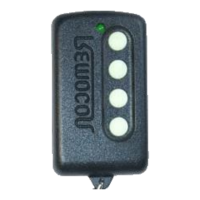
Need help?
Do you have a question about the Remocon LRT-1 and is the answer not in the manual?
Steps to adjust the frequency of the LRT-1 remote, including finding the original remote's frequency and setting the jumper.
Detailed steps for copying individual buttons from an original remote to the LRT-1, involving button presses and LED feedback.
Advice to perform copying in areas free from electrical interference to ensure successful operation.
This document outlines the operational procedures for the RMC-600(LRT-1) and Y2K10L self-learning remote controls, designed to duplicate the functions of existing remote transmitters. The primary function of these devices is to copy the signals from an original remote, allowing users to consolidate multiple remotes or replace a lost or damaged one. It's crucial to note that these devices are not compatible with code-hopping remotes, meaning they cannot successfully copy signals from remotes that employ dynamic, changing codes for security purposes. This limitation is explicitly stated to manage user expectations and prevent unsuccessful copying attempts.
The copying process involves several key steps, beginning with frequency adjustment, which is critical for successful signal duplication. Users must first identify the frequency of their original remote. This can be done either by using a frequency counter for precise measurement or by following a manual adjustment procedure. The RMC-600(LRT-1) features a jumper that needs to be moved to a position corresponding to the identified frequency range. The device provides three frequency ranges: 255-295 HMz, 295-355 HMz, and 355-500 HMz. Selecting the correct range is the foundational step for the copying process.
Once the jumper is set, the user initiates the frequency fine-tuning process. This involves placing the LRT-1 on a flat, non-metallic surface to avoid interference. The first and second buttons on the LRT-1 are pressed simultaneously. The second button is released after the LED flashes four times, while the first button is held down. This action prepares the LRT-1 for frequency detection. The original remote is then placed near the LRT-1, and any button on the original remote is pressed and held. The user observes the LED on the LRT-1; if it doesn't flash, the frequency needs further adjustment using the tuning bar until the LED flashes three times. This iterative process ensures that the LRT-1 is tuned to the exact frequency of the original remote.
A more advanced step in frequency adjustment involves optimizing the signal reception. While still holding the two buttons, the user gradually increases the distance between both remotes, simultaneously adjusting the frequency. The goal is to achieve maximum LED brightness on the LRT-1 when the distance reaches approximately 3 cm. This indicates optimal signal reception and tuning. For users with a frequency counter, this entire manual adjustment process can be streamlined by directly setting the LRT-1 to the precise frequency of the original remote, bypassing the iterative tuning steps. This feature offers a more efficient and accurate method for professionals or those with access to specialized equipment.
After the frequency is accurately set, the next stage is to copy the individual buttons. This process requires placing the two remotes within 2 cm of each other to ensure strong signal transmission. To copy a specific button, the user simultaneously presses the desired button on the original remote and any other button on the LRT-1. These buttons are held until the LRT-1's LED flashes four times. Following this, the user continues to hold the button on the original remote that they wish to copy, while releasing the other button on the LRT-1. The LED on the LRT-1 should then flash three times, indicating a successful copy of that specific button's function. This sequence needs to be repeated for each button the user wishes to copy from the original remote to the LRT-1, ensuring all desired functions are duplicated.
A critical maintenance and usage feature highlighted in the manual is the importance of performing the copying procedure in an environment free from electrical interference. Electrical interference can disrupt the signal transmission and reception between the remotes, leading to incorrect or incomplete copying. Therefore, users are advised to choose a location away from other electronic devices, power lines, or any sources that might emit electromagnetic signals. This precaution is essential for ensuring the accuracy and reliability of the copied functions.
In summary, the RMC-600(LRT-1) and Y2K10L self-learning remotes offer a practical solution for duplicating existing remote control functions, provided the original remote does not utilize code-hopping technology. The process involves careful frequency adjustment, either manually or with a frequency counter, followed by a precise button-copying sequence. Adherence to the recommended environment for copying is crucial for successful operation. The device is designed for straightforward use, enabling individuals to manage their remote control needs effectively by creating functional duplicates.
 General
| Model | LRT-1 |
|---|---|
| Brand | Remocon |
| Category | Remote Control |
| Power Source | Battery |
| Battery Type | AAA |
| Number of Batteries | 2 |
| Material | Plastic |
| Color | Black |
| Type | Remote Control |

 To Next Page