SECTION 4
SOFTWARE SETUP INFORMATION
58
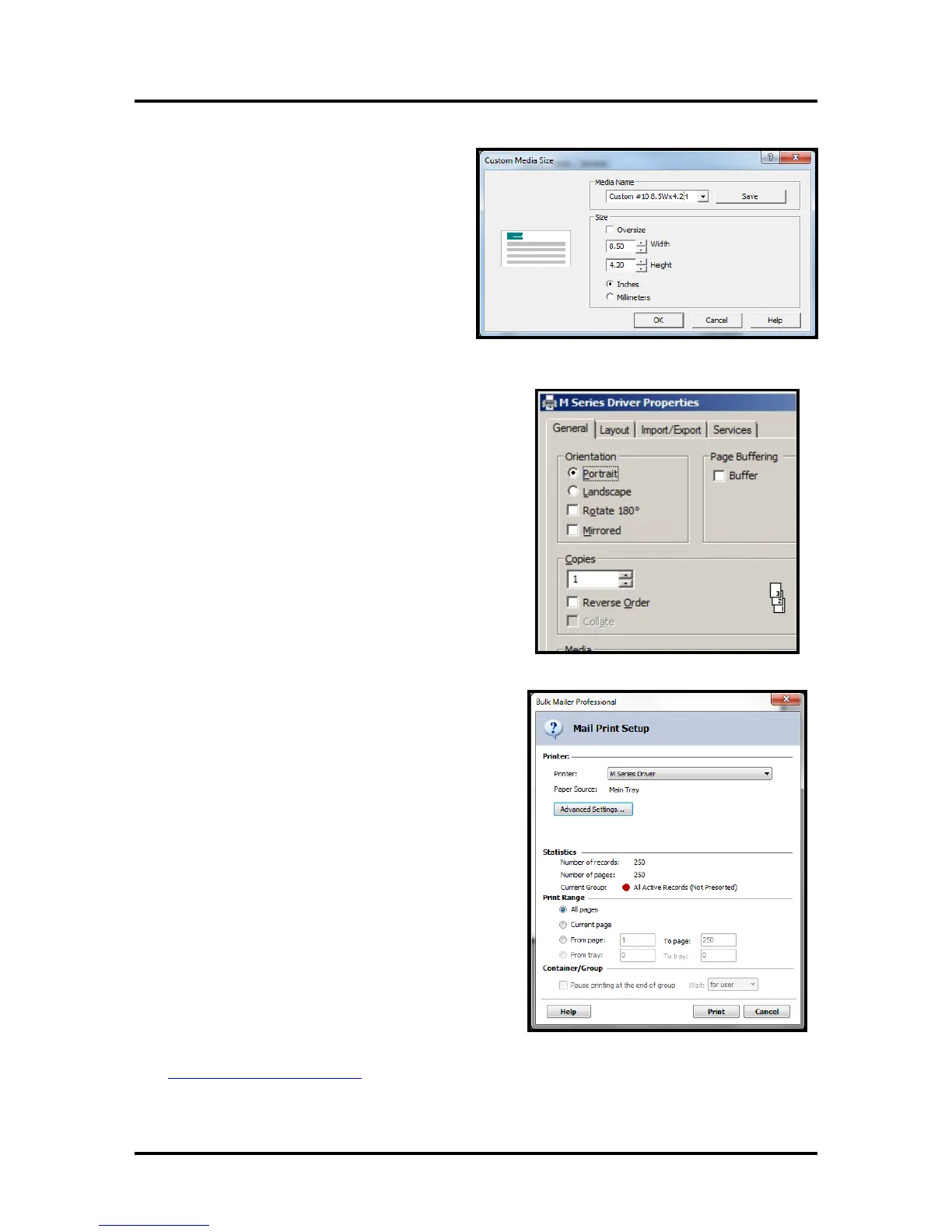
18. From the “M Series Printer Driver
Properties” window; Click on the
“Custom Sizes” button.
The “Custom Media Size” window will
open.
Set the Width to 8.50 inches and the
Height to 4.2 inches.
Tip: If you type 4.13 it will default to 4.2.
Type a name into the “Media Name”
window.
Example: Custom #10 8.5Wx4.2H
Click on Save.
Then click on OK to close this window.
19. Under Orientation select Portrait.
Select your other desired choices
Print Quality, Copies, etc.
Then Click on OK to close this window.
20. In the “Mail Print Setup” window select “all
pages” or the range of addresses you want to send
to the printer.
21. When ready to print, make sure the printer is
ready (ON/OFF button is illuminated), then click
on the "Print" button.
Note: The Intelligent Mail Barcode (IMB) will not
be displayed or printed unless you have “cleaned
up” the mailing list using the Address Quality,
Address Correction (CASS) feature in Bulk
Mailer. Your Bulk Mailer subscription must be
current for this feature to work.
Please contact Satori Software (800-357-3020) or visit their web site for additional information.
http://www.satorisoftware.com



 To Next Page