SECTION 5
MAINTENANCE
81
You don’t need to open the Print Engine.
Shown for clarification purpose only.
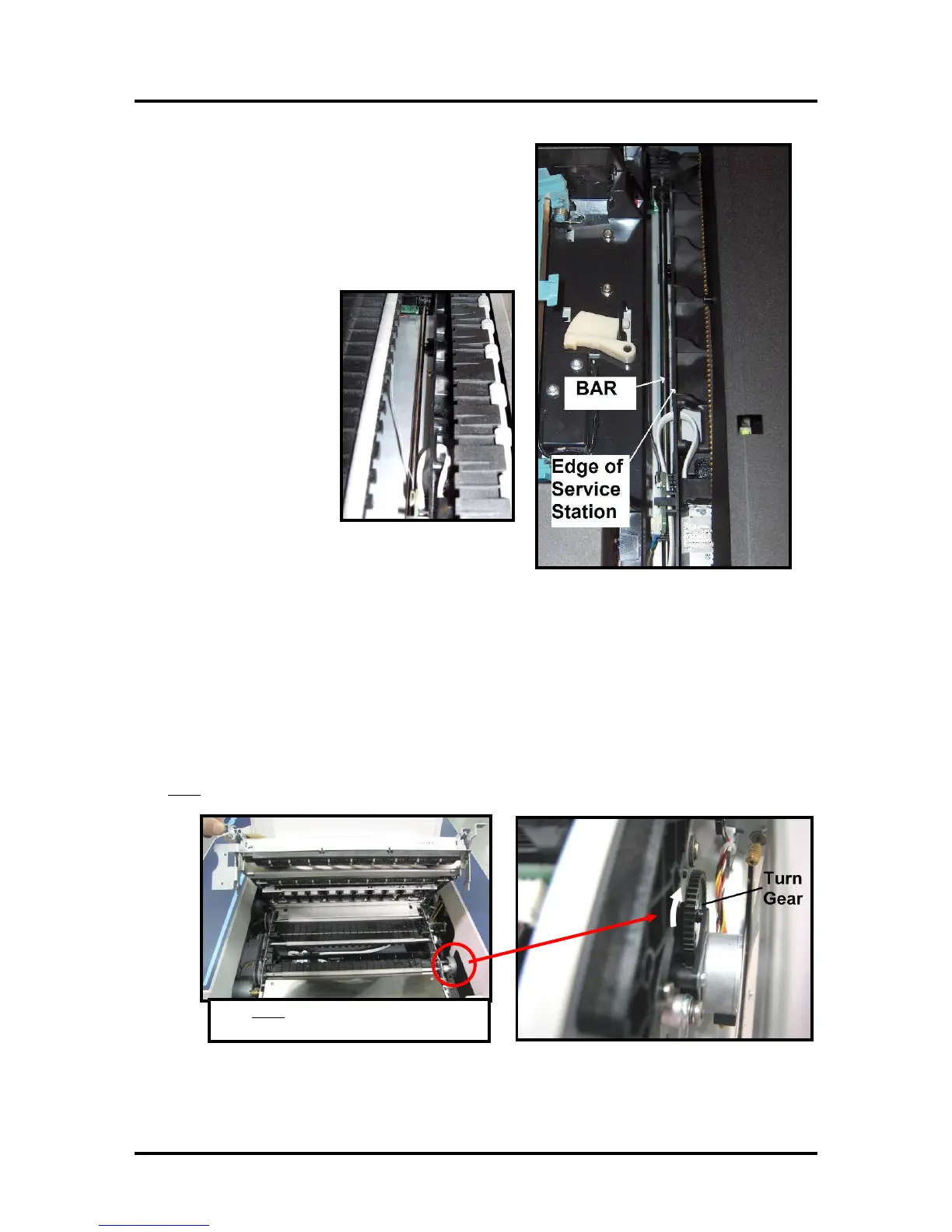
9. Look down through open area, in the Print Engine, to
make sure the Service Station is aligned with the “Bar”;
(Service Station Drive Shaft) as shown.
If the Printhead Cartridge is not installed (has been
removed), you can look down through the top of the
Print-Engine, through the Printhead Cartridge opening.
If the Printhead Cartridge
is still installed, you must
open the Clamshell to see
into this area; as shown.
IMPORTANT!
The Service Station must perfectly aligned with the “Bar” to prevent misalignment and jamming of the
service station.
10. GENTLY push in on the Service Station with one hand, while slowly turning the “Large Gear”
clockwise with the other hand. It should be easy to turn this gear and the service station should start to
drive into the print engine squarely.
Once the Service Station moves about ¼ inch past the “Bar” (shown in previous step), stop turning the
gear. Do NOT manually drive the Service Station into the print engine beyond this point.
NOTE: The “Large Gear” is located on the non-operator side of Print Engine; as shown below. You
don’t
need to open the Print Engine to access this gear.



 To Next Page