1
2
1
nu683-5_fra_G1.qxd 4/06/03 16:17 Page 1.52
CLIO L65 NU683-5 - Spécial pays de l'Est
C:\Documentum\Checkout\nu683-5_eng_T1.win 4/9/2003 13:12
-page60
1.52
EXTERNAL LIGHTING AND SIGNALS
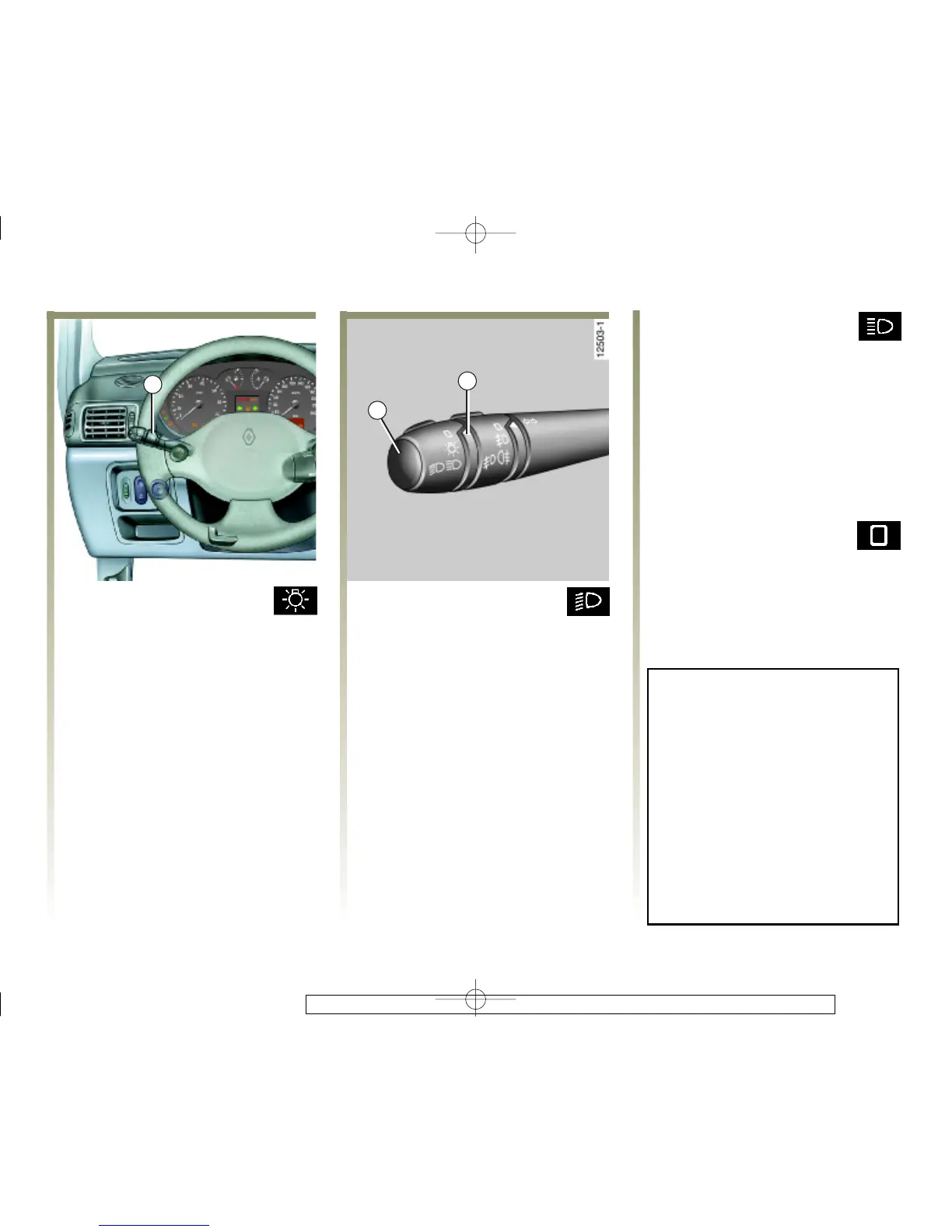
Side lights
Turn the end of the stalk 1
until the symbol is opposite the
mark 2.
Dipped beam headlights
Turn the end of the stalk 1
until the symbol is opposite the
mark 2.
A light lights up on the instrument
panel.
Main beam headlights
With stalk 1 in the dipped
beam position, pull the stalk
towards you.
An indicato r light on the instrument
panel lights up when the main beam
headlights are on.
To return to the dipped headlight
position, pull the stalk towards you
again.
Switching off the lights
Turn the end of stalk 1
back to its original position.
Before setting out to drive at
night: check that the electrical
equipment is working correctly,
and adjust your headlights (if
usual load conditions do not
apply).
Generally, make sure that the
lights are not obscured (dirt,
mud, snow, transporting objects
which could cover them, etc.).














 To Next Page