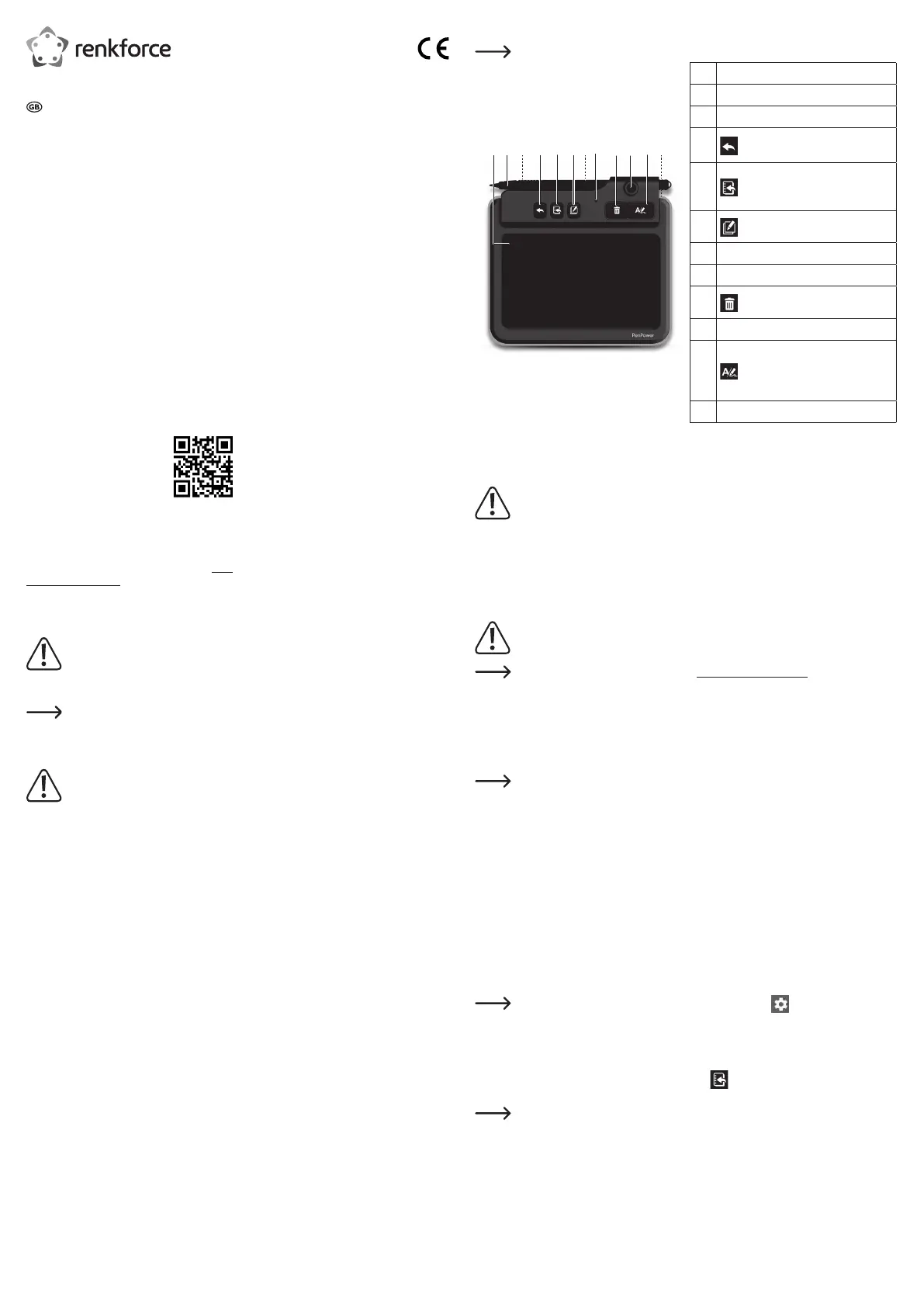
Operating Elements
“Online” refers to when the device is connected to a computer.
3 421 5 6 7 98 10 11
12
1 LCD notepad
2 Pen
3 USB port
4
Online: Send to application
Offline: Save to memory
5
Online: Send note to “PenPower
Memo Board”
Offline: No function
6 Append: Add another page
7 Battery Compartment
8 LED indicator
9 Clear.
10 Pen holder
11
Switch writing functions:
Online: Switch between Application
and Signature Mode
Offline: No function
12 Power switch: ON/OFF
Getting Started
a) Insert Batteries
Replace the batteries if you can no longer erase written content on your device, or if the LED (8)
flashes red.
Battery life depends on your usage patterns. Frequently deleting handwritten entries will cause
the battery life to decrease.
• Remove the battery compartment cover (7).
• Insert the included batteries matching polarities as shown inside the compartment.
• Replace the battery compartment cover (7).
b) Installing the Software
The instructions given are for a Windows
®
operating system and may be different for a Mac.
Download Windows
®
or Mac software here: http://dl.penpower.net/w2ga
• After the download is complete, double-click the file to open it.
• Select an installation language then follow the prompts to complete the installation process.
• Restart the computer when the installation is complete.
c) Connect Device to Computer
• Connect the USB port (3) on the device to a USB port on your computer.
If connecting to a USB hub, use an external power adapter so that there is an adequate supply
of power.
• The blue LED indicator (8) will light when the connection is made.
d) Online / Offline Mode
• “Online” is when the device is connected to a computer via USB.
- The blue LED will light up when connected.
- You do not need to turn the power on.
• “Offline is when the device is not connected to a computer.
- Turn the power ON (12). Remember to turn the power OFF (12) when not in use.
- The device will automatically power off after 30 seconds of no activity. Tap anywhere on the LCD
notepad (1) to wake it up.
e) Calibrate Pen
• Before using for the first time or when reconnecting to a computer, follow the onscreen prompts to
calibrate the LCD notepad (1).
If needed, manually launch calibration by selecting Settings > General > Writing Pad
Calibration.
“PenPower Memo Board” Application
This application is bundled with the “Write2Go Anytime” software.
Enter the “PenPower Memo Board” application by pressing or launching the “PenPower Memo Board”
application on your computer.
Options include send to email, export to calendar, categorize, batch delete, archiving, and
settings.
Operating Instructions
Penpower Write2Go Anywhere Digital Notepad
Item No. 2115068
Intended Use
This device allows you to transfer handwritten notes to your digital devices via USB connection, and has
built-in memory to save notes when you do not have access to a computer. You can archive, write, share
or manage digital content such as handwritten notes, signatures and sketches using the bundled software.
Handwritten notes can be saved in Word, Excel or PDF formats, and is compatible with Windows
®
and Mac
operating systems.
The device only works with the bundled “Write2Go Anywhere” application, and cannot be used as a general
handwriting input device for your computer.
It is intended for indoor use only. Do not use it outdoors. Contact with moisture, e.g. in bathrooms, must be
avoided under all circumstances.
For safety and approval purposes, you must not rebuild and/or modify this product. If you use the product
for purposes other than those described above, the product may be damaged. In addition, improper use can
result in other hazards. Read the instructions carefully and store them in a safe place. Make this product
available to third parties only together with its operating instructions.
This product complies with the statutory national and European requirements. All company names and
product names are trademarks of their respective owners. All rights reserved.
Delivery Content
• LCD Notepad
• Pen
• USB 2.0 cable
• 2x 1.5 V AAA batteries
• Quick start guide
• Operating instructions
Up-to-date Operating Instructions
Download the latest operating instructions at www.
conrad.com/downloads or scan the QR code shown.
Follow the instructions on the website.
Explanation of Symbols
The symbol with the exclamation
mark in the triangle is used to indicate
important information in these
operating instructions. Always read this
information carefully.
The arrow symbol indicates special
information and advice on operation.
Safety Instructions
Read the operating instructions
carefully and especially observe
the safety information. If you do not
follow the safety instructions and
information on proper handling in
this manual, we assume no liability
for any resulting personal injury or
damage to property. Such cases will
invalidate the warranty/guarantee.
a) General Information
• The device is not a toy. Keep it out of the reach
of children and pets.
• Do not leave packaging material lying around
carelessly. This may become dangerous playing
material for children.
• Protect the appliance from extreme
temperatures, direct sunlight, strong jolts, high
humidity, moisture, flammable gases, steam and
solvents.
• Do not place the product under any mechanical
stress.
• If it is no longer possible to operate the product
safely, take it out of operation and protect it from
any accidental use. Safe operation can no longer
be guaranteed if the product:
- is visibly damaged,
- is no longer working properly,
- has been stored for extended periods in poor
ambient conditions or
- has been subjected to any serious transport-
related stresses.
• Please handle the product carefully. Jolts,
impacts or a fall even from a low height can
damage the product.
• Consult an expert when in doubt about the
operation, safety or connection of the appliance.
• Maintenance, modifications and repairs must
only be completed by a technician or an
authorised repair centre.
• If you have questions which remain unanswered
by these operating instructions, contact our
technical support service or other technical
personnel.
b) Connected devices
• Also observe the safety and operating
instructions of any other devices which are
connected to the product.
c) Batteries
• Correct polarity must be observed while inserting
the battery.
• The batteries should be removed from the device
if it is not used for a long period of time to avoid
damage through leaking. Leaking or damaged
batteries might cause acid burns when in contact
with skin, therefore use suitable protective
gloves to handle corrupted batteries.
• Batteries must be kept out of reach of children.
Do not leave batteries lying around, as there is
risk, that children or pets swallow them.
• All batteries should be replaced at the same
time. Mixing old and new batteries in the device
can lead to battery leakage and device damage.
• Rechargeable batteries must not be dismantled,
short-circuited or thrown into fire. Never recharge
non-rechargeable batteries. There is a risk of
explosion!



 To Next Page
 Loading...