3. Operation Instruction
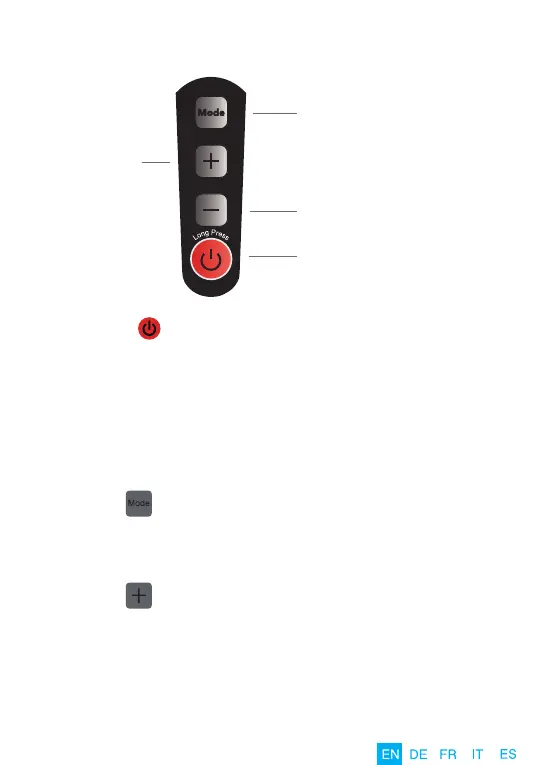
5 Mode Select Button
Mode 1: continuous pulse
Mode 2: 1 second pulse
Mode 3: 2 pulses per second
Mode 4: 3 pulses per second
Mode 5: continuous pulse + 1 second pulse +
2 pulses per second + 3 pulses per second
Increase
Intensity Button
(5 intensity levels)
Reduce Intensity Button
Power On/Off Button
(Default mode is Mode 1,
Default intensity is level 3)
08
1. Long press “ ” Power On/Off Button to turn on the massager. You
will hear a tone and the indicator light will be GREEN to indicate that
the massager is on. The default mode is Mode 1(Continuous Pulse)
and default intensity is Level 3. (Note: When the power light BLINKS
GREEN, the massager needs to be charged). Short press the Power
On/Off Button to turn off the massager. The massager will automatica-
lly shut off after 20 minutes of continuous use.
2. Press the “ ” Mode Button to select between the different percussion
modes. There are 5 percussion modes available, default mode is
mode 1 (Continuous Pulse).
3. Press the “ ” Increase Intensity Button to enhance the intensity of
the percussion. There are 5 intensity levels for each mode, the default
intensity is level 3. You will hear a tone with each press of the increase
power button. If you do not hear a tone when you press the increase
power button, it indicates you have reached the maximum intensity.


 To Next Page