Android Auto®:
You can operate Android applications with
finger gestures such as tapping, dragging,
scrolling, or flicking on the screen of this
product
Starting procedure of using Android Auto
1 Connect an Android Auto™ compatible
device to this unit via USB.
2 Touch the Android Auto icon.
The Android Auto home screen appears
Apple CarPlay
®
& Android Auto
®
How to connect Wireless Apple CarPlay
Starting procedure of using Wirelessly Apple
CarPlay
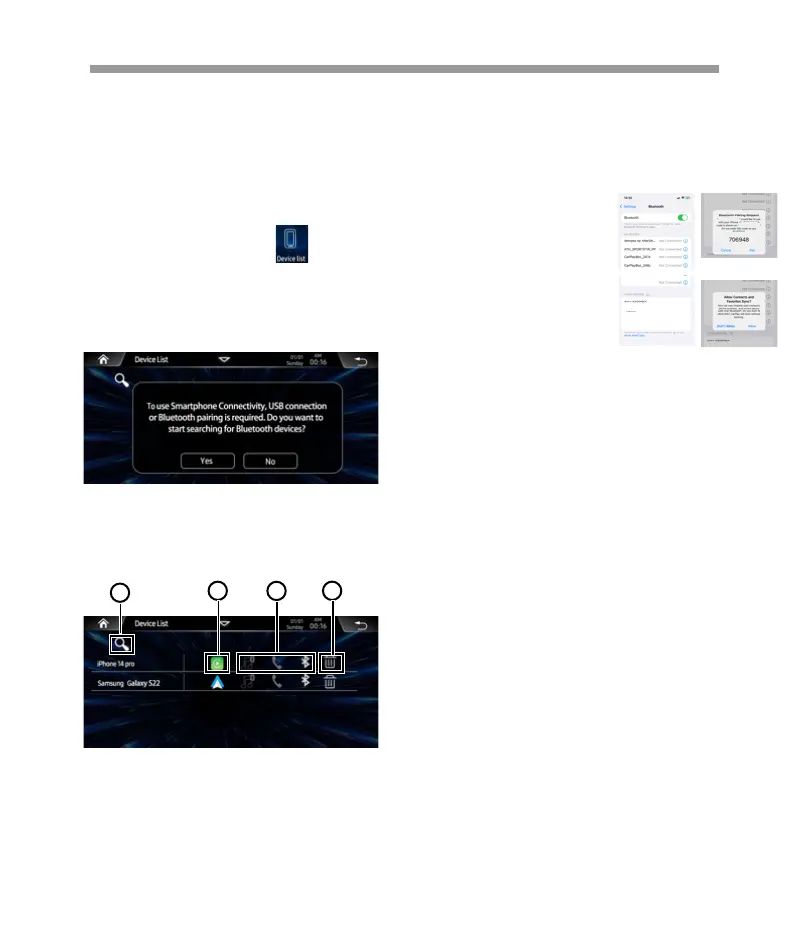
1 On the Main menu tap the icon access
to Device Link interface.
Show below pop-up menu, tap YES start to
search the available devices.
Before using Apple CarPlay wirelessly, turn on
the Bluetooth function on the iPhone.
4. Tap to delete current device.
1. Tap to start to search new device.
2. Tap to access Apple CarPlay interface.
3. Tap to access Bluetooth interface.
2. When the headunit detect the available
device, follow the pop-up notice step by step
to connect the iPhone. After connected, will
show below page:
1
3
2 4
1. Turn on your iPhone’s
Bluetooth and Wi-Fi, and
connect to Soundstream
V2.
a. Go to Settings >
Bluetooth and the phone
should be able to find a
Bluetoot Device(Sound-
stream V2) .
b. A Bluetooth Pairing Request will be displayed on
the screen with a specific code which should match
what is shown on. Tag “Pair” for connecting.
Soundstream V2
Soundstream V2
Soundstream V2
MagiCast_1104
3.Wait for a moment for CarPlay connection, click
use CarPlay and enter the UI interface.
4. iPhone will pop-up prompts, click “Use CarPlay”.
c. Immediately following the Pairing notification, a
new request to “Allow Contacts and favorites Sync”
on your iPhone, Allow in order to have caller ID and
access to your contacts through CarPlay.
:Following the BT connection, there is no
need to try and connect WIFI manually (although it
does need to be ON), after the BT connection
process is complete, the WIFI will connect automati-
cally on its own.
The user also can use the iPhone
search the device via Bluetooth , then
follow the pop notice step by step to
connect
15


 To Next Page
 Loading...