Apple CarPlay
®
& Android Auto
®
• Android phone with Android 5.0 or higher is
required. Update to the latest OS version
before use.
• Your Android phone needs to support
Android Auto. For details on compatible
models, refer to the compatibility list on the
support site on the back cover.
• Download the Android Auto app on Google
Play.
• For details about Android Auto, refer to the
manual supplied with your Android phone, or
visit
• Since the GPS on your Android phone is used,
place your Android phone where it can easily
receive a GPS signal.
• Android Auto may not be available in your
country or region.the website of Android Auto.
Notes on using Android Auto
• The Bluetooth connection with the Android
Auto compatible device will be terminated
automatically if Android Auto is turned on.
• Hands-free phoning via Bluetooth wireless
technology is not available while Android
Auto is on.
Note:
• You can use Voice function by touching
button once Android Auto is activated.
21
3
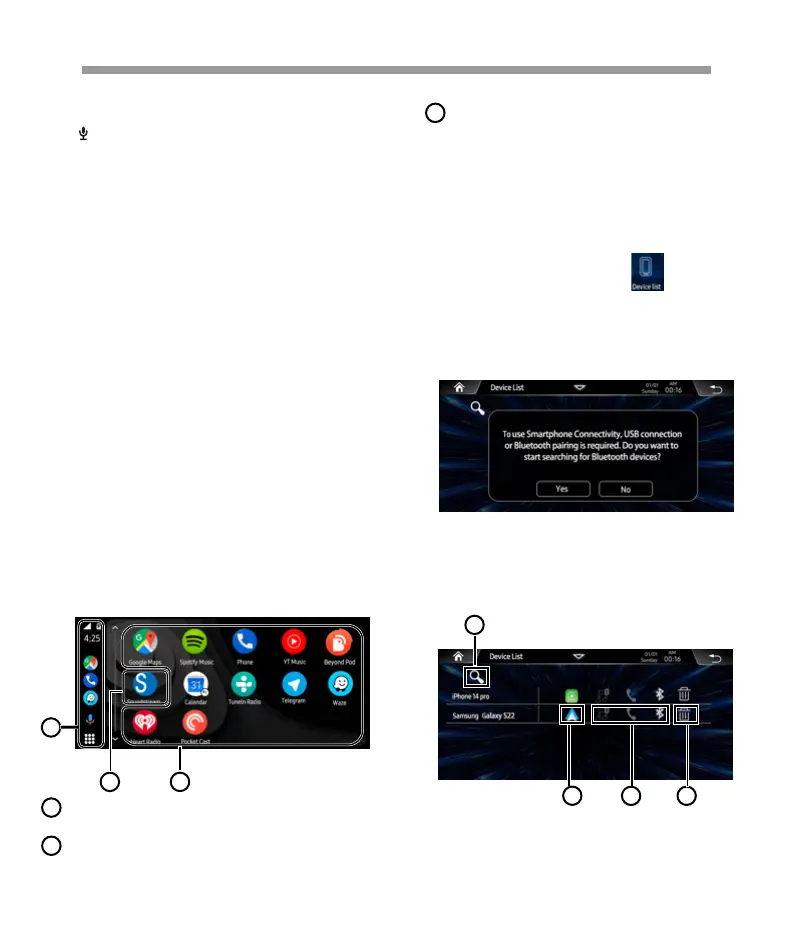
Start the application.
Application keys
Exit the Android Auto screen and displays
Home screen.
Home
Operation Bar
1
Starts the application or displays informa-
tion.
3
2
1 On the Main menu tap the icon access
to Device Link interface.
Show below pop-up menu, tap YES start to
search the available devices.
4. Tap to delete current device.
1. Tap to start to search new device.
2. Tap to access Android Auto interface.
3. Tap to access Bluetooth interface.
2. When the headunit detect the available
device, follow the pop-up notice step by step
to connect the iPhone. After connected, will
show below page:
1
3
2
4
How to connect Wireless Android Auto
Starting procedure of using Wirelessly Android
Auto
16


 To Next Page
 Loading...