Radio
Touch “Radio” in the main menu to enter the
radio interface.
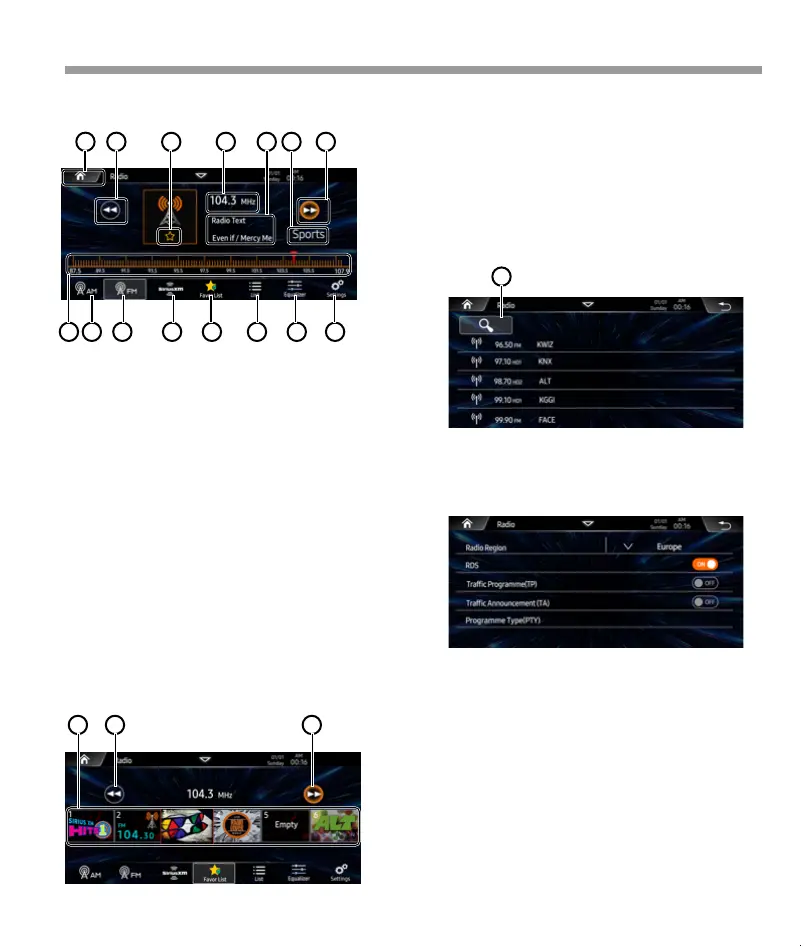
1. Favorite list (Global preset), user can store
favorite AM/FM/SixiusXM station, then
select it for playback directly.
Once tap one station, will back to playback
page.
2. Tap to show previous list page.
3. Tap to show next list page.
1. Tap to start to search available station,
press one station and back to radio playback
page.
Radio Region: Select desired radio region.
e.g: America, Europe...
RDS: Select RDS is ON/OFF.
TP: Select TP is ON/OFF.
TA: Select TA is ON/OFF.
PTY: Tap to access PTY information page.
3
1 2
4 5 6 7
8
9
10
11
13
12
14
15
Favorite station list
Search station list
Radio settings:
1 2
1
3
1. Tap to back to home page.
2. Short press to seek down, Long press to
step down.
3. Tap to store current station as one favorite
station.
4. Show current staion frequency information.
5. Show current station Radio Text.
6. Show PTY information.
7. Short press to seek up, long press to
step up.
8. Frequency scroll bar, user can choose
desired frequency manually.
9. AM button.
10. FM button.
11. SiriusXM Button
12. Favorite list button.
13. Station list button.
14. EQ Button.
15. Settings Button.
18


 To Next Page
 Loading...