Sirius XM
For
Canadian
Subscriptions, please contact:
-Visit www.siriusxm.ca/activate
-Call SiriusXM Customer Care at
1-888-539-7474
Note:
the SiriusXM Radio ID does not include
the letters I, O, S or F.
For more information, visit
www.siriusxm.com.
Only SiriusXM- Ready® brings you more of what you
love to listen to, all in one place. Get over 140
channels, Including commercial-free music, plus
the best sports and live events, comedy, news,
exclusive talk, and entertainment. Welcome to the
world of satellite radio. A SiriursXM vehicle tuner
and subscription are required. Fsold separately,
SiriusXM subscription required).
(SiriusXM service is only available in the continental
US and Canada.)
After installing your SiriusXM Connect Vehicle
Tuner and antenna, power on your SoundstreaM
V2 and select SiriusXM mode. You should be able to
hear the SiriusXM preview channel on Channel 1. If
you cannot hear the preview channel, please check
the installation instructions to make sure your
SiriusXM Connect tuner is properly installed.
SIRIUSXM® SATELLITE RADIO
Activating Your SiriusXM Subscription
After you can hear the preview channel, tune to
Channel 0 to find the Radio ID of your tuner.
In addition, the Radio ID is located on the bottom
of the SiriusXM Connect Vehicle Tuner and it
packaging. You will need this number to activate
your subscription. Write the number down for
reference.
In the
USA
, you can activate online or by calling
SiriusXM Listener care:
-Visit www.siriusxm.com/activatenow
-Call SiriusXM Listener Care at
1-866-635-2349
As part of the activation process, the SiriusXM
satellites will send an activation message to your
tuner. When your radio detects that the tuner has
received the activation message, your radio will
display "Subscription Updated". Once subscribed,
To enter
SiriusXM
Mode, touch the SXM icon on
the Main Menu.
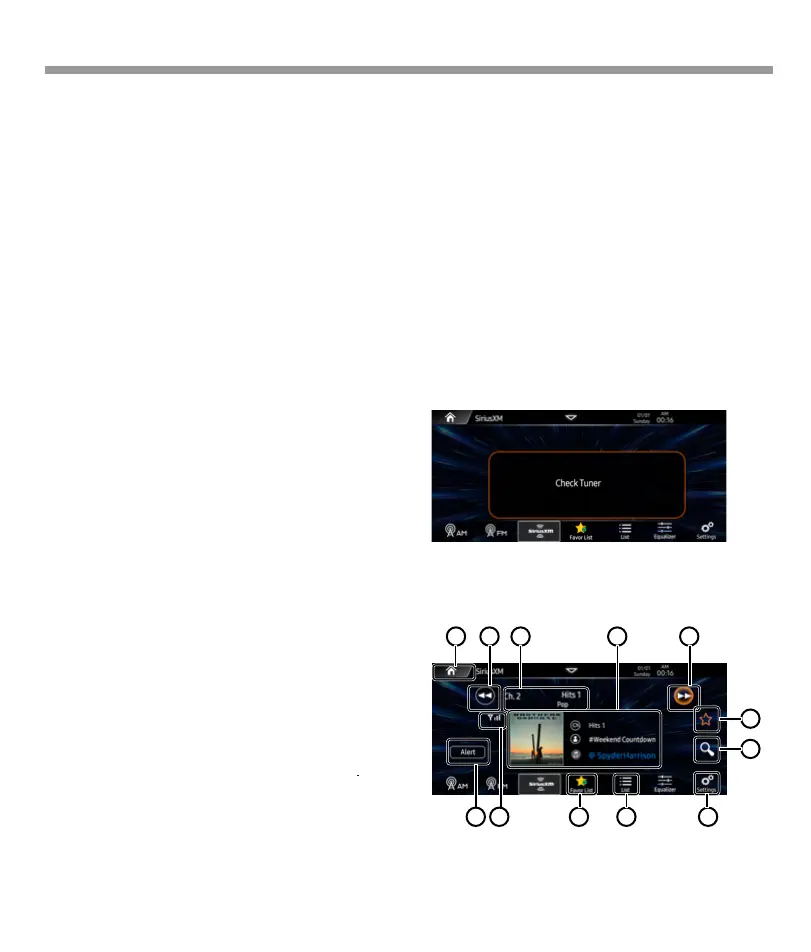
If the screen is shown
“Check Tuner”
as below,
check the SiriusXM tuner connection.
you can tune to channels in your subscription
plan.
Note:The activation process usually takes 10 to
15 minutes, but may take up to an hour. Your
radio will need to be powered on and
receiving the SiriusXM signal to receive the
activation message.
Some SiriusXM channels contain mature content.
When the Parental Controls feature is enabled,
channels with mature content are restricted and
will require a 4-digit lock code to access.
Radio ID:
Press
channel 0
to display the Radio ID.
You can use channel up/down or direct tune.
Touch “
SiriusXM” in the main menu to enter the
SXM interface.
1 2
3
5
6
7
8912 11
4
10
19


 To Next Page
 Loading...