iGo map Operation
2.3 Navigation view
The navigation view is the main screen of Epsilon
Linux device that shows the planned route on a map.
Epsilon Linux device works with digital maps which
are not simply the computerized versions of tradition-
al paper maps. Similarly to paper road maps, the 2D
mode of digital maps shows you streets and roads.
Elevation is also illustrated in color. The navigation
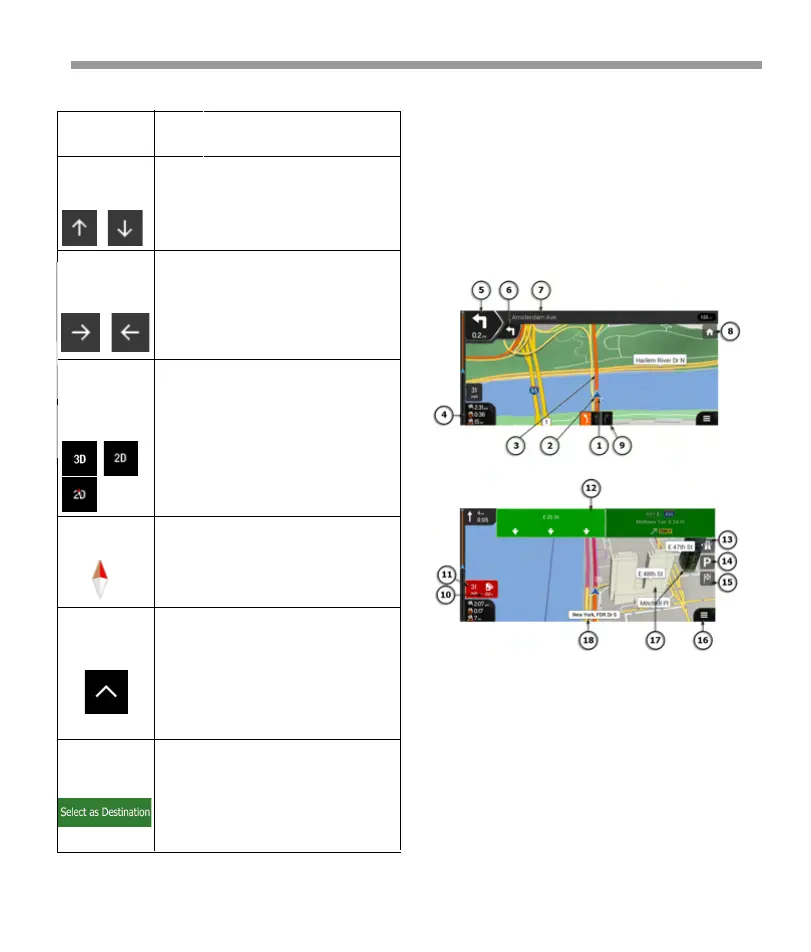
view displays the following screen buttons, data
fields, and route information on the map during
navigation:
Tilting up
and down
Rotating left
and right
Changing
2D, 3D, or 2D
North up
views
Checking the
compass
Selecting
additional
options
Selecting a
destination
Change the vertical view angle of
the map in 3D mode. Tap once to
modify the view in a large step, or
tap and hold the button to modify
it continuously and smoothly.
Changes the horizontal view angle
of the map. Tap once to modify the
view in a large step, or tap and hold
the button to modify it continuous-
ly and smoothly.
Switch between the 3D perspective,
2D Heading up, and 2D North up
map view modes. In Heading up
mode the map is rotated so its top
always points in the current driving
direction. This is the default orienta-
tion in 3D map view mode. In North
up mode, the map faces North.
The direction of the compass shows
North.
Open a list of additional features like
saving a location, or searching for
Places around the cursor.
Select the cursor location as a new
destination. The route is automati-
cally calculated.
Note! Some buttons, fields, or icons may
not be available in your product version.
Action
/Buttons
Function
You can perform the following actions on the map:
32


 To Next Page
 Loading...