This document describes the ResMed VPAP IV S/T machine with H4i Humidifier, a portable ventilator used for breathing support during sleep. It covers the device's function, various operational modes, power sources, front and rear panel components, detailed operation instructions, and maintenance procedures, along with comprehensive troubleshooting guides for both the humidifier and the main VPAP unit.
Function Description
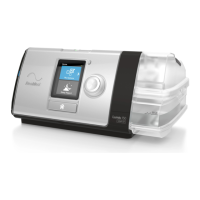
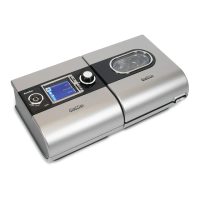
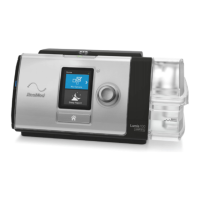
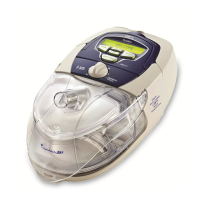
The ResMed VPAP IV S/T is a portable ventilator designed to provide breathing support to individuals during sleep. It is specifically used by people who require assistance with their breathing efforts, ensuring adequate ventilation throughout the night. The device works in conjunction with an H4i Humidifier to deliver humidified air, enhancing comfort and preventing dryness in the airways.
The VPAP IV S/T machine offers different modes of ventilation to cater to varying patient needs:
- Spontaneous mode: In this mode, the machine responds directly to the user's breathing efforts, delivering breaths as needed. This allows for a more natural breathing pattern, as the machine assists only when the user initiates a breath.
- Timed mode: This mode ensures that the machine delivers a set number of breaths every minute, regardless of the user's spontaneous breathing efforts. This is particularly useful for individuals who require a consistent respiratory rate.
- S/T mode (Spontaneous/Timed): This is a hybrid mode where the machine delivers breaths at a set rate while also responding to the user's breathing efforts. This mode provides a balance between controlled ventilation and patient-initiated breathing, offering flexibility and responsiveness.
The integrated H4i Humidifier warms and humidifies the air delivered by the VPAP machine. This feature is crucial for patient comfort, especially during long-term use, as it helps prevent dryness of the nasal passages, throat, and lungs, which can lead to irritation and discomfort. The humidifier's temperature can be adjusted to suit individual preferences.
Usage Features
The VPAP IV S/T machine is designed for ease of use, with clear controls and indicators.
Power Source:
The device primarily operates from mains power. For situations where mains power is unavailable, an external 12-volt battery can be connected via a power inverter. This external battery can provide up to 8 hours of operation, offering flexibility for travel or power outages. Users are advised to contact VRSS Outreach for more information regarding external battery usage.
Front Panel Components:
- Black carrying handle: Facilitates easy transportation of the device.
- LCD screen: Displays current settings and operational status, providing essential information to the user.
- VPAP Control panel: Includes buttons for On/Off, Up/Down adjustments, and Left/Right navigation, allowing users to easily control the device and modify settings.
- Humidifier temperature control: A dedicated control for adjusting the humidifier's temperature to optimize comfort.
- 22mm Air outlet: The connection point for the circuit tubing that delivers air to the mask.
Rear Panel Components:
- Air inlet and filter: Where ambient air is drawn into the machine and filtered to ensure clean air delivery.
- DC power socket: For connecting to a DC power source, such as an external battery.
- AC power socket: For connecting to mains power.
Operation Instructions:
- Preparation: Before operating, it is critical to ensure that the humidifier chamber is empty if the machine needs to be moved. Spilling water into the machine can cause mechanical failure. Always remove and empty the chamber before moving the device.
- Power Connection: Plug the power cord into the rear of the machine.
- Humidifier Setup:
- Remove the water chamber by lifting its lid.
- Fill the chamber with warm tap water.
- Place the filled chamber back onto the hotplate and close the cover securely.
- Circuit Connection: Connect the circuit tubing to the air outlet on the humidifier cover and then to the mask.
- Mask Application: Put on the mask as instructed by the manufacturer.
- Starting the Machine: Press the START/STOP button to turn the machine on.
- Adjusting Humidifier: Adjust the humidifier temperature as required using the dedicated control.
Troubleshooting Features:
The manual provides comprehensive troubleshooting guides for both the humidifier and the main VPAP unit, addressing common issues and offering corrective actions.
Humidifier Troubleshooting Guide:
- Leaking water chamber:
- Possible Cause: Chamber incorrectly assembled or cracked.
- Corrective Action: Reassemble chamber, replace "O" ring (seal), or replace chamber.
- Water splashing into face:
- Possible Cause: Water chamber overfilled or condensation forming in tubing/mask.
- Corrective Action: Empty some water, turn humidifier down, or use a tubing cover.
VPAP Troubleshooting Guide:
- Unit does not start:
- Possible Cause: Power cord not connected properly or power point faulty.
- Corrective Action: Connect cord firmly at both ends, try another power outlet.
- Machine does not alternate between IPAP and EPAP:
- Possible Cause: Hyperventilation and/or high room temperature causing overheating.
- Corrective Action: Machine will revert to normal once cooled (approx. 15 mins). Stop machine if uncomfortable, slow breathing, cool room down.
- Machine not giving enough air:
- Possible Cause: Ramp timer on, dirty air filter, kinked/punctured tubing, improperly connected tubing, mask/headgear not on properly, or missing plugs from mask access ports.
- Corrective Action: Wait for pressure build-up or turn ramp timer off, change filter, straighten/replace tube, tighten connections, reapply mask, replace plugs.
- Air leaking around nose and eyes:
- Possible Cause: Cushion not properly fitted to mask frame, mask/harness not positioned correctly, missing plugs from mask access ports, or worn/torn nasal cushion.
- Corrective Action: Refit cushion to frame, adjust mask position, replace plugs/seal hole with tape, replace cushion.
- Machine does not stop when mask is taken off (Smart Start/Stop on):
- Possible Cause: Smart Start/Stop disabled or incompatible humidifier/mask.
- Corrective Action: Enable Smart Start/Stop, use On/Off button to stop, change humidifier/mask type.
- Error message "Check tube!!":
- Possible Cause: Loose air tubing.
- Corrective Action: Secure all connections, press any key to clear message.
- Error message "SYSTEM ERROR":
- Possible Cause: Component failure.
- Corrective Action: Call VRSS Outreach.
- Excessive motor noise:
- Possible Cause: Component failure.
- Corrective Action: Call VRSS Outreach.
- Error message "High leak in last session":
- Possible Cause: Excessive mask/mouth leak during the night.
- Corrective Action: Secure all connections, use mask fitting feature to properly fit mask.
Maintenance Features
Regular cleaning and maintenance are essential for the optimal performance and longevity of the VPAP IV S/T machine and its humidifier.
Daily Maintenance:
- Humidifier Cleaning: If using a humidifier, disconnect the tubes, remove the chamber, and empty the water. Then, remove the base of the chamber and dry both parts thoroughly before reassembling them.
- Water Refill: Fill the chamber with warm water before placing it back on the heater base for the next use.
Weekly Maintenance:
- Machine Cleaning: Dust the machine with a slightly damp cloth. Ensure that no water gets into the power socket on the back of the machine.
- Humidifier Disassembly and Washing: Remove the humidifier chamber, empty the water, and disassemble the chamber. Wash all items in warm water using mild unperfumed soap and rinse thoroughly.
- Reassembly: Reassemble the humidifier before the next use of the VPAP machine.
Periodic Maintenance:
- Filter Check: Check the air filter every month and change it if it appears dusty.
- Filter Replacement: Change the filter every 2-3 months. If the environment is particularly dusty, replace the filter more frequently.
- Filter Installation: When installing a new filter, ensure the blue tinted side faces outwards.
Servicing:
The VRSS Outreach Service staff will contact users to arrange for routine annual servicing and performance tests. This ensures that the device continues to function correctly and safely, maintaining its therapeutic effectiveness.

 Need help?
 General


 To Next Page
