Pro-Tips
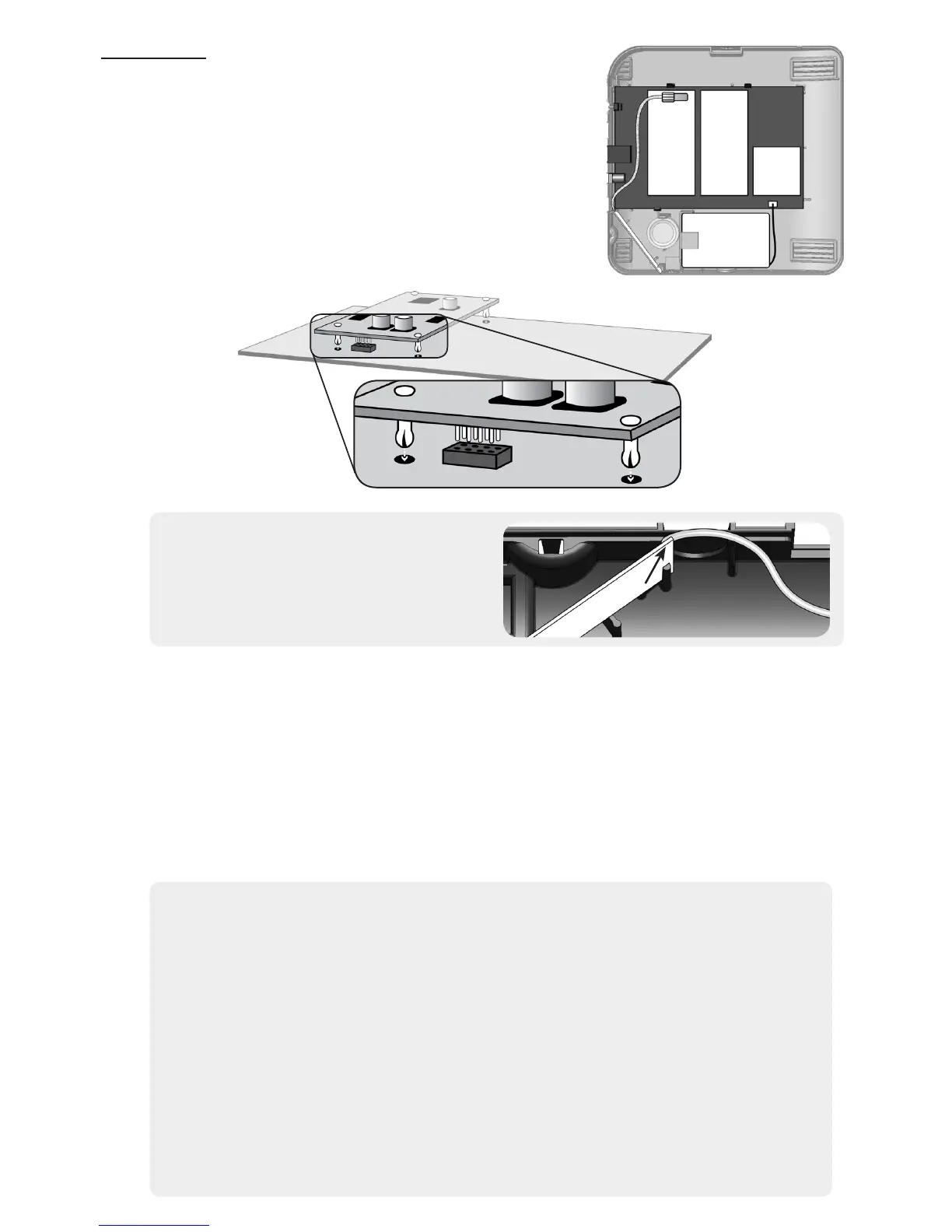
Install an expansion card by rst disconnecting AC
power and the battery. Cellular cards must use slot
1 and square cards must use slot 3. Always refer to
the specic card manual for a full list of installation
requirements. Next, carefully align the nylon retention
posts and 8-pin connector while pushing the card rmly
onto Helix until all the posts are fully seated. Finally,
reconnect the battery, AC power, and verify proper
operation using the LED indicators on the expansion
card.
Cellular Antenna Installation
• Route the antenna wire near the
Ethernet jack as shown above.
• Install the antenna with the feed wire
on the top side as shown to the right.
RF Signal Strength is an averaged signal-to-noise indication. Even in the absence of
sensor transmissions, Helix experiences ambient RF energy (i.e. noise). The RF signal
strength indication represents a sensor’s signal relative to ambient noise. If multiple
sensors score low signal strength, this could be due to one or more of the following.
1. High ambient noise - Ensure Helix is not mounted adjacent to other electronics.
2. Helix isn’t centrally located, or is mounted below ground - Move Helix to a
central location in the home that is above ground level.
3. Helix is located near ducts, appliances, or other large metal objects - Relocate
Helix away from these types of objects.
Sensor Signal Strength Tips
• The signal strength scale is from 0 to 100 (0 to 5 bars).
• There is nothing wrong with a sensor that has at least one bar (e.g. a signal
strength of at least 20).
• Signal strength readings are averaged. If you move Helix or a sensor, it takes
some time for the signal strength readings to update. Tripping a sensor
several times will help update a sensors signal strength faster.
• Before mounting a sensor permanently, expose a slight portion of its mounting
tape and apply it (very lightly) to the desired location. If it performs well,
mount it permanently. If it performs poorly, try rotating it by 90 degrees.
• Do not test a mounting location by tripping a sensor in your hand. Holding
a sensor changes how it radiates RF energy. Sometimes these “hand effects”
help, and sometimes they hurt.
Slot 1
Slot 2
Slot 3
Backup
Battery


 To Next Page
 Loading...