Installation:
Monitor:
Positioning The Monitor:
1. Place the 4.3” monitor in the included bracket securely.
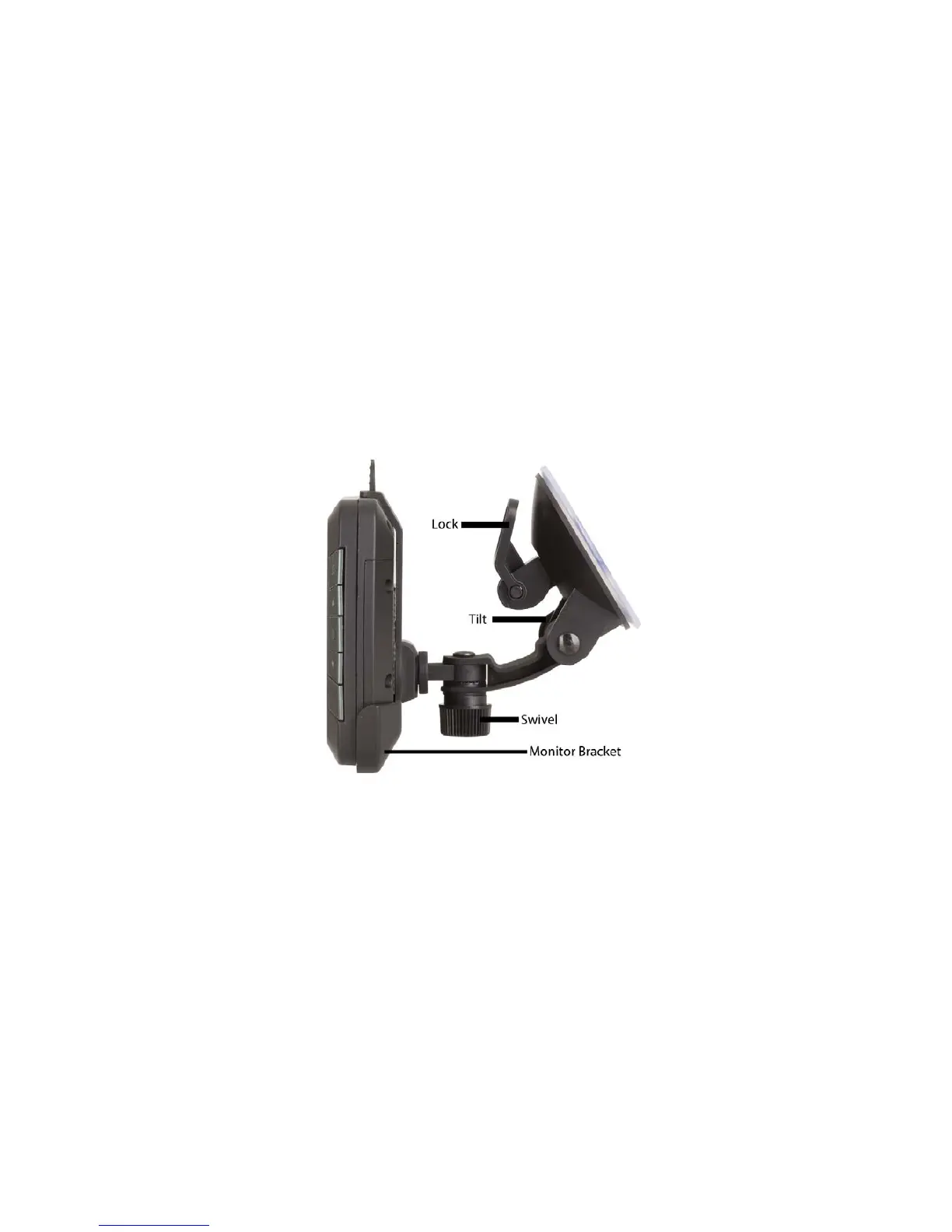
2. Connect the monitor bracket to the suction cup mount.
3. Position the suction cup on your windscreen or dash and make sure that it doesn’t obstruct
your view while driving.
4. Once the suction cup is placed in your desired location, press down the lock on the suction up
to fix securely in place.
5. Adjust the lock nuts for both tilt and swivel as shown in the picture below to get your desired
view:
Please Note: Ensure that the surface area of the suction cup is placed on a clean flat surface
otherwise the suction cup may fall off.
Connecting The Monitor:
1. Plug the cigarette lighter power adaptor in to the 12 or 24VDC cigarette lighter socket of your
vehicle.
2. Plug the DC plug of the cigarette lighter power adaptor in to the DC socket of the 4.3”
monitor.
3. Once the power is connected, the blue LED indicator will turn on.
Please Note: If there is no signal, the blue LED indicator will start flashing and the monitor will
turn off automatically.


 To Next Page