UsingtheProgram
1. Createanewfolderinyourcomputer(anywhereyouprefer)called“CarEventRecorderPlayer”
2. InsertthesuppliedCDintoyourcomputer.
3. OpentheCDanddouble‐clickonthezippedfiletoopen.
4. Right‐clickonthe.exefileandselect“ExtractFiles…”
5. Findthefold
eryoucreatedinstep1,andextracttoit.
6. Onceithasbeenextracted,gobacktotheCDanddouble‐clickonthecodecfile.Followthe
instructionsonscreentoinstall.
7. Afterthecodecisinstalled,theprogramisreadytouse.
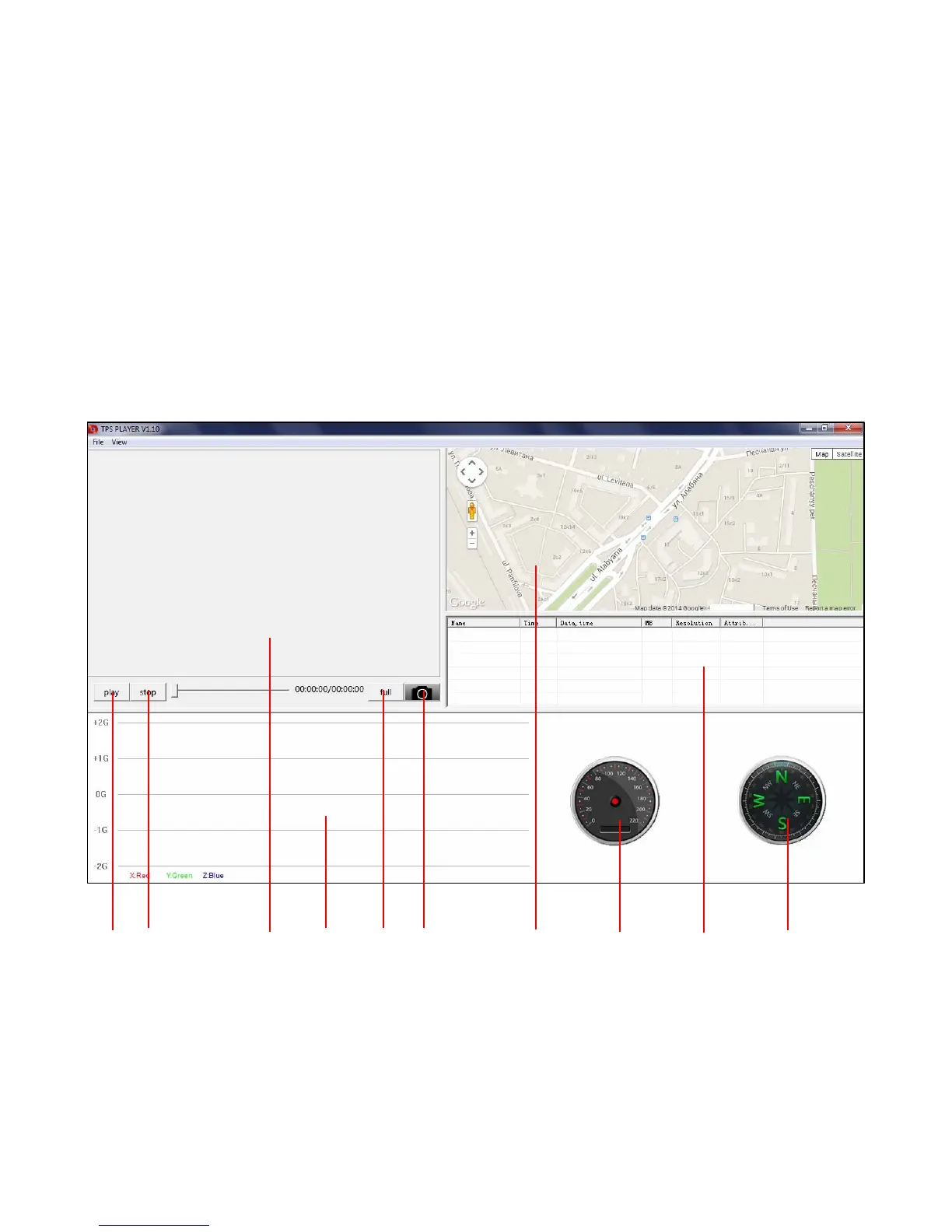
1 2 3 4 5 6 7 8 9 10
1–Play/Pause 5–FullScreen 8‐Speedometer
2–Stop6–PrintScreen 9‐Playlist
3–Video7–GPSMap10‐Compass
4–G‐SensorGraph


 To Next Page