Need help?
Do you have a question about the Retekess HR11 and is the answer not in the manual?
Expresses gratitude for purchasing the HR11 multi-band radio.
Lists the items included with the HR11 radio package.
Identifies display, speaker, and microphone.
Covers menu, mode selection, escape, and power buttons.
Details buttons for tuning, band switching, and stereo/mono.
Explains buttons related to music playback and recording.
Covers flashlight, SOS, alarm, and lock/unlock functions.
Identifies USB, card slots, charging switch, and antenna.
Describes solar panel, crank power, and battery compartment.
Identifies ports, switches, antenna, and crank power.
Covers battery compartment and hand strap.
Defines short press, long press, and hold-on key actions.
Explains how to activate and deactivate the key lock feature.
Provides step-by-step instructions for battery installation.
Explains the meaning of the battery consumption symbols.
Details charging the battery via external adapter and PC.
Explains how to generate power using the crank.
Details how the solar panel charges the battery.
Describes how to turn the radio on and off.
Explains how to access and navigate the main menu.
Lists available functions like Radio, Music, and Settings.
Guides on showing the time from the main menu.
Guides on how to tune into and listen to radio stations.
Explains the elements shown on the radio display.
Guides on choosing between FM, MW, SW, and WB bands.
Details options for selecting FM frequency ranges.
Explains how to select FM stereo or mono listening.
Provides suggestions for optimal stereo/mono reception.
Guides on changing AM tuning steps (9k/10k).
Details how to increase and decrease volume levels.
Explains how to mute and unmute the sound.
Offers tips for improving radio signal reception.
Explains using telescopic and built-in antennas.
Guides on manual, auto tuning, and ATS.
Further details on the Auto Search tuning process.
Guides on saving and retrieving stations from memory.
Explains how to tune by inputting frequencies directly.
Covers deleting single or all stored stations.
Guides on how to record radio broadcasts.
Provides important notes about radio recording.
Explains how to record audio using the built-in microphone.
Guides on how to locate and play recorded audio.
Details steps to find and play back recorded content.
Explains how to use the calendar feature.
Guides on inserting a TF card and selecting music mode.
Explains the display elements during music playback.
Guides on pairing and connecting via Bluetooth.
Explains how to play and pause music tracks.
Guides on browsing and selecting music files.
Details setting start and end points for repeat playback.
Lists available repeat modes like Repeat All and Random.
Explains how to select different equalizer presets.
Guides on enabling lyrics display for songs.
Explains how to delete single or all music files.
Guides on reading .txt files using the text browser.
Guides on entering and navigating the system settings menu.
Details how to set the device's date and time.
Explains how to show the time from the main menu.
Guides on setting the duration of the display backlight.
Explains how to change the device's display language.
Details how to set the automatic power-off timer.
Guides on enabling or disabling button press sounds.
Explains how to turn the alarm on or off.
Guides on setting the alarm time and recurrence pattern.
Details the different alarm modes: ringtone, radio, music.
Guides on adjusting the screen contrast level.
Explains how to view the current firmware version.
Guides on restoring the device to factory settings.
Details the steps for updating the device's firmware.
Instructs to download firmware and update software.
Guides on connecting the radio via USB for updates.
Explains how to use the update tool and start the process.
Advises on keeping the device dry and avoiding extreme temperatures.
Guides on cleaning the device and avoiding damage.
Specifies normal operating temperature and humidity.
Advises on safe handling, short-circuit prevention, and storage.
Guides on proper disposal and avoiding sunlight exposure.
Solutions for issues like not turning on or PC connection.
Solutions for speaker sound and TF card playback problems.
Solutions for charging failures and how to reset the radio.
Details supported memory cards and music file formats.
Lists frequency ranges, output power, and earphone specs.
Details power source, battery consumption, and charging time.
Provides unit size, speaker, and earphone dimensions.
Warns about small parts being a choking hazard.
Advises on safe listening volumes to prevent hearing damage.
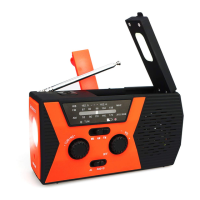
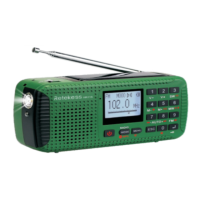
The Retekess HR11 is a versatile multi-band digital radio designed for a variety of uses, from outdoor activities and emergencies to everyday entertainment. It integrates several functions into a compact and portable device, making it an indispensable companion.
The primary function of the HR11 is a multi-band digital radio, capable of receiving FM, AM, and SW (Shortwave) frequencies, as well as Weather Band (WB) broadcasts. This wide range of reception ensures access to local and international radio stations, as well as critical weather alerts during emergencies. The radio features a digital display that shows the frequency, band, stereo/mono status, and battery level, providing clear and immediate information to the user.
Beyond radio reception, the HR11 also functions as a Bluetooth receiver, allowing it to connect wirelessly to mobile devices for audio streaming. This feature transforms the radio into a portable speaker for your smartphone or tablet. Additionally, it includes an MP3 player that supports MP3, WMA, and WAV audio formats from a Micro SD/TF card, enabling users to enjoy their favorite music without needing an external device.
A notable feature of the HR11 is its recording capability. It can record radio broadcasts directly to a TF card in MP3 format, allowing users to save programs for later listening. It also supports MIC recording, enabling the device to capture audio from its built-in microphone, which can be useful for voice notes or capturing ambient sounds.
The HR11 also incorporates a text browser (Ebook reader), allowing users to read .txt format text files from a TF card on its display. This adds another layer of utility, providing access to reading material on the go.
For convenience and emergency preparedness, the device includes a flashlight and an SOS light/alarm sound switch. These features are crucial for visibility and signaling during power outages or outdoor adventures. A calendar function is also integrated, displaying the date, time, and day of the week.
The HR11 offers multiple ways to power the device, ensuring continuous operation even in challenging conditions. It primarily uses a rechargeable lithium battery. For charging, it can be connected to an external 5V DC/500mA USB adapter or a computer via a Micro-USB cable. The battery symbol on the display indicates the charging status and battery level.
In situations where external power sources are unavailable, the HR11 provides backup power options:
Tuning stations can be done through five methods:
The radio supports FM stereo/mono selection, allowing users to switch between stereo for strong signals and mono for weaker signals to reduce noise. It also offers 9k/10k AM tuning steps to accommodate different regional broadcasting standards.
For music playback, the HR11 provides various controls:
The device features a key lock/unlock function to prevent accidental button presses, especially useful during outdoor activities. The volume knob allows for easy adjustment of audio levels.
System settings offer customization options for:
The HR11 also supports firmware upgrades, allowing users to update the device's software for improved performance or new features.
To ensure the longevity and optimal performance of the Retekess HR11, several maintenance guidelines are provided:
The HR11 also includes troubleshooting tips for common issues such as the radio not turning on, connectivity problems with a computer, no sound from the speaker, issues playing audio from a TF card, charging failures, and how to reset the radio to factory settings. These guidelines help users diagnose and resolve minor problems independently.
 Memory
| supported micro-SD card capacity | 64M-32G |
|---|
 Audio Specifications
| music format | MP3 WMA WAV |
|---|---|
| MP3 access rate | 16-320Kbps |
| WMA access rate | 8-384Kbps |
| frequency range FM | 87.0-108MHz |
| earphone output | ≤10mW*2 |
| max. output (Speaker) | About 600mW |
 Power
Power| max. current consumption | About 300mA |
|---|---|
| power source - lithium battery | 3.7V |
| power source - external adapter | 5V 500mA |
| lithium battery consumption (Mp3) | About 5H |
| lithium battery consumption (Radio) | About 5H |
| charging time | 4-6 hours |
Dimensions| unit size | Approx.126 x 43 x 62mm |
|---|---|
| speaker diameter | D40mm |
| earphone diameter | D3.5mm |

 To Next Page